

Skills in Codex CLI, in one paragraph
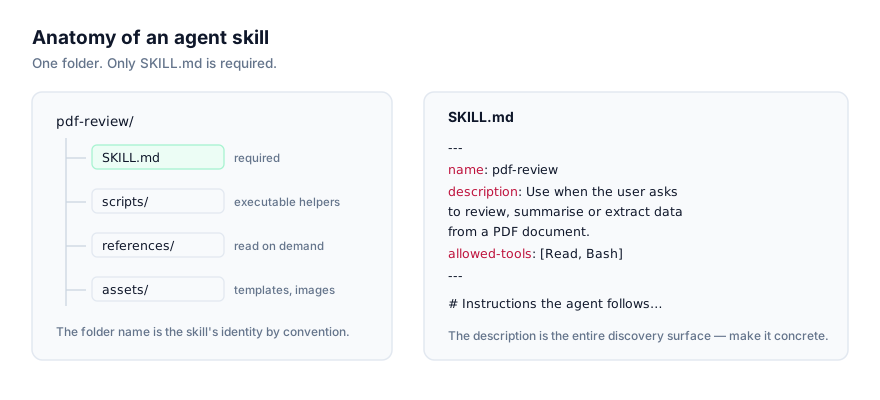
OpenAI's Codex CLI reads the same SKILL.md standard that Claude Code originated: a folder with YAML frontmatter (name, description, optionally allowed-tools and model) followed by markdown instructions, plus optional scripts/, references/, and assets/ subfolders. Anthropic published the format as an open standard in late 2025, and Codex CLI is one of several agents that now support it natively, no adapter, no conversion, the same folder just works.
What sets Codex CLI apart from some other implementations isn't the file format, it's how you can trigger a skill. Most agents rely entirely on the description field to decide when a skill is relevant. Codex CLI supports that automatic path too, but it also lets you invoke a skill directly by name inside a prompt, prefixed with a $, for example $changelog-writer. That's useful when you know exactly which skill you want and don't want to depend on your phrasing happening to match a description closely enough.
Two ways to install a skill
The skills CLI
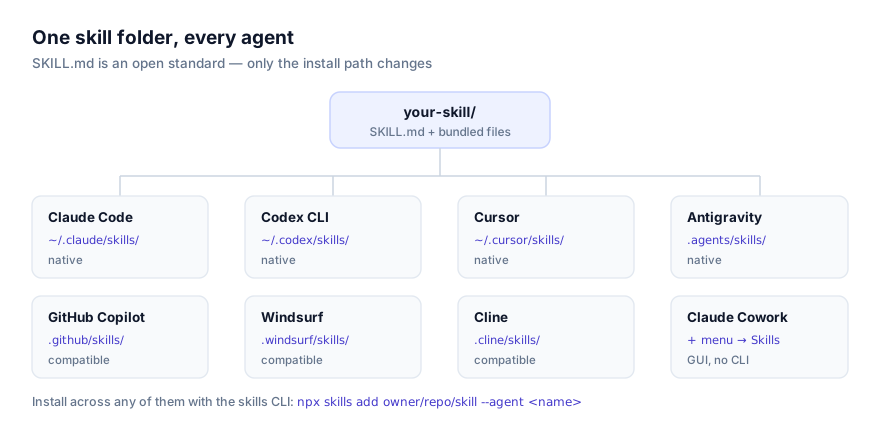
npx skills add owner/repo/skill-name --agent codex
owner/repo/skill-name is the GitHub location of the skill, repository owner, repository name, and the path to the skill folder inside it if that repo hosts more than one skill. The --agent codex flag tells the installer to target Codex CLI's directories specifically, which matters once you've got more than one supported agent installed locally and don't want a skill landing in the wrong one.
Where the command installs to depends on where you run it from: from a project root, it writes to project scope; run elsewhere, it writes to personal scope.
To find skills worth installing, browse getclaudeskills.com/skills, or filter to ones confirmed compatible with Codex CLI at getclaudeskills.com/platforms/codex-cli. Listings link to the skill's GitHub source rather than a packaged download. That's deliberate, so you can read the code before the installer ever touches your machine.
Installing by hand
Nothing about the format requires the CLI. Clone or copy the folder into the right directory yourself:
# Personal scope, every project, every session
git clone https://github.com/owner/repo ~/.codex/skills/skill-name

# Project scope. This repository only
git clone https://github.com/owner/repo .codex/skills/skill-name
A zip download works the same way. Extract it directly into either path. Double-check that SKILL.md ends up immediately inside the skill's folder and not nested under an extra directory the archive added; that's the single most common reason a manually installed skill goes unnoticed.
Auto-trigger vs direct invocation
It's worth understanding both paths since Codex CLI supports them side by side.
Automatic activation works exactly like other agents that implement the standard: Codex CLI reads every installed skill's description at session start, and when your prompt matches one closely enough, it loads the full SKILL.md body. This is the default and requires no extra syntax. You just describe what you want.
Direct invocation skips the matching step. Reference the skill's name with a $ prefix in your prompt, and Codex CLI loads that specific skill regardless of how close your wording is to its description. This is worth reaching for in two situations: when you have several skills with overlapping subject matter and want to be unambiguous about which one runs, or when you're testing a skill you just installed and want to confirm the instructions themselves work correctly before worrying about whether the description would have triggered it.
Neither mode changes what the skill does once loaded. The SKILL.md body runs the same way either way. The difference is entirely in how Codex CLI decides to load it.
Personal scope vs project scope
| Scope | Path | Right for |
|---|---|---|
| Personal | ~/.codex/skills/ | Skills you want in every repo you open Codex CLI in |
| Project | .codex/skills/ | Skills tied to one codebase, or shared with a team via version control |
Personal scope makes sense for anything general-purpose: a skill wrapping your preferred way of writing PR descriptions, or one that knows how to talk to an internal API you use across projects. It's not tied to any particular repository, so it shows up no matter what you're working on.
Project scope is the better fit when a skill only makes sense for one codebase, something that understands a specific build system, a specific migration process, or a workflow a colleague wrote and checked into .codex/skills/ so the rest of the team gets it automatically on clone. It's also the safer starting point for a skill you haven't fully vetted yet, since it's confined to one repo and shows up as a reviewable diff rather than something invisible in your home directory.
Default to project scope if you're unsure. Moving a skill from project to personal later is a one-line copy; walking back a skill installed globally that turned out to be a bad fit for every other project is more annoying.
Skills are not the same thing as AGENTS.md
If you've already got an AGENTS.md file guiding Codex CLI in a repository, it's worth being clear about how that's different from a skill, because they solve different problems. AGENTS.md is always-on context. Codex CLI reads it every session, regardless of what you're doing, and it's a reasonable place for things like "run pnpm install before tests" or "this repo uses trunk-based development." A skill is conditional: it costs almost nothing until a request matches its description, at which point its full instructions load. Put things Codex CLI should always know in AGENTS.md. Put specialized, occasionally-needed procedures (the kind of thing you'd otherwise have to remember to mention) into a skill instead. A detailed comparison lives at agent skills vs AGENTS.md if you're deciding where a given piece of guidance belongs.
Updating or removing a skill
There's no registry to update. A skill is a folder, so updating one means updating the folder. If you installed via git clone, cd into the skill's directory and git pull to bring in changes from upstream. If you installed via the CLI, re-running npx skills add owner/repo/skill-name --agent codex overwrites the existing copy with the current version. Removing a skill is just deleting its folder from ~/.codex/skills/ or .codex/skills/, followed by a new session so Codex CLI stops reading it.
Because updates are manual, so is pinning. If an upstream change to a skill breaks something you rely on, treat it like any other vendored dependency: git checkout <sha> inside the skill's folder to lock to a known-good version, or maintain your own fork. For a project-scoped skill committed to your repo, an update shows up as an ordinary diff, which makes it easy for a reviewer to see exactly what changed before it lands.
Verifying the install actually worked
Three checks, roughly in order of speed:
- List the directory.
ls ~/.codex/skills/orls .codex/skills/should show the skill's folder withSKILL.mddirectly inside it. - Start a new session. Codex CLI reads skill metadata once, at session start, anything installed or edited mid-session is invisible until you restart.
- Ask, or invoke directly. In a fresh session, either ask Codex CLI what skills it currently has available (it can answer from what it read at session start), or just invoke the skill directly with
$skill-nameand see whether it loads and follows the expected instructions.
The direct-invocation path is the fastest way to separate two different problems: if $skill-name loads the skill and it behaves correctly, but the same request phrased naturally doesn't trigger it, the install is fine and the description needs work. If $skill-name itself does nothing, the install didn't take, go back to step 1.
When skills don't work
The description never triggers it
This is the most common complaint, and it's a writing problem, not an installation problem. Codex CLI's automatic path matches your request against the description field alone. Nothing else. A description like "SQL helper" gives it nothing concrete to match against "review this migration for a missing index" or "check this query for an N+1." Name the actual trigger conditions:
# Too generic to match a specific request
description: "SQL helper"

# Names what it does and when to reach for it
description: "Reviews SQL migration files for missing indexes, unsafe column drops, and locking issues. Use when the user asks to review a migration, check a schema change, or audit a .sql file before it ships."
If you'd rather not depend on wording matching at all, invoke it directly with $skill-name instead of fixing the description, though fixing the description is still worth doing, since teammates using the skill won't know the exact invocation syntax.
A new or edited skill doesn't show up
Codex CLI reads skills once per session, at startup. Editing SKILL.md, tightening a description, or installing something new mid-session has no effect until you open a new session. This is the first thing to rule out before assuming an edit didn't work.
Scripts fail as soon as the skill runs
If a skill shells out to something in scripts/ and it errors immediately, the problem is usually a missing runtime rather than a broken skill. A Python script needs python3 on PATH; a Node script needs node; anything calling jq, pandoc, or a vendor CLI needs that binary present too. Open the script (you should be reading it before installing anyway) to see what it assumes, then confirm with which <tool> that your machine actually has it.
Two skills with the same name
If two installed skills declare the same name, or the same skill is duplicated at both personal and project scope with different versions, Codex CLI has two candidates that can answer the same trigger, automatic or direct. Don't assume one scope silently wins over the other in a way you can rely on. Rename one skill's name field (and its folder) to something distinct, or delete the stale copy. This turns up most often after installing the same skill twice, once by hand months ago and once again via the CLI more recently.
Read it before you run it
Codex CLI will execute a skill's bundled scripts when its instructions call for it, the same as any other agent implementing this standard. Before installing anything, open SKILL.md and every file under scripts/ and read what it actually does, what commands it runs, what it touches on disk, whether it makes network calls. This site links to a skill's GitHub source rather than hosting a packaged download specifically so you can do this before the installer ever runs.
OpenAI's own reference material is at the Codex CLI skills documentation, and is worth a read if you want the vendor's own description of how skill discovery and invocation work.
If you're not confident a skill deserves trust yet, install it at project scope rather than personal scope. It's a smaller blast radius, and a git-tracked diff a teammate can review. For more depth on this, see the security guide. If you're deciding between Codex CLI and Claude Code for a particular workflow, this comparison walks through the differences, and how agents discover and activate skills covers the matching mechanism in more depth than fits here. Browse everything cataloged for Codex CLI at getclaudeskills.com/platforms/codex-cli.