

Same standard, two different CLIs
Claude Code and Codex CLI read the same file: SKILL.md, with YAML frontmatter and a markdown body. That's not a coincidence. Agent Skills is an open standard, and both of these tools are implementations of it, alongside Cursor, Antigravity, Windsurf and others. But "same file format" doesn't mean "same behaviour." Where you put a skill, how it gets activated, and when it takes effect all differ enough between the two that it's worth knowing before you ship a skill to a team using both.
Claude Code: the reference implementation
Claude Code, from Anthropic, was the reference implementation of the Agent Skills standard. It reads skills from ~/.claude/skills/ for anything you want available across every project, and from .claude/skills/ for anything scoped to one repository. Because it was first, the ecosystem of published skills is largest around Claude Code.
Activation is automatic. Claude Code reads every installed skill's name and description at session start, and matches your request against those descriptions as you work. If one matches, it loads the skill's full body. You don't ask for a skill by name, you just make the request the skill was written to catch.
Codex CLI: OpenAI's take on the same format
Codex CLI, from OpenAI, reads the identical SKILL.md format, from ~/.codex/skills/ for personal-scope skills and .codex/skills/ for project-scope. A skill written for Claude Code, dropped into the right Codex directory, is a skill Codex can read.
Two behavioural differences matter in practice. First, Codex loads its skills at session start, if you add a new skill mid-session, Codex won't see it until you start a new one. Second, Codex supports explicit invocation: you can call a skill directly with $skill-name, rather than relying purely on description matching. Claude Code doesn't offer that same explicit-invocation mechanic. Codex also leans on AGENTS.md alongside skills for repo-wide conventions. See Agent Skills vs AGENTS.md for how that division of labour works.
Side-by-side
| Claude Code | Codex CLI | |
|---|---|---|
| Vendor | Anthropic | OpenAI |
| Personal-scope path | ~/.claude/skills/ | ~/.codex/skills/ |
| Project-scope path | .claude/skills/ | .codex/skills/ |
| Activation | Automatic, by description matching | Automatic by description matching, plus explicit $skill-name invocation |
| When new skills take effect | Picked up during the session as installed | Loaded at session start — needs a new session after adding one |
| Ecosystem size | Largest — reference implementation | Growing, on the same underlying standard |
| Repo conventions file | CLAUDE.md | AGENTS.md |
| Install via CLI | npx skills add owner/repo/skill --agent claude-code | npx skills add owner/repo/skill --agent codex |
Activation model: automatic vs explicit
This is the single biggest behavioural difference. In Claude Code, a well-written description is the entire interface. You write a request the way you normally would, and if a skill's description matches, it fires. There's no ceremony.
Codex CLI supports that same description-matching path, but adds a second one: naming the skill directly with $skill-name. That matters for skills where you want deterministic, on-demand invocation rather than relying on the agent to recognise a match. Useful for a skill you only ever want to run when you explicitly ask for it, not one you want firing opportunistically off a loosely related request.
This has a practical consequence for how you write the description field in each context. In Claude Code, the description is doing all the work. It's the only mechanism that triggers the skill, so it needs to name concrete situations precisely enough that the agent recognises a match without your help. In Codex, a weak description is more recoverable, because you can always fall back to $skill-name and invoke it directly. That doesn't mean Codex skills can skip a good description (automatic matching is still the more common path) but it does mean the explicit-invocation option is a safety net Claude Code doesn't have.
Install paths, worked
Say you want a skill available globally in Claude Code but scoped to just one project in Codex:
~/.claude/skills/
└── changelog-writer/
    └── SKILL.md

my-project/.codex/skills/
└── changelog-writer/
    └── SKILL.md
Same folder, same SKILL.md, two different homes, global for Claude Code, project-scoped for Codex on this one repo. The skills CLI handles this distinction for you: npx skills add owner/repo/changelog-writer --agent claude-code versus --agent codex, pointed at the right project.
What doesn't change between them
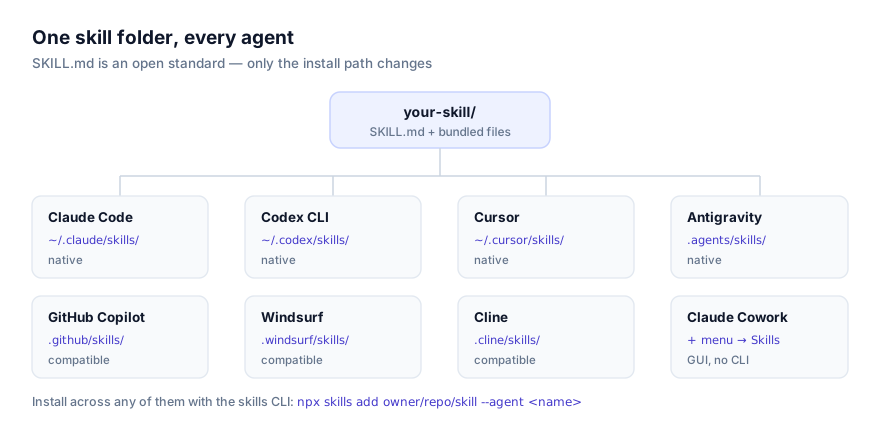
It's worth being explicit about how much of the standard is genuinely shared, because it's more than the differences suggest. The SKILL.md structure itself (YAML frontmatter with name and description, optionally allowed-tools and model, followed by a markdown body) is identical in both tools. The optional scripts/, references/ and assets/ subfolders work the same way in both: references/ loads on demand, scripts/ runs only when the instructions direct it to, assets/ holds templates or images the instructions point at. None of that is Claude-Code-specific or Codex-specific. It's the open standard both tools implement, which is also why the same folder works in Claude Cowork, Cursor, Antigravity, Windsurf, GitHub Copilot, OpenCode, Cline and the rest of the ecosystem.
For teams running both
It's increasingly common for a team to have some engineers on Claude Code and others on Codex CLI, or for one engineer to switch between the two depending on the task. The good news is that maintaining one skill for both tools is normal, not an edge case. You're not choosing a side so much as deciding where each copy lives.
The skills CLI makes this explicit with its --agent flag:
npx skills add your-org/skills/pr-review --agent claude-code
npx skills add your-org/skills/pr-review --agent codex
Both commands pull from the same source skill and install it into the right directory for each tool, ~/.claude/skills/pr-review/ or .claude/skills/pr-review/ for Claude Code, ~/.codex/skills/pr-review/ or .codex/skills/pr-review/ for Codex. As long as the skill itself avoids agent-specific tool names, this is a one-time setup, not an ongoing maintenance burden, updates to the source skill just get reinstalled to both places.
Portability: what carries over, what doesn't
Because both tools read the same SKILL.md standard, the frontmatter and markdown body of a skill are portable as-is. The name, description, and body instructions don't need editing to move between the two.
Two things can need attention. Skills that shell out to bundled scripts depend on the agent having tool execution available. Both Claude Code and Codex CLI have that, so this generally isn't a blocker. But skills that reference agent-specific tool names in their allowed-tools frontmatter may need editing, since the exact tool names available differ between agents. If a skill was authored assuming a Claude Code-specific tool name in allowed-tools, check that field before relying on the skill working unmodified in Codex, or vice versa.
Worked example: a skill that works cleanly in both
A changelog-writing skill with no agent-specific tool assumptions ports over with zero edits:
---
name: changelog-writer
description: Use when the user asks to write or update a changelog entry for a release.
---

# Changelog Writer

## Format
- One bullet per change, past tense, no trailing period.
- Group under Added / Changed / Fixed / Removed. Omit empty groups.
- Reference the PR or issue number in parentheses at the end of each bullet.

## Example
### Added
- Support for CSV export (#142)

### Fixed
- Timezone offset bug in the reports page (#149)
Nothing in this skill names a tool or assumes a particular agent's quirks, so it works identically whether it's read from ~/.claude/skills/ or ~/.codex/skills/. Compare that to a skill whose frontmatter declares allowed-tools: [Bash, mcp__internal-db__query]. The MCP tool name is specific to a particular server configuration, and needs to exist, and be named the same way, in whichever agent's session is loading the skill.
Which should you use
This usually isn't an either-or choice. The same skill can live in both tools' directories, and many teams run both. But a few things tip the decision for a given task:
- Want automatic, invisible activation with the largest existing library of published skills to draw on? Claude Code, as the reference implementation, has that ecosystem advantage.
- Want the option to invoke a skill explicitly and deterministically, not just via description matching? Codex CLI's
$skill-namegives you that in a way Claude Code doesn't. - Adding a skill mid-session and need it to work immediately? Claude Code fits that better. Codex needs a fresh session to pick up newly added skills.
- Already leaning on AGENTS.md for repo conventions? Codex is built around that pairing by default; Claude Code's equivalent is CLAUDE.md.
Neither answer is permanent. Because the underlying SKILL.md format is shared, switching a skill from one tool to the other later is a matter of moving a folder, not rewriting it.
What this looks like in practice, side by side
Picture the same request ("review this PR for missing tests and exposed secrets") made in each tool, with the same pr-review skill installed in both.
In Claude Code, you'd type that request as-is. The agent has already read the skill's name and description at session start, matches your phrasing against "Use when reviewing a pull request for correctness, missing tests, exposed secrets, or unsafe migrations," and loads the full body before doing anything else. No extra step.
In Codex CLI, the same phrasing works the same way, through the same description-matching mechanism, but if you'd rather not rely on the match, you could instead type $pr-review review this PR for missing tests and exposed secrets to invoke it directly, bypassing the need for the description to catch your exact wording. That option doesn't exist in Claude Code; there, the description carries the entire burden.
The difference rarely changes the outcome for a well-written skill. It matters most at the edges, a request phrased unusually, or a skill you deliberately don't want firing automatically. Codex gives you an escape hatch for those cases; Claude Code asks you to get the description right instead.
Troubleshooting: skills that behave differently between tools
A skill I just added to Codex isn't firing. Start a new session. Codex loads its skills at session start, so anything added after that point won't be visible until you restart.
A skill works in Claude Code but errors in Codex, or vice versa. Check the allowed-tools frontmatter for tool names that only exist in one agent's environment. An MCP tool name or an agent-specific built-in is the usual culprit.
A skill never activates in either tool. This is almost always the description, not the platform. See how agents discover and activate skills for what makes a description trigger reliably.
$skill-name doesn't do anything in Claude Code. That's expected. Explicit invocation by name is a Codex-specific mechanic, not part of how Claude Code activates skills. In Claude Code, phrase the request so it matches the skill's description instead.
The bigger picture
Because both are implementations of the same open standard, the choice between Claude Code and Codex CLI for skills rarely needs to be exclusive. A well-written skill, one that avoids agent-specific tool names and keeps its instructions generic, will work in both without modification, and in every other agent that reads the standard too. Review a skill's SKILL.md and any bundled scripts before installing it in either tool (see the security guide) and check the platforms directory for the full list of agents that read the same format.