

Agent Skills, in one paragraph
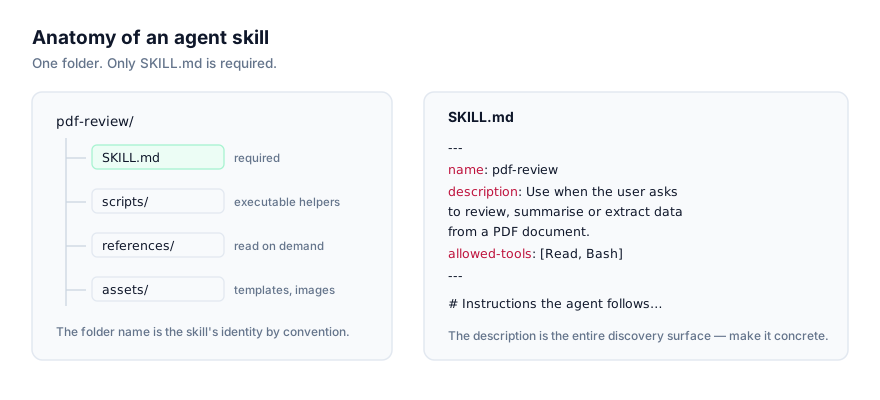
An agent skill is a folder containing a file called SKILL.md: YAML frontmatter (name, description, and optionally allowed-tools and model) followed by a markdown body of instructions. That's the whole format. Optionally, the folder can also hold scripts/ (executable helpers), references/ (documentation the agent reads only when it needs to) and assets/ (templates, images, boilerplate files). Anthropic published Agent Skills as an open standard in late 2025, and it's now read by Claude Code, Claude Desktop, Claude Cowork, the Claude API, OpenAI Codex CLI, Cursor (2.4+), Google Antigravity, GitHub Copilot, Windsurf, OpenCode, Cline and others. One folder, many agents.
That portability is the point. A skill written for code review or pitch-deck formatting doesn't belong to one vendor's product. It's a small, versionable unit of expertise that travels with you between tools.
This guide covers what a skill actually is, how agents find and load them without drowning in context, how skills differ from other ways of extending an agent, and where to go next depending on whether you want to install, write, or just browse skills.
Anatomy of a skill folder
Every skill, no matter how small or elaborate, has the same minimum shape:
my-skill/
└── SKILL.md
A more developed skill looks like this:
pdf-report-builder/
├── SKILL.md              # frontmatter + instructions (always read first)
├── scripts/
│   └── render_pdf.py     # executable helper the instructions can invoke
├── references/
│   └── layout-spec.md    # detailed docs, loaded only if the task needs them
└── assets/
    └── cover-template.pdf
SKILL.md is the only file the agent reads automatically. Everything else (scripts, references, assets) is there because the instructions point to it when relevant. That separation is deliberate, and it's the whole reason skills scale to large collections without bloating context. We cover the format field by field, with a fully annotated example, in The SKILL.md Format Explained.
The core mechanic: progressive disclosure
This is the part worth understanding properly, because it explains almost every other design decision in the format.
At the start of a session, an agent doesn't read the full body of every installed skill. It reads only two frontmatter fields from each one: name and description. That's it. A description is typically a sentence or two, something like "Use when the user asks to review a pull request for security issues, particularly around auth and input validation." The full SKILL.md body behind it might run to several hundred or a few thousand words of workflow steps, examples and constraints. The referenced files in scripts/ and references/ might add several thousand more.
If the agent loaded everything from every installed skill into context at session start, a library of even a few dozen skills would consume a meaningful chunk of the context window before you'd typed a single message. Progressive disclosure avoids that by loading in three stages:
- Discovery, at session start, the agent scans its skill directories and reads only
name+descriptionfrom eachSKILL.md. This is deliberately cheap: a short sentence per skill, not a full document. - Activation, when you make a request, the agent matches your intent against those descriptions. If one matches, it now reads that skill's full body into context. Skills that don't match stay unread.
- Execution. The agent follows the loaded instructions, and only pulls in bundled
scripts/orreferences/files if the instructions direct it to for that specific task.
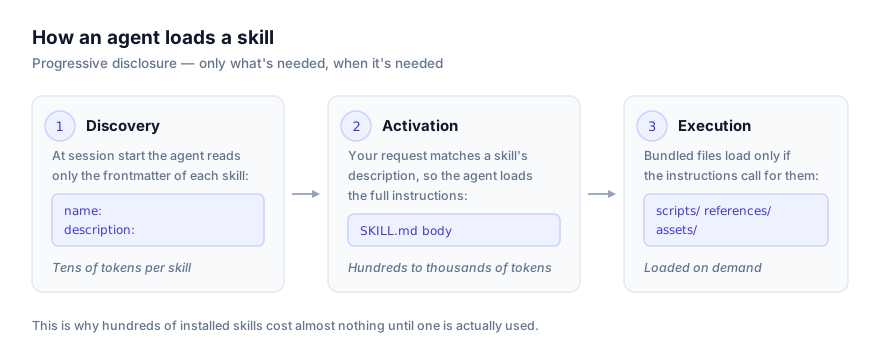
A concrete illustration. Say you have 50 skills installed, and each has a name + description pair that runs to roughly two sentences, call it 30–40 words. That's somewhere around 1,500–2,000 words of discovery text total, regardless of how large the skills themselves are. Now compare that to what happens if only one of those 50 skills activates for your current request: its full body loads (commonly a few hundred to low thousands of words), plus perhaps one reference file it calls for. The other 49 skills stay at the "two sentences" level for the entire session. Without progressive disclosure, an agent would either have to load all 50 full bodies up front (dwarfing the discovery cost many times over) or skip having a skill library at all. This is the mechanism that lets a user install hundreds of skills and have it cost the agent almost nothing until one is actually needed.
The practical consequence for anyone writing a skill: the description field is the entire discovery surface. If it doesn't name concrete triggering situations, the skill quietly never activates, no matter how well-written the body is. We go deep on writing a good one in How to Write Your Own Agent Skill, and on the discovery mechanics specifically in How AI Agents Discover and Activate Skills.
What makes a skill different from a prompt
You could, in principle, paste the same instructions into a chat message every time you needed them. People did this for a long time. Skills improve on that in three concrete ways:
- They're discoverable automatically. You don't have to remember to paste anything. If your request matches a skill's description, the agent loads it without being told to.
- They're versioned folders, not throwaway text. A skill lives in a git repo (or a local directory) like any other project asset. You can diff it, review changes to it, roll it back, and track who changed what.
- They're portable across agents. The same folder that works in Claude Code works, unmodified in most cases, in Cursor or Codex CLI. A prompt saved in one tool's UI generally isn't.
None of this makes prompting obsolete, for a one-off request, typing it out is still faster than authoring a skill. Skills earn their keep for anything you or your team will ask an agent to do more than a handful of times, or want to standardize across people.
Skills vs. the other ways to extend an agent
Agent Skills sit alongside a few other extension mechanisms, and it's worth being precise about where each one fits, since people conflate them:
| Mechanism | What it gives the agent | Loaded |
|---|---|---|
| Agent Skills | Reusable procedure or expertise ("how we review code") | On demand, by description match |
| MCP (Model Context Protocol) | New capabilities — live access to an external system (a database, an API) | Via a running server process, connected at session start |
| Subagents | An isolated context window and tool set for parallel or separated work | Spawned explicitly for a task |
| AGENTS.md / CLAUDE.md | Facts about this specific repo — conventions, commands, architecture | Always, every session |
The short version: MCP gives an agent new capabilities. A skill gives it knowledge and procedure, and can itself instruct the agent to use an MCP tool it already has. A subagent buys isolation and parallelism at the cost of coordination overhead; a skill buys expertise cheaply in the context you're already in. AGENTS.md is always-loaded project context and should stay short; skills are conditionally-loaded procedure and can be as long as they need to be, because they only load when relevant.
We've written each of these comparisons up in full:
- Agent Skills vs MCP: What's the Difference?
- Agent Skills vs Subagents: When to Use Each
- Agent Skills vs AGENTS.md: How They Work Together
In practice, serious setups use all four together: AGENTS.md for repo facts, skills for procedure, MCP for live external access, and subagents when a piece of work needs its own context.
Why isn't my skill activating? Common misconceptions
A few misunderstandings come up repeatedly once people start using skills for real. Naming them directly saves time:
"I installed a skill, why didn't it do anything?" Almost always a discovery problem, not an installation problem. If the skill's description doesn't closely match how you phrased the request, the agent never loads it. This is covered in depth in How AI Agents Discover and Activate Skills, and from the authoring side in How to Write Your Own Agent Skill.
"I installed the same skill globally and per-project, which one wins?" This depends on the agent; some prefer project scope over global when both exist, some merge them. Check the specific platform page rather than assuming, since this isn't standardized across the ecosystem.
"Two skills seem to overlap. Will the agent pick the wrong one?" If two descriptions both plausibly match a request, which one activates can be inconsistent. The fix is on the authoring side: narrow or disambiguate the descriptions, not something you can reliably control at request time.
"I updated a skill's files but the agent is still using the old behavior." Some agents load skill definitions at session start and won't see changes until a new session. Check whether your agent watches skill directories live or requires a restart. This is noted on each platform's install guide.
"Does having a skill installed slow down every request, even unrelated ones?" No more than reading a sentence or two per installed skill at session start, which is the entire point of progressive disclosure described above. The cost that scales with skill count is the discovery step, not the full body. That only loads for the skill that actually activates.
Where skills run
Because Agent Skills is an open standard rather than a single vendor's feature, the same folder works across a growing list of agents. Coverage and discovery behavior differ slightly by platform. Some load skills at session start and require a fresh session to pick up new ones, some watch directories live. The full picture, with verified install paths, is on the platforms page. Individual install walkthroughs:
- Claude Code
- Claude Desktop
- Claude Cowork
- Claude API
- OpenAI Codex CLI
- Cursor
- Google Antigravity
- GitHub Copilot
- Windsurf
- OpenCode
- Cline
If you're comparing two specific agents rather than shopping the whole list, see Claude Code vs Codex CLI for Agent Skills.
Installing a skill
The cross-agent way to install a skill is the skills CLI:
npx skills add owner/repo/skill
Target a specific agent with --agent:
npx skills add owner/repo/skill --agent claude-code
npx skills add owner/repo/skill --agent codex
Under the hood this just copies (or symlinks) the skill folder into the right directory for that agent. There's no registry, account or install step beyond that. You can do the same thing manually by cloning or downloading a skill folder into your agent's skills directory, global or project-scoped, per the paths listed on each platform page.
Before you install anything
A skill isn't inert text. It's instructions an agent will follow, and often scripts an agent will execute with your permissions. That's closer to adding a dependency than reading an article, and it deserves the same scrutiny. Before installing anything from the internet: read the SKILL.md in full, check what's in scripts/ and references/, and look at the allowed-tools frontmatter for anything unexpectedly broad. This site links out to source on GitHub rather than re-hosting skill files, specifically so you can read what you're about to run before you run it. The full checklist is in Agent Skills Security: What to Check Before You Install.
How to write your own skill
Skills are plain files, so writing one doesn't require special tooling. A text editor and a folder is enough to start. The short version: create a folder, write SKILL.md with a name and a specific description, write the body as procedural instructions, and add scripts/, references/ or assets/ only if the task genuinely needs them. The description is the highest-leverage sentence you'll write, because it's the only thing standing between "the agent uses this skill correctly" and "the agent never loads it at all." The full walkthrough, including a worked example built up step by step and how to test that a skill actually activates, is in How to Write Your Own Agent Skill.
Hand-writing SKILL.md isn't the only way to produce a skill anymore. Since 21 July 2026, Claude Cowork offers a second authoring path called Record a Skill: you screen-record yourself doing a task while narrating what you're doing and why, and Claude converts that demonstration into a reusable skill. It suits tacit, GUI-heavy work that's hard to write down as steps; hand-writing still wins for anything that needs precision, code review, version control, or to run on more than the Claude ecosystem. See Recorded Skills vs Hand-Written SKILL.md for the full comparison.
Where to find agent skills
Browse the full catalog at getclaudeskills.com/skills, or narrow by category if you know roughly what you need, development, design, writing, data, security, business, research, productivity and skill-authoring are all covered. Each listing links to its source repository rather than a re-hosted copy, so you can review before you install.
Where to go next
If you've got the concept and want the mechanics of the file itself, read The SKILL.md Format Explained next. It walks through every frontmatter field with a full annotated example. If you're choosing between skills and another extension mechanism for a specific problem, the comparison articles linked above will save you some trial and error. And if you're about to install something from an unfamiliar repo, read the security guide first. It takes five minutes and it's the difference between a good habit and a bad one.