

What an agent skill is, in Claude Code terms
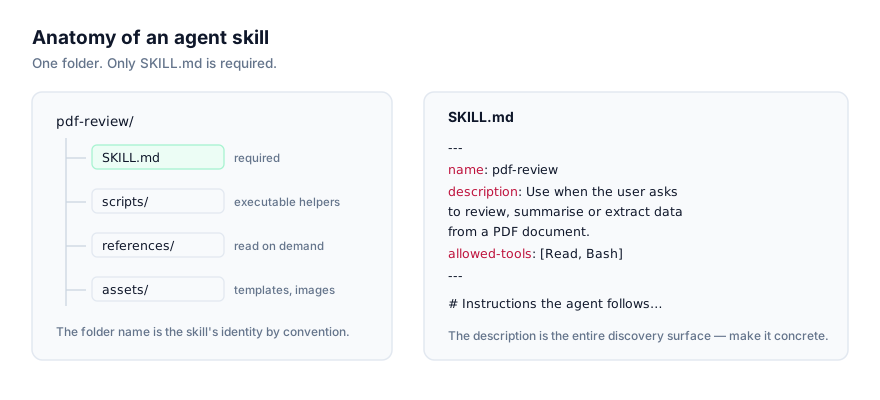
An agent skill is a folder. Inside it sits a SKILL.md file: YAML frontmatter with a name and description, optionally allowed-tools and model, followed by markdown instructions written for the agent rather than for you. The folder can also carry scripts/, references/, and assets/ subfolders that the instructions point to when they're needed.
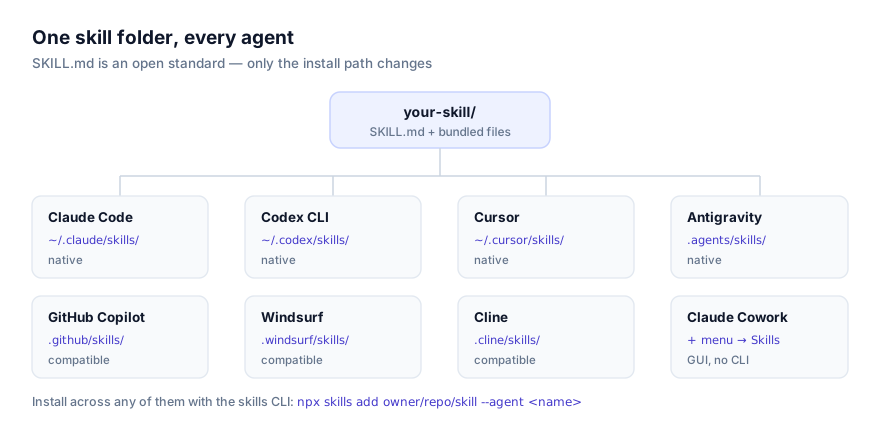
Claude Code is the reference implementation of this format. Anthropic built Agent Skills against Claude Code first, then published the format as an open standard in late 2025. Every other tool that now reads a SKILL.md folder (Codex CLI, Cursor, Google Antigravity, GitHub Copilot, Windsurf, Claude Cowork, and others) is reading the exact structure Claude Code originated. Practically, that means a skill that works in Claude Code will very likely work unmodified anywhere else the standard is supported.
What a skill buys you is repeatable behavior without repeatable typing. Instead of pasting the same instructions into every session where you want Claude Code to write commit messages in your team's format, or walk through your org's incident-response checklist, you write that once, drop it in a folder, and Claude Code finds it on its own the next time a matching request comes in.
The mechanism behind that is progressive disclosure. At session start, Claude Code reads only the name and description of every installed skill, not the body, not any bundled scripts. That's a trivial number of tokens per skill. When a request matches a skill's description, Claude Code loads the full SKILL.md body into context. If the instructions reference a script or reference file, that content loads only when the instructions actually call for it. This is why you can have hundreds of skills installed and barely notice the cost, most sit dormant beyond their one-line summary until something matches.
The corollary is worth internalizing before you install anything: the description field is the entire discovery surface. Claude Code has no other signal for when to reach for a skill. A vague description means the skill effectively doesn't exist, regardless of how good the instructions inside it are. This comes up again in the troubleshooting section below because it's the single most common reason a correctly installed skill appears to do nothing.
Installing a skill
There are two routes into Claude Code: the skills CLI, or copying the folder yourself. Both land at the same result. A folder on disk that Claude Code reads at session start.
Install with the skills CLI
The fastest route, and the one that behaves identically across every supported agent, is:
npx skills add owner/repo/skill-name --agent claude-code
Replace owner/repo/skill-name with the GitHub location of the skill: the repository owner and name, plus the path to the skill folder inside it if the repo bundles more than one. The --agent claude-code flag tells the installer where to put it, which matters as soon as you have more than one supported agent on the same machine.
Run the command from your project root to install into project scope, or from anywhere to install into personal scope. The CLI writes to whichever directory matches the scope you're targeting.
Browse installable skills at getclaudeskills.com/skills, or filter to ones confirmed to work with Claude Code at getclaudeskills.com/platforms/claude-code. Every listing links to the skill's source on GitHub rather than hosting a packaged download. Open it and read it before you run the installer.
Install manually
The CLI is convenience, not a requirement. A skill is a folder, and Claude Code reads whatever it finds sitting in its skills directories when a session starts. To install by hand:
# Personal scope, available in every project
git clone https://github.com/owner/repo ~/.claude/skills/skill-name

# Project scope, available only inside this repo
git clone https://github.com/owner/repo .claude/skills/skill-name
You can also just download a zip and extract it into either path. There's nothing CLI-specific about the format. Watch for the common unzip mistake where the archive contains an extra wrapper folder, leaving SKILL.md one directory too deep to be discovered.
Personal scope vs project scope
Claude Code checks two locations for skills:
| Scope | Path | Best for |
|---|---|---|
| Personal | ~/.claude/skills/ | Your own conventions and general-purpose tools you want in every project |
| Project | .claude/skills/ | Workflows tied to one codebase, or skills shared with teammates via the repo |
Personal scope suits anything you'd otherwise have repeated in a personal system prompt: how you like commit messages written, a skill wrapping a CLI tool you use everywhere, your preferred changelog format. It travels with you regardless of which project you're in.
Project scope is the right call when a skill only makes sense inside one repository, something that understands your monorepo's build graph, or a skill a teammate wrote and checked into .claude/skills/ so the whole team gets it the moment they clone the repo. Because project scope lives inside the repository, it's versioned and reviewable in the same pull requests as the code it touches, which also makes it the safer default when you're not fully sure a skill should be trusted yet.
If you're genuinely unsure which to pick, default to project scope. Promoting a project skill to personal later is a one-line copy. Explaining to a teammate why their session behaves differently because of something sitting in your home directory that they've never seen is a worse conversation to have.
Updating or removing a skill
Skills aren't registered anywhere beyond the filesystem, so updating and removing them is filesystem work too. To update a skill you installed via git clone, cd into its folder and git pull. To update one installed via the CLI, re-run the same npx skills add command. It overwrites the existing folder with the current version from the source repo. To remove a skill entirely, delete its folder from ~/.claude/skills/ or .claude/skills/ and start a new session; there's no uninstall command to run beyond that, because there was never anything to register in the first place.
This also means version pinning is manual. If a skill you depend on changes in a way that breaks your workflow, the fix is the same as with any other vendored dependency: pin to a specific commit with git checkout <sha> inside the skill's folder, or keep a private fork you control the update cadence of. For a project-scoped skill checked into your repo, this is no different from pinning any other vendored file. Reviewers can see exactly what changed in the diff.
Confirming the skill actually loaded
Copying a folder into the right place doesn't guarantee Claude Code has picked it up. Work through these in order:
Check the directory contents. Run ls ~/.claude/skills/ or ls .claude/skills/ and confirm the skill's folder is there, and that SKILL.md sits directly inside it, not nested one level too deep.
Start a fresh session. Claude Code reads skill metadata once, at session start. A skill copied in mid-session isn't visible until you restart.
Ask Claude Code directly. In a new session, ask something like "what skills do you currently have available?" Since it has already read every installed skill's name and description by that point, it can answer accurately. If the skill you installed doesn't appear in that list, the install itself didn't work. If it appears but never triggers on real requests, the problem is the description, not the install. See below.
The most reliable check is still behavioral: make a request that clearly matches what you wrote in the skill's description, and confirm Claude Code's response reflects the instructions in the body, a particular format, a particular constraint, a particular sequence of steps you wrote into SKILL.md.
Why isn't my skill activating in Claude Code?
The skill installed cleanly but never activates
This is the failure mode you'll hit most often, and it's almost never a broken install. It's a description that doesn't describe when to use the skill. Claude Code matches your request against that one field alone. A description like "Helps with PDFs" gives it nothing to match against "fill out this W-9" or "extract text from this scanned contract." Rewrite it to name concrete triggers, what the user is likely to say, what kind of task this is, what file types are involved:
# Too vague to ever match a real request
description: "Helps with PDFs"

# Names the actual trigger conditions
description: "Fills out PDF forms by mapping field names to provided values. Use when the user asks to fill in a PDF, complete a form, or populate a template PDF with data."
It worked yesterday, now it doesn't seem to exist
Skills load at session start, not continuously. If you edited SKILL.md, tightened a description, or added a new skill, the currently running session has no idea. It read the old state, or nothing at all, when it started. Open a new session before concluding a fix didn't work.
Bundled scripts fail immediately when the skill runs
If a skill's instructions shell out to a script in its scripts/ folder and that script errors out, check what the script assumes about your machine before assuming the skill itself is broken. A Python script needs python3 on PATH; a Node script needs node; a script that calls out to jq, pandoc, or a cloud provider's CLI needs that binary installed too. Read the script (you should be reading it anyway, see below) to see what it expects, then confirm those tools exist with which <tool>.
Two skills claim the same name
If two installed skills declare the same name in their frontmatter (or you've got the same skill duplicated at both personal and project scope with diverging edits) Claude Code has two candidates that can match the same request, and which one actually runs isn't something worth betting on. Don't rely on scope order resolving this quietly and correctly. Rename one skill's name field (and ideally its folder) to something unique, or delete the duplicate outright. This shows up most often when a skill lands in .claude/skills/ via a teammate's setup script and you've separately installed the same thing into ~/.claude/skills/.
Security: read it before you install it
A skill can carry executable scripts, and Claude Code will run them when its instructions call for it. Before installing anything, from getclaudeskills.com or anywhere else. Open SKILL.md and every file in scripts/. Look at what commands it runs, what it reads or writes on disk, and whether it talks to the network. This is exactly why this site links out to a skill's source on GitHub instead of hosting a packaged download: you can read the code in the same place you're about to pull it from.
When you're not confident a skill is trustworthy yet, install it at project scope rather than personal scope. That limits its reach to the one repository you're working in, and gives a teammate a small, git-tracked diff to review instead of something invisible sitting in your home directory.
For Anthropic's own reference material, see the official Claude Code skills documentation. For more on what to check before running someone else's skill, see the security guide. If you're building your own instead of installing one, the SKILL.md format guide covers the file in full, and Claude Code vs Codex CLI for skills is worth reading if you're running both tools side by side. You can also browse everything cataloged for Claude Code at getclaudeskills.com/platforms/claude-code or by category at getclaudeskills.com/categories.