

What a skill is, in API terms
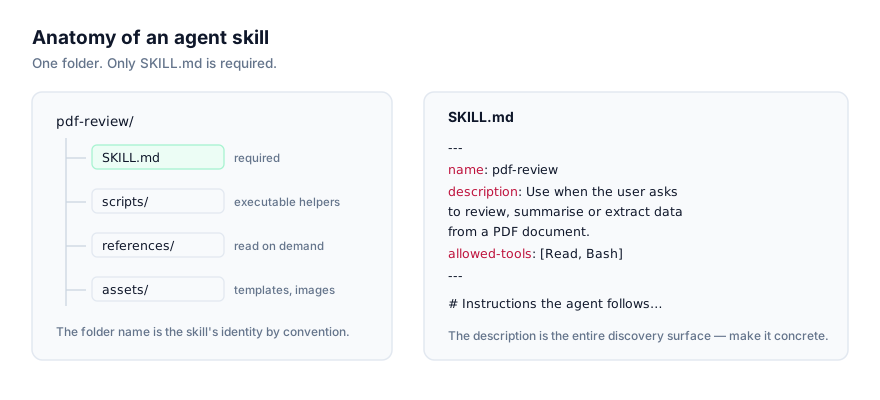
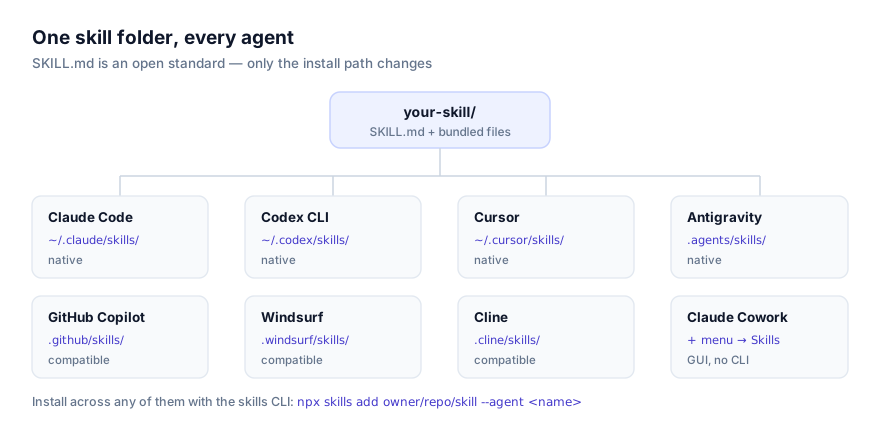
An agent skill is a folder, not a service. At its core sits SKILL.md: YAML frontmatter with a name and a description, optionally allowed-tools and model, followed by markdown instructions. It can also carry scripts/, references/, and assets/ subfolders. Anthropic published this as an open standard in late 2025, and the same unmodified folder is read by Claude Code, Claude Desktop, the Claude API, Claude Cowork, Codex CLI, Cursor, Antigravity, and a growing set of third-party agents.
What makes the Claude API different from every other platform in this list is that there's no persistent local filesystem sitting behind it the way there is for a CLI agent or a desktop app. Claude Code reads ~/.claude/skills/ off your disk every time you start a session. The API has no equivalent standing directory, every skill has to be delivered as part of the request path, through a container upload used alongside the code execution tool. That's a real architectural difference, not a minor detail, and it shapes almost everything else in this guide.
Why progressive disclosure still matters here
The mechanic that keeps skills cheap (progressive disclosure) works the same way through the API as anywhere else. At the point a skill becomes available to a request, the model sees only its name and description, not the full body. The full SKILL.md loads only once the request matches that description, and bundled scripts or reference files load only when the instructions call for them. For a production integration handling real traffic, this matters more than it does in a one-off chat: you can make many skills available to an agent built on the API without paying a proportional token cost on every single call, because most of them never get past the description stage for any given request.
What "native" means for a platform with no directory
The platform data behind this site marks the Claude API as native support, in the same tier as Claude Code, Claude Desktop, Claude Cowork, Codex CLI, Cursor, and Google Antigravity. That's worth pausing on, because native usually implies a first-party, well-documented path, and here that path looks nothing like the others. There's no directory Anthropic ships a reference implementation around, no startup routine that scans a folder. Native, in this case, means Anthropic built and documents the container upload and code execution tool path itself, as the intended way to run a skill against the model that powers every other platform on this list. It's a different shape of support, not a lesser one.
Why teams reach for skills in a production API integration
If you're building an agent on the Claude API (a support bot, an internal tool, a coding assistant embedded in your own product) a skill is a way to package a capability the same way you'd package a library: name it, describe when it applies, bundle whatever scripts or reference material it needs, and let the model decide when to reach for it based on the request. That's a cleaner unit of deployment than stuffing every possible instruction into one long system prompt that grows every time you add a new capability. And because it's the same open format used elsewhere, a skill your team already validated in Claude Code during development can move to a production API agent without a rewrite.
The install route: container upload, not a CLI command
There is no npx skills add ... --agent command for this platform. The Claude API's cliAgent value is simply not set, and no shortcut exists to fake one. The route instead runs through two things working together:
- A container upload. The skill's folder (
SKILL.mdplus anyscripts/,references/, orassets/it needs) gets uploaded into a container associated with your API request, rather than read from a directory that persists between calls the way it would on a CLI agent's local machine. - The code execution tool. This is what gives the model a sandbox to actually read the uploaded
SKILL.md, follow its instructions, and (if the skill bundles them) run its scripts. Without the code execution tool enabled on the request, an uploaded skill folder has nothing to execute inside.
Because the exact request shape for container uploads changes as the API evolves, this guide won't reproduce specific request bodies or parameter names. That's exactly the kind of detail that goes stale fastest. The authoritative reference is Anthropic's own Agent Skills documentation for the API, and it's worth reading directly rather than through a summary before you wire this into a real integration.
What a skill built for the API looks like
The folder structure doesn't change based on which platform reads it. That's the point of the open standard:
invoice-parser/
├── SKILL.md
├── scripts/
│   └── extract_line_items.py
└── references/
    └── field-mapping.md
---
name: invoice-parser
description: Extracts line items, totals, and vendor details from an uploaded invoice. Use when asked to parse, summarize, or extract data from an invoice document.
allowed-tools: ["bash", "read"]
---

# Invoice Parser

1. Run scripts/extract_line_items.py against the uploaded file.
2. Map extracted fields using references/field-mapping.md.
3. Return a structured summary: vendor, date, line items, total.
This is the same shape you'd write for Claude Code or Codex CLI. What changes for the API isn't the skill. It's how the folder reaches the model at request time.
Verifying the skill loaded
There's no interactive session to check a skill list in the way you would in Claude Desktop's Settings or a CLI agent's startup log, so verification here is closer to integration testing than a UI check:
- Run the container upload and code execution tool call from a development environment first, not directly against production traffic.
- Send a prompt that should match the skill's
descriptionin plain language. - Inspect the model's response and, where visible, its tool-use trace for evidence it read the skill's instructions and, if relevant, executed a bundled script.
- Only after that response looks correct, wire the same call into whatever production path will actually use it.
If the response doesn't reflect the skill's instructions at all, treat it as an activation failure and work through the troubleshooting steps below before assuming the container upload itself is broken.
Scope: no personal or project split
Claude Code and CLI agents built on the same standard split installs between a personal, cross-project directory and a project-specific one. That distinction doesn't exist for the Claude API, its listed paths are a container upload with no separate project path. Instead, scope is something you control at the integration level: which container a given request uploads the skill into, and which requests get the code execution tool enabled at all. If you want a skill available to one internal tool but not a customer-facing one built on the same API key, that's a decision you make in your own application code (deciding which requests bundle which container upload) not a setting inside the skill or the platform itself.
Why isn't my skill activating through the API?
Skill never activates. The same root cause as every other platform: the description doesn't match how the request is actually phrased. Since API requests are often generated programmatically rather than typed by a person, check that whatever's constructing the prompt produces language that resembles the description's trigger condition, not just structured data the model has to infer intent from.
Code execution tool not enabled. If a skill's instructions depend on running a bundled script and nothing happens, confirm the code execution tool is actually turned on for that request. A skill folder sitting in a container without that tool enabled has no way to run anything in scripts/.
Container upload succeeds but SKILL.md isn't found. Check the folder structure inside the upload. SKILL.md needs to be at the root of what you uploaded, not nested inside an extra wrapper folder from how the archive was built.
Works in development, not in production. This usually means the production code path isn't attaching the same container upload or doesn't have the code execution tool enabled the way your development test did. Diff the two request configurations directly rather than assuming the model's behavior changed.
Script depends on a package that isn't in the sandbox. A bundled script that imports something outside the standard library may fail inside the code execution sandbox if that dependency isn't available there. Keep scripts intended for API deployment as dependency-light as practical, or confirm what's available in the execution environment ahead of time.
Skill behaves differently than it did in Claude Code testing. The instructions and scripts are identical, but the surrounding context isn't. A production API agent may have a different system prompt, different available tools, or a different model set via the skill's own model field than whatever you tested with locally. Check those differences before assuming the skill itself regressed.
Multiple skills uploaded, only one seems to matter. If several skills are available to the same request and only one ever activates, look at whether their descriptions overlap so heavily that the model consistently prefers one. As with any platform, narrowing each description to its actual trigger condition resolves most of these collisions. The fix isn't different here just because the surrounding infrastructure is.
Latency increased after adding skills. A container upload and code execution round trip adds real overhead compared to a plain text completion. If you're attaching several skills to every request regardless of relevance, consider whether your application logic can narrow which skills get uploaded per request based on what you already know about the task, rather than making every skill available to every call by default.
Security: this is production, review accordingly
A skill you upload to a Claude API integration runs against real traffic and whatever tools that integration exposes. This isn't a sandboxed personal experiment the way trying a skill in a chat app might feel like. Read the SKILL.md body and every file in scripts/ on the skill's actual GitHub source before it goes anywhere near a production container. This site links to that source rather than re-hosting it precisely so you can do that review yourself. Pay particular attention to what a bundled script does with any data it touches, and to any instruction that directs the model toward an external call, in a production integration, both have real consequences. The security guide covers this in more depth and is worth reading in full before a first production deployment, not skimmed after something goes wrong.
Where to go from here
Anthropic's Agent Skills documentation is the canonical reference for the exact API request shape. Check it directly before you build against it, since that's the detail most likely to change over time. For the format itself, what an agent skill is and the SKILL.md format explained cover ground this guide assumes. If your team develops skills locally before shipping them to production, how to install skills in Claude Code is the fastest local loop for testing before a container upload. Browse the Claude API platform page or the full skills directory for something to try first.