

The shape of a SKILL.md file
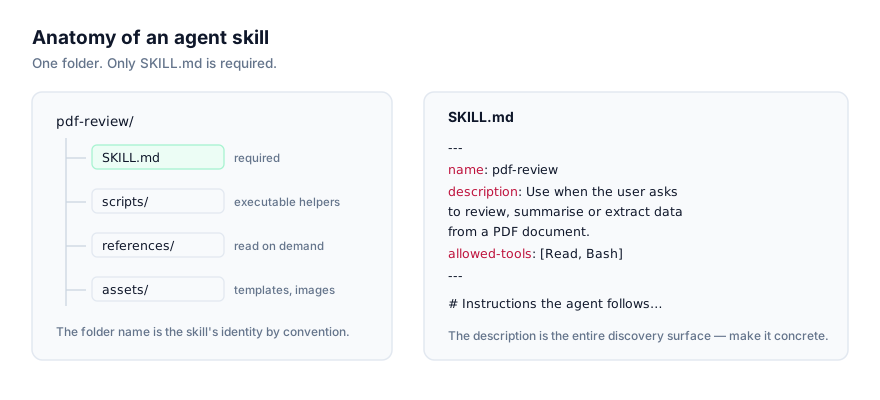
Every SKILL.md file has the same two-part structure: YAML frontmatter delimited by ---, followed by a markdown body.
---
name: skill-name
description: When and why the agent should use this skill.
---

## Instructions go here, in markdown.
That's the entire required shape. Everything else (extra frontmatter fields, bundled folders, section headings in the body) is optional and additive. This article goes through the frontmatter field by field, then the body, then the folders a skill can bundle alongside it, with a complete annotated example throughout. Hand-writing this file isn't the only path to a working skill anymore. Record a Skill in Claude Cowork produces one from a narrated screen recording instead. This article covers the format you get either way; if you're deciding which authoring path fits a given task, see Recorded Skills vs Hand-Written SKILL.md.
Frontmatter fields
name (required)
The skill's identity. By convention, name matches the folder name the skill lives in. A skill in a folder called pdf-form-filler/ should have name: pdf-form-filler. Keep it lowercase, hyphenated, and specific enough that it won't collide with another skill's name in the same install directory.
description (required)
The single most important field in the whole format. This is the text an agent reads during discovery (before it has loaded anything else about the skill) and matches against your request. If your description is vague ("A helpful writing skill"), the agent has nothing concrete to match against and the skill will rarely, if ever, activate. If it's specific ("Use when the user asks to rewrite marketing copy to be shorter and punchier"), the agent can recognize the situation reliably.
Good descriptions name concrete triggering situations, not abstract categories. We cover this in depth, with more before/after examples, in How to Write Your Own Agent Skill and in How AI Agents Discover and Activate Skills.
allowed-tools (optional)
Restricts which tools the agent may use while this skill is active. Useful when a skill should only ever read files and never write or execute, or when a skill's instructions assume a narrow, specific toolset and you want to prevent it from improvising with something else.
model (optional)
Pins the skill to a specific model, for cases where a task is sensitive to model choice, a skill built around a particular model's tool-calling behavior, for instance.
Other fields seen in the wild (optional)
Beyond the four above, skill authors sometimes add version, author, license and tags. None of these are required by the format, but they're useful metadata for anyone (human or agent) inspecting a skill folder: version for tracking changes over time, author and license for attribution and reuse terms, tags for categorization if you're browsing a large personal collection.
The body
Everything after the closing --- is markdown, read in full once the skill activates. Good bodies are specific and procedural. They read like a runbook, not an essay. Common sections, in a sensible order:
- When to use this, a short restatement of the triggering situation, useful as a sanity check even though the real discovery work happened in
description. - Workflow, the actual steps, in order. This is the core of most skills.
- Constraints, what not to do. Explicit negative instructions ("never commit directly to main," "don't fabricate data") pull more weight than most authors expect.
- Examples, a worked input/output pair or two, especially for anything with a specific expected format.
There's no fixed template the agent enforces, but bodies that follow this rough shape tend to produce more consistent results than bodies that don't.
Bundled folders
A skill can bundle three kinds of subfolder, all optional, all loaded only when the instructions call for them:
scripts/, executable helpers. Use these when a task is better done in code than described in prose: parsing a specific file format, running a deterministic transformation, calling a CLI tool with exact flags. A skill that bundles scripts needs an agent with tool execution available to run them.references/. Documentation the agent reads on demand. Use this for detail that would bloat the main body if it were inlined: a full API spec, a long style guide, an exhaustive list of edge cases. The body should point to the relevant reference file rather than repeat its contents.assets/(templates, boilerplate files, images) anything the skill's output is built from rather than instructions about how to build it.
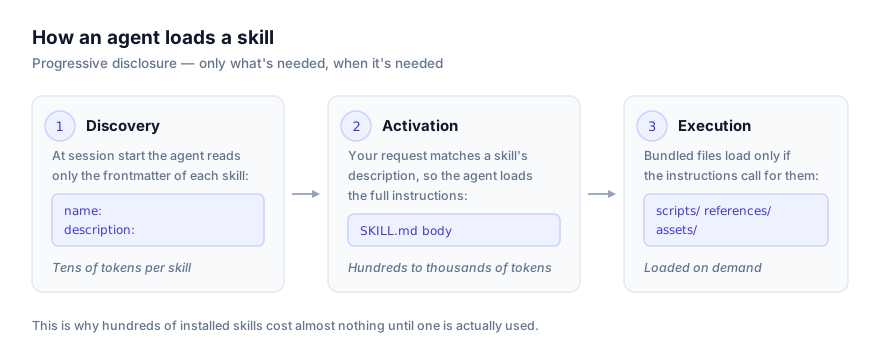
None of these are read automatically at discovery time or even at activation time, only if the loaded SKILL.md body specifically directs the agent to them for the task at hand. That's what keeps a skill with a 50-page reference manual just as cheap to have installed as a five-line skill, right up until the moment the reference is actually needed. This staged loading (frontmatter only, then body, then bundled files) is progressive disclosure, the mechanic that lets an agent keep hundreds of skills installed without any of them costing context until one actually fires.
Directory layout
A skill using all three optional folders looks like this:
pr-review-skill/
├── SKILL.md
├── scripts/
│   └── check_test_coverage.sh
├── references/
│   ├── security-checklist.md
│   └── style-guide.md
└── assets/
    └── review-comment-template.md
SKILL.md is the entry point and the only file read automatically. The instructions inside it decide when check_test_coverage.sh gets run, when security-checklist.md gets read, and when review-comment-template.md gets used as a starting point for output.
A complete annotated example
Here's a realistic, full SKILL.md for a skill that reviews pull requests for security issues, with the folder structure above.
---
name: pr-review-skill
description: Use when the user asks to review a pull request or diff for security issues, especially around authentication, input validation, and secrets handling.
allowed-tools: Read, Grep, Bash
---

## When to use this

Trigger this skill when the user pastes a diff, links a pull request, or
asks for a security-focused code review. Do not use it for general code
style review. That's a separate concern.

## Workflow

1. Read the full diff before commenting on anything. Don't review file by
   file in isolation; a change in one file often only matters in light of
   another.
2. Check for the issues in `references/security-checklist.md`, in order.
   Read that file now if you haven't already.
3. For any file touching authentication, session handling, or user input,
   run `scripts/check_test_coverage.sh <file>` to confirm the change has
   test coverage. Flag any change to those areas that doesn't.
4. Draft findings using the structure in
   `assets/review-comment-template.md`. One comment per issue found;
   don't bundle unrelated issues into a single comment.
5. Rank findings by severity (critical, high, medium, low) and lead with
   critical.

## Constraints

- Never approve a pull request as part of this skill. Findings only;
  approval is a human decision.
- Never commit or push changes while running this skill.
- If no issues are found, say so explicitly. Don't manufacture minor
  nitpicks to seem thorough.

## Example

Input: a diff adding a new `/login` endpoint with no rate limiting.

Output:
> **Critical: no rate limiting on `/login`.** This endpoint accepts
> unauthenticated POST requests with no throttling, which makes credential
> stuffing trivial. Add rate limiting keyed on IP and username before this
> merges.
Walking through what each part does:
- The frontmatter gives the agent a name, a description specific enough to fire reliably on "review this PR for security issues" but not on "review this PR for style," and an
allowed-toolslist that keeps this skill read-and-grep-and-run only, no writes. - The workflow is a literal sequence, not a vague description of goals. Step 3 shows the pattern for calling a bundled script: name it, say when to run it, say what to do with the result.
- The constraints section does real work here, without it, nothing stops the agent from "helpfully" approving the PR or committing a fix itself.
- The example shows the expected output shape, which matters more than it might seem: a skill that says "flag issues" gets vaguer output than one that shows exactly what a flagged issue looks like.
Common mistakes
- Description too abstract. "A skill for code quality" tells the agent almost nothing about when to use it. "Use when reviewing a diff for security issues" tells it exactly when.
- Body repeats the description instead of adding detail. The body is where the actual procedure lives, restating the trigger and stopping there wastes the one chance to be specific.
- Everything crammed into the body instead of
references/. A 4,000-wordSKILL.mdwith an inlined API spec loads all 4,000 words every time the skill activates, even for tasks that don't touch the API spec. Splitting that intoreferences/api-spec.mdmeans it only loads when needed. - Scripts with no explanation of when to run them. A bundled script the body never mentions calling is just dead weight in the folder.
namethat doesn't match the folder. Not fatal, but it breaks the convention other tooling (including install scripts) tends to assume.
Troubleshooting specific failure modes
A few problems come up repeatedly when reading or writing SKILL.md files. Each has a specific cause worth checking for directly, rather than guessing.
The skill never activates, even for requests it should clearly cover. Almost always a description problem. Open the file and ask honestly whether the description names a concrete situation ("use when the user asks to review a diff for security issues") or an abstract category ("a code review skill"). Rewrite toward the concrete version and test again with phrasing close to how a real user would ask.
The skill activates, but the agent ignores a bundled script or reference file. Check that the body actually names the file and says when to use it. A file sitting in scripts/ or references/ that the body never mentions won't get read, bundling a file doesn't make it part of the instructions, the body has to point to it explicitly.
The YAML frontmatter fails to parse. The most common cause is an unescaped double quote inside a double-quoted value, or a colon inside an unquoted value that YAML reads as a new key. Wrap any field containing a colon or a quote in quotes, and escape internal double quotes as \".
A bundled script runs but silently does nothing useful. Check that the workflow step calling it specifies what to do with its output. "Run scripts/check.sh" without a follow-up instruction leaves the agent to guess whether the result matters.
Two installed skills both seem to match the same request. This usually means their descriptions overlap. Narrow each one, or add a short disambiguating clause to each ("use this one for X, not Y") so the overlap shrinks.
Related reading
For the bigger picture (why this format exists and how progressive disclosure keeps large skill libraries cheap) see What Are Agent Skills? The Complete Guide. For a full walkthrough of writing one from scratch, including how to test that it actually fires, see How to Write Your Own Agent Skill. Before installing anyone else's skill, read Agent Skills Security: What to Check Before You Install. Bundled scripts and reference files are exactly the parts of a skill folder worth reading closely before you trust them. Browse real examples of the format in the wild across the full skill catalog.