

Two paths to the same destination
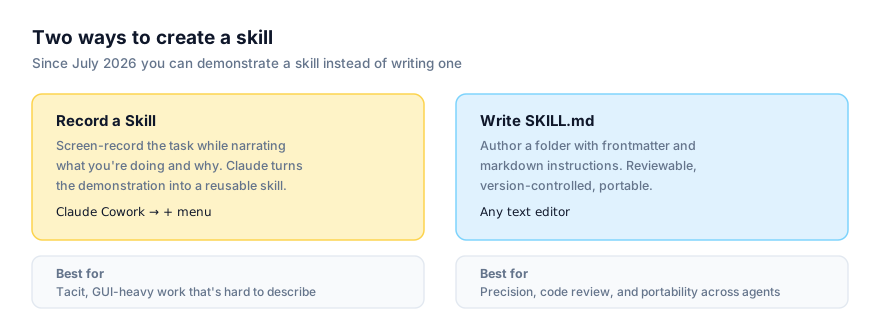
An agent skill, at its core, is a small, well-defined thing: a name, a description Claude uses to decide when it's relevant, and instructions for what to do, optionally backed by bundled scripts, references or assets. As of 2026 there are two ways to produce one. You can write it by hand, as a SKILL.md file inside a folder, the way skills have worked since Anthropic published the format as an open standard in late 2025. Or, since 21 July 2026, you can create one by demonstration in Claude Cowork, screen-record yourself doing the task while narrating what you're doing and why, using Record a Skill, and Claude converts that into a reusable skill.
Both produce something Claude can reach for again without you re-explaining the task. That surface similarity is exactly why they get compared, and why the comparison is usually framed as a contest, when it shouldn't be. Our stance: recorded skills and hand-written skills are complements, not rivals. Recording wins for tacit, GUI-heavy, hard-to-articulate work. Hand-written SKILL.md wins where you need precision, review, version control and portability across agents. Teams that use both, matched to the task, get more out of the ecosystem than teams that pick one and force everything through it.
The comparison
| Recorded skill | Hand-written SKILL.md | |
|---|---|---|
| How it's created | Screen recording + narration in Cowork | Typed YAML frontmatter + markdown instructions |
| Where it lives | Inside Claude Cowork's interface | A folder on disk, portable and version-controllable |
| Review before use | Not line-by-line — you watch it run, you don't read source | Fully readable before you ever run it |
| Version control | Not exposed as files you can diff | Native — it's just files in git |
| Portability | Claude ecosystem (Cowork) | Claude Code, Codex CLI, Cursor, Google Antigravity, and more |
| Plans required | Pro, Max, Team (Cowork) | Any platform that reads the open standard |
| Best suited to | Tacit, GUI-heavy, hard-to-articulate tasks | Precise, well-understood, reusable-across-agents tasks |
| Sharing | Named colleagues or org directory (Team, Enterprise) | Shared repo, .claude/skills/, or any distribution channel you choose |
| Editing after creation | Limited to what Cowork exposes | Full — it's a text file |
| Effort to create | Do the task once, narrated | Write instructions, test, iterate |
How each is actually made
The workflows don't just differ in output. They differ in what kind of person can complete them and how long they take.
Writing a SKILL.md by hand:
- Decide the trigger. Write a
descriptionthat names the exact situation this skill should activate for. - Write the instructions as clear, ordered markdown steps.
- Add
scripts/,references/, orassets/subfolders if the task needs them, and setallowed-toolsif the skill should be restricted to specific tools. - Test it against a few real requests, phrased differently, to check the description actually triggers reliably.
- Commit it to a repo or drop it into the relevant platform's skills folder. See verified install paths for each agent.
This takes longer up front and requires comfort with plain-text editing, but every step produces something inspectable, and step 5 is where portability comes from. The same folder works wherever it's placed. Step 1 and 2, in their minimal form, look like this:
---
name: expense-reconciliation
description: Use when reconciling this week's expense report against the card statement.
---
That's the entire discovery surface a hand-written skill needs to start from. The rest of the body is procedural instructions layered on top.
Recording a skill in Cowork:
- Get the environment into a clean, representative starting state.
- Start recording from the
+menu and do the task once, narrating what you're doing and why as you go. - Stop recording at the task's natural end state.
- Claude converts the demonstration into a skill automatically.
- Review the result, run it once on a low-stakes case, and share or publish it if it's meant for a team.
This is faster for someone who already knows the task cold and has never opened a text editor for anything more structured than an email. The trade-off is that step 4 is opaque. You don't get to read the generated logic line by line the way you can read a SKILL.md, you get to watch it run and judge the output.
A quick decision framework
Ask these questions, in order, about the task in front of you:
- Does it need to run outside Cowork, in Claude Code, Codex CLI, Cursor, or another agent? If yes, write it by hand. Recording can't get you there.
- Does it involve running a script, hitting an API, or precise conditional logic? If yes, write it by hand. You need to be able to read and test that logic directly.
- Does it need a security or compliance review before anyone relies on it? If yes, write it by hand, so the review has something concrete to read.
- Is the task mostly clicking through a GUI, and would explaining it in writing take longer than just doing it? If yes, recording is the faster, entirely legitimate choice.
- Is this a one-off for a single non-technical person, with no need to share it or run it anywhere else? If yes, recording is almost certainly the right call, writing a
SKILL.mdfor a task nobody else will ever touch is effort spent in the wrong place.
If you land on "write it by hand" from any of the first three questions, that answer overrides a "yes" to four or five. Portability, code, and review requirements are hard constraints; ease of narration is not.
Where recording wins
Recording is the better fit whenever the task is easy to do but hard to describe precisely. The kind of work where you'd struggle to write a clean numbered list of steps because so much of it is judgment calls, visual recognition, or muscle memory built up over months of doing it.
Concrete examples:
- Navigating a legacy internal tool with no API. If your only way in is a web UI with no documented structure, describing the click path in prose is tedious and error-prone. Demonstrating it once, narrating what you're clicking and why, is far faster and captures details ("this dropdown only appears after you select a region") that are easy to omit from written instructions.
- A multi-app handoff task. Pulling a number from one internal spreadsheet, cross-referencing it against a report in another tool, and pasting the result into a third system is the kind of workflow most people could show you in two minutes but would take considerably longer to write up accurately.
- Formatting or layout work in a desktop application. Getting a document, slide deck, or spreadsheet into a specific visual shape (column widths, conditional formatting, a particular chart style) is often much easier to demonstrate than to specify in words.
- A process only one person on the team actually knows well. If the person who does a task hasn't documented it and isn't going to sit down and write a
SKILL.md, recording is the realistic path to capturing that knowledge at all. The alternative, in practice, is often not "a hand-written skill". It's nothing.
Where hand-written SKILL.md wins
A hand-written skill is the better fit whenever precision, auditability, or reach beyond the Claude ecosystem matters more than speed of authoring.
Concrete examples:
- Anything that runs code. A skill that calls a script to transform a file, hit an API, or run a calculation needs
allowed-toolsscoped correctly and logic you can actually read. That's a hand-written skill's territory, recording captures what you clicked, not the logic a bundled script should run. - A skill that has to work identically across tools. If your team writes code in Claude Code and Codex CLI, or you want one skill folder to work in Cursor and Google Antigravity too, only a hand-written
SKILL.mdgets you there. A recorded skill lives in Cowork; it doesn't travel to a coding agent's terminal. - A skill that needs a security or compliance review before anyone trusts it. If a skill is going to run against production data or touch anything sensitive, being able to read every instruction line by line (and put it through the same review process as any other code change) matters more than how quickly it was authored. See our agent skills security guide for what that review should look for.
- A skill that needs to evolve carefully over time. Version control gives you a diff every time the skill changes, a history of why it changed, and an easy rollback if a change breaks something. That's a natural fit for anything that gets iterated on by more than one person.
- A skill built around exact, conditional logic. "If the invoice total is over $10,000, route to secondary approval; otherwise, route to standard approval" is a rule you can write precisely and test. Demonstrating both branches on camera is possible but clumsy, and the resulting skill is only as good as how well the demonstration captured the condition, not just one outcome.
Portability is the real dividing line
The single biggest structural difference between the two isn't quality. It's where the resulting skill can run. A hand-written SKILL.md is just a folder: name, description, instructions, optional bundled files. That folder is read, unmodified, by Claude Code, the Claude API, Codex CLI, Cursor 2.4+, Google Antigravity, and a growing list of other agents that adopted the open standard Anthropic published in late 2025. Write it once, and it's an asset that outlives any single tool's roadmap.
A recorded skill doesn't have that reach. It's created inside Claude Cowork and lives there. There's no confirmed path, as of August 2026, to export a recorded skill into a standalone SKILL.md folder you could drop into a different agent. That's not a criticism of the feature; it wasn't built to solve the portability problem, it was built to solve the authoring problem for people who were never going to write YAML frontmatter in the first place. But if a task is genuinely going to be run by more than one kind of agent (say, a data-formatting skill your engineers want in Claude Code and your ops team wants in Cowork) a hand-written skill is the only version of that skill that can actually go both places.
If you're unsure which category a task falls into, ask: would this skill still be useful if the whole team switched coding agents next year? If yes, write it by hand. If the honest answer is "it only ever needs to work inside Cowork, for this one process," recording is the faster, entirely reasonable choice.
Combining both in practice
The two aren't mutually exclusive within a single team, or even a single workflow. A common pattern that's emerging: use Record a Skill to quickly capture a non-technical process that would otherwise never get documented at all, and reserve hand-written SKILL.md files for anything that needs to be portable, auditable, or precise, API integrations, anything security-sensitive, anything shared as open source. Neither path makes the other obsolete. A finance team member recording their month-end close process and an engineer hand-writing a skill for a deployment checklist aren't in competition; they're both doing the appropriate thing for their task.
If you're deciding where to start, browse all skills or the category pages to see what's already been written and shared. It may cover the task you were about to record or write from scratch. And if you do go the hand-written route, how to write your own agent skill covers the format in full.