

What Antigravity does with a skill folder
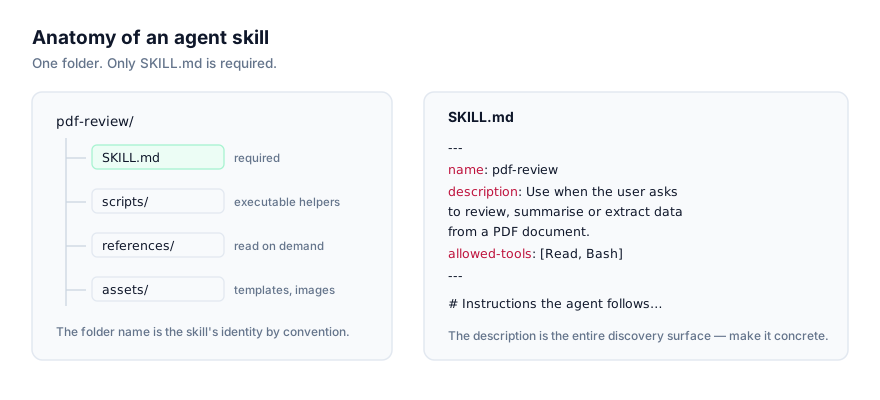
Google Antigravity is an agent-first IDE, and it reads Agent Skills the same way every other implementation of the standard does: a folder containing SKILL.md (YAML frontmatter with name and description, optionally allowed-tools and model, followed by markdown instructions) plus optional scripts/, references/, and assets/ subfolders that only load when the instructions actually need them. Anthropic published this as an open standard in late 2025, and Antigravity is one of the agents that adopted it directly, with no conversion step needed for a skill written elsewhere. Google's own reference material is at the Antigravity skills documentation.
The value proposition is the same one every agent skill offers: turning a procedure you'd otherwise re-explain into something the agent finds on its own. If you're using Antigravity across several Google Cloud projects and want it to consistently follow a particular deployment checklist, or format infrastructure-as-code changes a specific way, a skill is where that lives. Written once, discovered automatically whenever a matching request comes in, rather than retyped into every session.
Discovery follows progressive disclosure: at session start, Antigravity reads only each installed skill's name and description, not the body and not any bundled scripts. That's a negligible token cost per skill even with a large library installed. The full SKILL.md content loads only once a request matches the description closely enough, and any scripts or reference files inside the skill load only when the loaded instructions actually call for them. This is why the description field carries so much weight: it's the only thing Antigravity has seen about a skill until the moment it decides to use it.
Installing a skill
Via the skills CLI
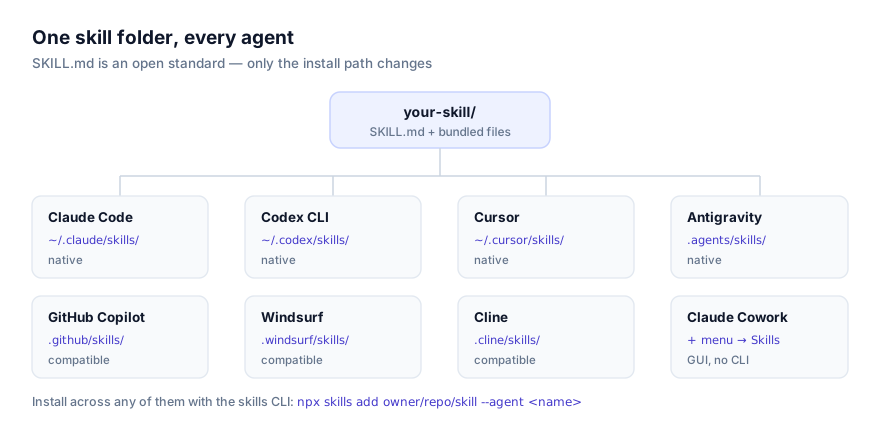
npx skills add owner/repo/skill-name --agent antigravity
owner/repo/skill-name points at the skill's location on GitHub: the repository owner, the repository name, and (if the repo bundles more than one skill) the path to the specific skill folder. --agent antigravity tells the installer to write into Antigravity's directories specifically, which matters if you've also got Claude Code, Cursor, or another supported agent installed on the same machine.
Run the command from inside a workspace to install at workspace scope, or from anywhere else to install globally.
Find skills to install at getclaudeskills.com/skills, or filter to ones confirmed to work with Antigravity at getclaudeskills.com/platforms/antigravity. Every listing links to the skill's source on GitHub rather than a packaged download, so you can read it before it ever touches your machine.
Manually
A skill is a folder. Antigravity doesn't need the CLI to find one, only that it's sitting in the right directory when a session starts.
# Global scope, every workspace
git clone https://github.com/owner/repo ~/.agents/skills/skill-name

# Workspace scope. This project only
git clone https://github.com/owner/repo .agents/skills/skill-name
A downloaded zip extracts the same way into either path. Check that SKILL.md sits directly inside the skill's folder rather than nested under an extra directory the archive added. That one extra folder level is the single most common reason a manually installed skill is never found.
A note on the older path
Antigravity's current skills location is .agents/skills, plural. If you're working in a project that predates this, or following an older guide, you may see .agent/skills (singular) referenced instead. Antigravity keeps backward-compatible support for that older location, so a skill sitting there should still be read. For anything new, install into .agents/skills rather than the older singular form, if you're setting up a fresh workspace, there's no reason to use the path that's only there for compatibility. If a workspace has skills scattered across both .agent/skills and .agents/skills from different points in time, consolidate them into the current plural path so there's one place to look when something goes wrong.
A worked example
Say a teammate has written a skill called release-notes-drafter that reads recent commits and produces a formatted changelog entry, and you want it available only in the project you're both working on. Before installing, the folder looks like this:
release-notes-drafter/
├── SKILL.md
├── scripts/
│   └── summarize_commits.py
└── references/
    └── changelog-style.md
Installing at workspace scope with the CLI, run from inside the project:
cd ~/code/shared-project
npx skills add owner/repo/release-notes-drafter --agent antigravity
That produces .agents/skills/release-notes-drafter/ inside the repository, containing the same three items. Commit it, and anyone who clones the project and opens it in Antigravity gets the skill automatically the next time they start a session, no separate install step required on their end. The manual equivalent is git clone https://github.com/owner/repo .agents/skills/release-notes-drafter, which produces an identical folder without touching the CLI at all.
Updating or removing a skill
There's no registry beyond the filesystem, so updating a skill means updating its folder. If you installed with git clone, cd into the skill's directory under .agents/skills/ or ~/.agents/skills/ and run git pull to bring in upstream changes. If you installed with the CLI, re-running the same npx skills add command overwrites the folder with the current version from the source repo. Removing a skill is deleting its folder, followed by a new session so Antigravity stops reading it.
Because updates are manual, so is pinning a version. If an upstream change to a skill breaks something you depend on, git checkout <sha> inside its folder locks it to a known-good commit, the same way you'd pin any other vendored dependency. For a workspace-scoped skill committed to the repo, an update shows up as an ordinary diff that a reviewer can read before it merges.
Global skills vs workspace skills
| Scope | Path | Fits |
|---|---|---|
| Global | ~/.agents/skills/ | Skills you want in every workspace, regardless of project |
| Workspace | .agents/skills/ | Skills tied to one project, or shared with a team through the repo |
Global scope is the natural home for anything not tied to a specific codebase. A skill that knows how you like documentation structured, one wrapping a personal tool you reach for across projects, general conventions you'd otherwise repeat in every new workspace. It applies no matter which project you open in Antigravity.
Workspace scope is the better fit when a skill only makes sense for one project, something that understands a particular repo's deployment pipeline, or a skill a teammate wrote and committed to .agents/skills/ so it's there automatically for anyone who opens the workspace. It's also the more defensible choice for a skill you haven't fully reviewed: it's confined to one project, and it shows up as an ordinary, git-tracked file rather than something invisible sitting in your home directory.
If you're not sure which to pick, start with workspace scope. Promoting it to global later is a one-line copy; walking back a global skill that turns out to be the wrong fit for other projects is a more annoying cleanup.
How to tell a skill actually loaded
Work through these in order:
- List the directory.
ls ~/.agents/skills/orls .agents/skills/should show the skill's folder withSKILL.mdimmediately inside it. - Start a new session. Antigravity reads skill metadata once, at session start. A skill copied in while a session is already open won't register until you restart.
- Ask directly. In a fresh session, ask what skills are currently available. Since Antigravity has already read every installed skill's name and description by that point, it can answer accurately. If your skill isn't in the list, the install didn't take. If it's listed but never triggers on real requests, the description is the problem, not the install.
The most reliable test remains behavioral: make a request that clearly matches what you wrote in the description, and confirm the response actually follows the instructions in the skill's body, a specific format, a specific sequence, a specific constraint you wrote into SKILL.md.
Fixing skills that don't work
Installed correctly, never used
The most common issue by a wide margin, and it's a writing problem rather than an installation problem. Antigravity matches your request against the description field alone. Something like "Deployment helper" gives it nothing concrete to match against "deploy this service to staging" or "roll back the last release." Name the actual conditions:
# Too vague to match a specific request
description: "Deployment helper"

# States what it does and exactly when to use it
description: "Deploys a service to Google Cloud Run following the team's staged rollout checklist. Use when the user asks to deploy, ship, or roll out a change to staging or production."
A fresh install seems invisible
Antigravity reads skills at session start, not continuously. Installing or editing a skill while a session is already running has no effect until a new session begins. This is the first thing to check before concluding a fix didn't work.
Bundled scripts error out immediately
If a skill's instructions shell out to something under scripts/ and it fails right away, the cause is usually a missing runtime rather than a broken skill. A Python script needs python3 on PATH, a Node script needs node, and anything calling gcloud, jq, or another CLI needs that binary installed and authenticated. Read the script first (you should be doing this before installing anyway) to see what it assumes, then confirm with which <tool> that it's actually present.
Naming collisions between two skills
If two installed skills declare the same name, or the same skill exists at both global and workspace scope with diverging versions, Antigravity has two candidates that can match the same request, and relying on one silently winning over the other is a bad bet. Rename one skill's name field and folder to something distinct, or delete the outdated copy. This tends to happen when a skill lands in a project's .agents/skills/ via a teammate's setup and you've separately installed the same thing globally.
Security before installation
Antigravity will run a skill's bundled scripts when its instructions call for it, the same as any agent implementing this standard. Before installing anything, open SKILL.md and every file under scripts/ and read what it actually does, what commands it runs, what it touches on disk, whether it calls out to a network endpoint or a cloud API. This is exactly why getclaudeskills.com links to a skill's source on GitHub instead of hosting a packaged download: you can read the code in the same place you're about to install it from.
If you're not confident a skill deserves trust yet, install it at workspace scope rather than globally, a smaller blast radius, and a diff a teammate can review before it lands. For more on this, see the security guide. If you're new to the format generally, what agent skills are and how agents discover and activate skills are both good background. Browse everything cataloged for Antigravity at getclaudeskills.com/platforms/antigravity, or the full catalog at getclaudeskills.com/skills.