

What an agent skill is
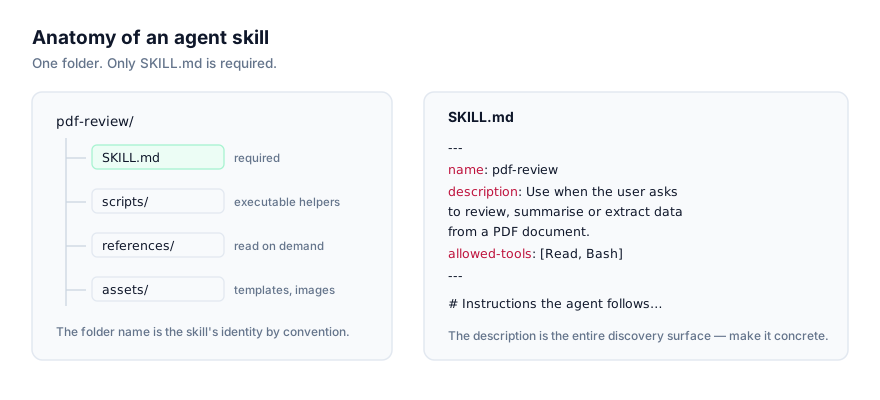
An agent skill is a folder, and the only file it strictly requires is SKILL.md. That file opens with YAML frontmatter (a name, a description, and optionally allowed-tools and model) followed by markdown instructions. Beyond that, a skill can carry scripts/, references/, and assets/ subfolders that only get opened when the instructions direct the agent to use them.
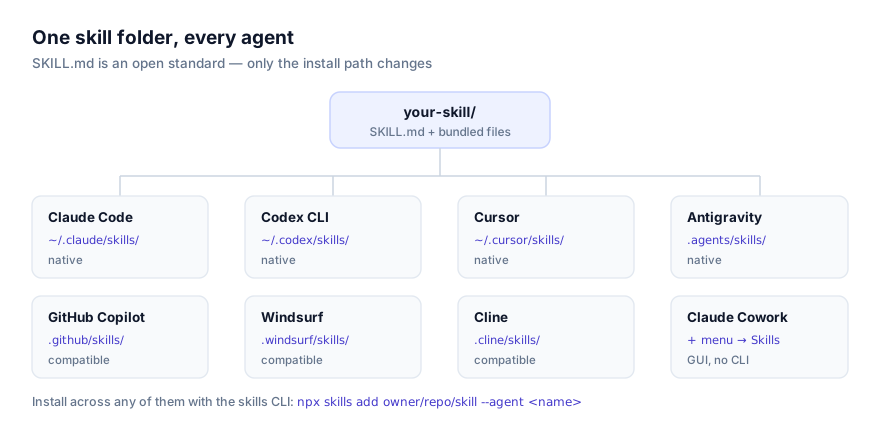
This format became an open standard when Anthropic published it in late 2025, and the point of publishing it that way was interoperability: the same folder, byte for byte, is now read by Claude Code, Claude Desktop, the Claude API, Claude Cowork, OpenAI's Codex CLI, Cursor, Google Antigravity, and a widening set of third-party agents. OpenCode (SST's open-source terminal agent) is one of them. If a skill already works in Claude Code, it works in OpenCode too, once it's in the right directory.
How OpenCode decides which skills to use
The mechanic is progressive disclosure, and it's worth understanding rather than taking on faith, because it explains both why skills scale and why they sometimes silently fail to fire. At the start of a session, OpenCode reads only the name and description of every skill available to it, not the body, and not anything under scripts/ or references/. When a request matches a description, OpenCode loads that one skill's full SKILL.md. Bundled files load only if the instructions call for them.
Two consequences follow directly. First, you can have a large library of skills installed without every session paying a large token cost for all of them, only the one that actually matches gets read in full. Second, the description field is the entire discovery surface. If it doesn't describe the trigger situation the way you'd actually phrase a request, OpenCode has no signal to act on, no matter how good the instructions inside are. Writing a tight, situation-specific description is the highest-leverage thing you can do when adapting or authoring a skill for OpenCode.
Why reach for a skill in OpenCode specifically
OpenCode is a terminal agent, which means most of what it does is already close to the metal: editing files, running commands, reading output, iterating. A skill fits naturally into that loop because it's the same shape as the rest of the work. Instructions plus, optionally, a script to run. Instead of re-explaining "here's how we structure a migration in this repo" or "here's the format our commit messages follow" at the start of every session, a skill makes that knowledge something OpenCode picks up automatically when the situation calls for it.
Because OpenCode is open source and terminal-based, it also tends to get used in environments where a team already has strong conventions around scripting and tooling, CI configuration, internal CLIs, infrastructure code. That's exactly the kind of codebase where a skill earns its keep: a bundled script that already knows how to run the project's linter with the right flags, or one that generates a boilerplate module matching the existing file layout, saves more time than a skill that's purely descriptive.
Native vs. compatible: where OpenCode fits
The platform data behind this site tracks two support levels. Native means the vendor built first-party, documented support for the open standard directly, Claude Code, Claude Desktop, the Claude API, Claude Cowork, Codex CLI, Cursor, and Google Antigravity fall in this group. Compatible means the agent reads the identical SKILL.md format and follows the same progressive-disclosure rule, having adopted the open convention rather than shipping it as a bespoke vendor feature. OpenCode sits here, alongside GitHub Copilot, Windsurf, Cline, and others.
The practical difference is smaller than the label suggests. A skill installed correctly in .opencode/skills/ behaves exactly like one installed in a native agent's directory: same frontmatter fields read, same progressive disclosure, same tool execution model for bundled scripts. What differs is mostly where you'll find first-party documentation and where the install tooling originates, the skills CLI, in OpenCode's case, rather than something OpenCode ships and maintains itself.
Installing a skill in OpenCode
The CLI route
The skills CLI is the cross-agent installer for this format. From your project directory:
npx skills add owner/repo/skill --agent opencode
Swap owner/repo/skill for the actual path of the skill you want, find it on the skill's listing at getclaudeskills.com/skills. The --agent opencode flag tells the installer to wire the skill into OpenCode's own lookup path.
What actually happens under the hood is worth knowing. The CLI's canonical storage (listed as OpenCode's "global path") is ~/.agents/skills/. That's not a directory OpenCode itself defined; it's the shared location the skills CLI manages for any compatible agent installed through it. Running the command above writes the skill's files to ~/.agents/skills/<skill-name>/, then links that same skill into your project's .opencode/skills/<skill-name>/, which is where OpenCode's own directory scan looks.
Manual install
Skip the CLI entirely by placing the skill folder directly at:
.opencode/skills/
A skill installed this way looks like:
.opencode/skills/
└── test-writer/
    ├── SKILL.md
    ├── scripts/
    │   └── find_uncovered_lines.py
    └── references/
        └── testing-conventions.md
With a SKILL.md like:
---
name: test-writer
description: Writes unit tests for a given function, matching this repo's existing test structure and naming conventions. Use when asked to add tests or improve coverage.
allowed-tools: ["bash", "read", "write"]
---

# Test Writer

1. Run scripts/find_uncovered_lines.py against the target file.
2. Read references/testing-conventions.md for naming and assertion style.
3. Write tests covering the uncovered branches first.
Because OpenCode is a terminal agent with tool execution built in, a skill like this (one that shells out to a script and writes new files) works exactly as intended. That's a meaningful difference from an agent like Claude Desktop, which can't run bundled scripts at all; a skill written with OpenCode or another CLI agent in mind should be checked for that dependency before you assume it'll behave the same way everywhere.
Verifying the skill loaded
- Confirm the folder exists where OpenCode expects it:
ls .opencode/skills/should list the skill by name. - Start a new OpenCode session. Skills are read at startup, so a session already running before you installed won't see it.
- Make a request that matches the skill's
descriptionin ordinary language, without naming the skill directly. If the description is well-written, OpenCode should apply it unprompted. - If you want a direct check rather than an inferred one, ask OpenCode to list the skills it currently has available.
If step 3 turns up nothing, treat the description as the first suspect before assuming the install itself failed. See troubleshooting below for how to tell the two apart.
Personal vs. project scope
| Scope | Path | Applies to |
|---|---|---|
| CLI canonical storage | ~/.agents/skills/ | Your machine, managed by the skills CLI |
| Project | .opencode/skills/ | This project only, and shared if committed |
For a skill you use across every project you touch, install it once with the CLI and let it live in the canonical ~/.agents/skills/ storage. This is what the "global" label actually refers to for OpenCode, rather than an OpenCode-specific personal directory. For something specific to one codebase (conventions, schemas, or workflows that don't make sense outside that repo) install into .opencode/skills/ for that project and commit the folder if you want teammates to get it too. The two aren't mutually exclusive: a skill can be present in both places if you want it globally available and also want it version-controlled with a specific project's history.
Why isn't my skill activating in OpenCode?
Skill never activates. Nearly always a description problem. OpenCode only sees name and description before deciding relevance, if the description reads like a summary of the skill's contents rather than a trigger condition ("use when asked to…"), rewrite it in the language a real request would use.
Skill isn't where OpenCode looks. Double-check the folder landed at .opencode/skills/<name>/, not .agents/skills/, .claude/skills/, or nested a level too deep from how an archive was extracted.
CLI ran but the project folder is empty. Confirm you ran npx skills add from inside the actual project directory you wanted the skill linked into. The project-side link path is resolved relative to your current working directory at the time you ran the command.
Session predates the install. Skills load at session start. If you install mid-session, that session won't pick it up. Start a new one.
Bundled script errors out. Check that whatever interpreter the script expects is actually available in the environment OpenCode is running in, and that file paths inside the script are relative to the skill's own folder rather than assuming the project root.
Two skills overlap. If OpenCode seems to blend two skills' instructions or picks the wrong one, their descriptions likely describe overlapping situations. Narrow each one until their trigger conditions are distinct.
Global and project copies drift apart. If you've installed the same skill both globally (via the CLI's canonical storage) and inside a specific project, and you later edit one copy but not the other, you'll get inconsistent behavior depending on which one OpenCode resolves first. Keep one as the source of truth and treat the other as a synced copy, or just pick one scope per skill.
Skill works for you, not for a teammate on the same repo. If .opencode/skills/ is in .gitignore, either intentionally or by an overly broad pattern, the folder never leaves your machine. Run git check-ignore -v .opencode/skills/<skill-name> if you're not sure whether that's happening.
Skill activates but produces inconsistent results. If the skill's instructions are ambiguous about ordering or leave a step open to interpretation, different sessions can resolve it differently. Rewrite vague instructions as an explicit numbered sequence rather than a loose description of the goal. This matters more for OpenCode than for a pure-text assistant, because an ambiguous step here often means an ambiguous shell command.
Skill directory shows up in opencode output but the model still ignores it. Confirm the skill folder actually contains a valid SKILL.md with correctly formed YAML frontmatter, a syntax error in the frontmatter (an unquoted colon, a missing closing quote) can cause an agent to skip a skill silently rather than raise a visible parse error.
Security: read it before you run it
OpenCode gives a skill real tool execution. A bundled script in scripts/ can run shell commands, write files, and call out to whatever's reachable from your terminal the moment OpenCode decides the skill applies. Before installing anything, read the SKILL.md body and every script in full, on the skill's actual source repository rather than a repackaged copy. This site links to that source specifically so this review is possible before you install, not after. If a script does something you can't fully explain, don't install it. The security guide has a fuller checklist for what to look for.
Where to go from here
Browse OpenCode's platform page or the full skills directory for something worth installing first. New to the format itself? What an agent skill is and how agents discover and activate skills cover the ground this guide assumes. If you split your time between OpenCode and another terminal agent, how to install skills in Codex CLI and how to install skills in Claude Code cover the equivalent setup for those, and a skill written well works across all three without changes.