

How Zed reads a skill folder
Zed added native support for Agent Skills in v1.4.2, which shipped in May 2026 and replaced the editor's older rules library outright. The release notes put it plainly: "Agent: Added support for skills." The same version added a global AGENTS.md file alongside settings.json, and swapped the old @rule autocomplete entry in the agent chat input for @skill.
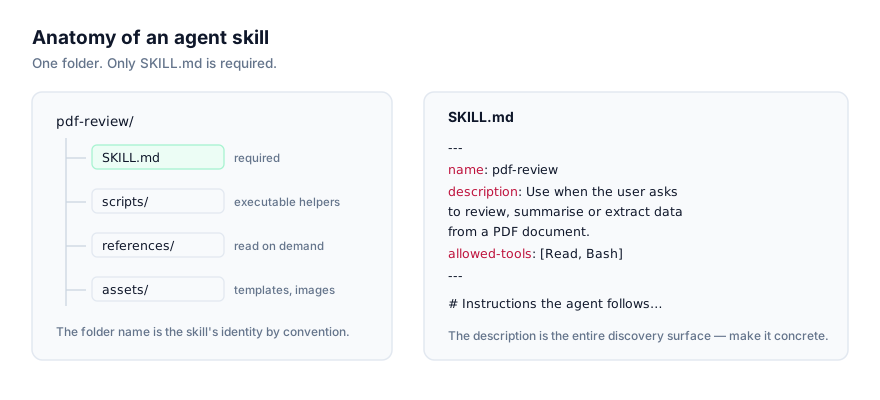
Zed reads the same open standard as every other implementation covered on this site: a folder containing SKILL.md, YAML frontmatter with a required name and description, followed by a markdown instruction body, plus optional scripts/, references/ and assets/ subfolders that only load when the instructions call for them. Anthropic published the format as an open standard in late 2025, and Zed's own Agent Skills documentation confirms it reads SKILL.md files without any conversion step for skills written for another agent.
Zed's implementation is stricter about the frontmatter than some agents: the name field must match [a-z0-9-]{1,64}, and description must fall between 1 and 1,024 characters. A skill that fails validation is rejected outright rather than loaded with a warning, so it's worth checking those two fields specifically if a skill installed elsewhere doesn't show up in Zed.
Installing a skill
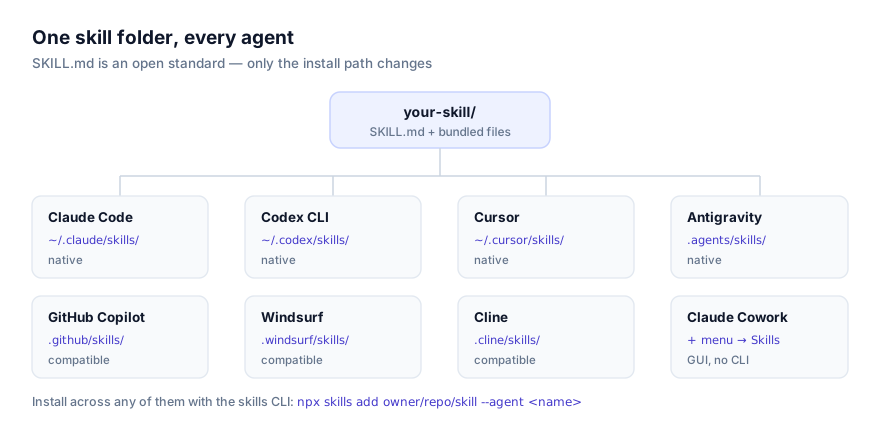
Via the skills CLI
npx skills add owner/repo/skill-name --agent zed
owner/repo/skill-name is the skill's location on GitHub, the repository owner, the repository name, and, if the repo bundles more than one skill, the path to the specific one. --agent zed (the CLI also accepts the short form -a zed) tells the installer to write into Zed's directories specifically, which matters if you've also got Claude Code, Cursor or another supported agent installed on the same machine, since each has its own skills path.
Run the command from inside a project to install at project scope, or from anywhere else to install globally.
Find skills to install at getclaudeskills.com/skills. Every listing links to the skill's source on GitHub rather than a packaged download, so you can read what it does before it touches your machine.
Manually
A skill is just a folder. Zed doesn't need the CLI to find one, only that it's sitting directly inside the right directory before a session starts scanning.
# Global scope, every project
git clone https://github.com/owner/repo ~/.agents/skills/skill-name

# Project scope, this worktree only
git clone https://github.com/owner/repo .agents/skills/skill-name
A downloaded zip extracts into either path the same way. Zed uses what its own crate documentation calls a "flat scan": it only recognises immediate children of the skills root, so SKILL.md needs to sit directly inside skill-name/, not nested under an extra folder the archive added. That extra directory level is the single most common reason a manually installed skill never appears.
Global skills vs project skills
| Scope | Path | Fits |
|---|---|---|
| Global | ~/.agents/skills/ | Skills you want available no matter which project you have open |
| Project | .agents/skills/ inside the worktree | Skills tied to one codebase, or shared with a team by committing the folder |
Global scope suits anything that isn't tied to a specific repository: a skill encoding how you like commit messages written, one wrapping a personal tool you reach for across projects, general conventions you'd otherwise repeat in every new workspace.
Project scope is the better fit for a skill that only makes sense inside one codebase, something that understands a particular deployment pipeline, or a skill a teammate wrote and committed to .agents/skills/ so it's there automatically for anyone who opens the project. It's also the safer default for a skill you haven't fully reviewed yet: confined to one worktree, and visible as an ordinary tracked file a reviewer can see in a diff, rather than sitting invisibly in your home directory.
Worktree trust and project-local skills
Zed starts every worktree in Restricted Mode. Until you grant trust, project-local content, including anything under .agents/skills/, is excluded from both the model's catalog and Zed's slash commands. This matters most right after cloning a repository: a skill sitting in that project's .agents/skills/ won't show up until you've explicitly trusted the worktree, even though the folder and its SKILL.md are perfectly valid.
Global skills under ~/.agents/skills/ aren't subject to this restriction, since they don't belong to any one worktree.
A worked example
Say a teammate has written a project-scoped skill called pr-description-drafter that reads a branch's commits and drafts a pull request description, and the team wants it available to anyone who opens the repository in Zed.
pr-description-drafter/
├── SKILL.md
├── scripts/
│   └── summarize_diff.py
└── references/
    └── pr-template.md
Installed at project scope from inside the repository:
cd ~/code/shared-project
npx skills add owner/repo/pr-description-drafter --agent zed
That produces .agents/skills/pr-description-drafter/ inside the repository. Commit it, and anyone who clones the project, opens it in Zed, and trusts the worktree gets the skill automatically the next time a session starts, no separate install step on their end. The manual equivalent is git clone https://github.com/owner/repo .agents/skills/pr-description-drafter, which produces an identical folder without touching the CLI.
Invoking a skill: automatic vs explicit
Zed offers both routes into a skill, and they behave differently:
Model invocation. By default, Zed's agent can call the built-in skill tool on its own when a request matches an installed skill's description. The first time it does, you get a permission prompt before the skill's content loads, the same permission flow used for every other built-in tool.
Slash command invocation. Typing /skill-name in the agent chat injects that skill's content directly into the conversation. Because you invoked it explicitly, there's no separate authorisation prompt.
If you want a skill available only as an explicit command, never picked up automatically, add disable-model-invocation: true to its frontmatter:
---
name: pr-description-drafter
description: Drafts a pull request description from a branch's commit history.
disable-model-invocation: true
---
A skill flagged this way is hidden from the model's catalog entirely, so the agent has no way to know it exists on its own, but it still works when you type /pr-description-drafter.
Zed also ships a built-in create-skill skill. Typing /create-skill walks you through scaffolding a new skill's folder and frontmatter interactively, without writing SKILL.md from a blank file.
How to tell a skill actually loaded
- List the directory.
ls ~/.agents/skills/orls .agents/skills/from inside the project should show the skill's folder withSKILL.mdimmediately inside it, not nested further. - Confirm the worktree is trusted, if it's a project-scoped skill. An untrusted worktree hides it regardless of whether the folder and file are correct.
- Start a fresh session, or trigger a reload. Zed's own documentation describes watching both skills directories for changes, so an author iterating on a
SKILL.mdshould see the catalog update without restarting. If a freshly added skill still isn't showing, opening a new agent session is the reliable fallback. - Ask directly. In the agent chat, ask what skills are currently available. If yours isn't listed, the install didn't take, or the worktree isn't trusted. If it's listed but never triggers on real requests, the description is the problem, not the install.
Fixing skills that don't work in Zed
Installed correctly, but never picked up automatically
The most common cause, and it's a writing problem rather than an installation one. Zed's model invocation matches your request against the description field alone. Something like "Helps with pull requests" gives it nothing concrete to match against "write a description for this branch." Name the actual trigger conditions:
# Too vague to match a specific request
description: "Helps with pull requests"

# States what it does and exactly when to use it
description: "Drafts a pull request description from a branch's commit history, grouped by feature and fix. Use when the user asks to write, draft, or update a PR description."
Skill is rejected outright
Zed validates name and description strictly. If name contains characters outside [a-z0-9-], exceeds 64 characters, or description is empty or longer than 1,024 characters, the skill fails validation rather than loading with a warning. Check both fields first if a skill that works fine in another agent doesn't appear in Zed's catalog.
A fresh clone shows no project skills
Check worktree trust before anything else. This is the single most common reason a project-scoped skill is invisible immediately after git clone, and it has nothing to do with the skill folder itself.
The catalog seems to be missing some installed skills
Zed caps the combined size of every skill's name plus description, across both global and project scope, at 50KB total. Skills that don't fit are dropped from the catalog with a warning rather than silently truncated. This only becomes relevant with a large number of installed skills; if you're seeing it, trimming a handful of verbose descriptions is the fix, not deleting skills outright.
Bundled scripts fail immediately
If a skill's instructions shell out to something under scripts/ and it errors right away, the cause is usually a missing runtime rather than a broken skill. A Python script needs python3 on PATH, a Node script needs node, and anything calling out to another CLI needs that binary installed and authenticated. Read the script first, which you should be doing before installing anyway, to see what it assumes.
Security before installation
Zed will run a skill's bundled scripts when its instructions call for it, and editing SKILL.md files themselves is treated as a sensitive path requiring explicit authorisation, the same caution Zed applies to other tool-driven file writes. Neither of those protections is a substitute for reading the skill first. Before installing anything, open SKILL.md and every file under scripts/ and check what it actually does, what it touches on disk, and whether it calls out to a network endpoint. This is the same reason getclaudeskills.com links to a skill's source on GitHub instead of hosting a packaged download.
If you're not confident a skill deserves trust yet, install it at project scope rather than globally: a smaller blast radius, and an ordinary diff a teammate can review before it merges. For more, see the Agent Skills Security Guide. If you're new to the format generally, What Are Agent Skills? and How AI Agents Discover and Activate Skills are both good background before you start installing.