

What makes a good data analysis skill
Data analysis is one of the categories where a skill's precision matters more than its ambition. A skill that says "cleans your data" is worth less than one that says "removes rows where the date field is blank, flags any column with more than 40% missing values, and reports the removal counts". The second one you can verify by reading the output; the first one you have to trust blindly. The strongest data analysis skills in this list share three traits: a description that names a specific, checkable operation; instructions detailed enough that a human reviewer could follow the same steps by hand; and, where the task calls for it, a bundled script rather than free-form reasoning, because a script produces the same result every time it runs.
The other thing worth checking before you rely on any of these for real numbers: what tool or file format it assumes. A skill built for Power BI's semantic layer won't help with a raw CSV, and a skill built around QuickBooks exports won't touch your data warehouse. Match the skill to your actual stack first, then judge it on the criteria above.
This is a curated selection based on quality, popularity and how actively each skill's repository is maintained, not a benchmarked or independently tested ranking. All facts below (star counts, licences, requirements) come straight from each skill's listing page on this site.
The best data analysis skills for AI agents
They're ordered from most broadly useful to most specialised. Spreadsheet work touches nearly every data job that exists; single-cell genomics QC touches a fairly small number of very specific ones. That ordering isn't a quality judgment (a narrow skill that nails its niche is often better engineered than a broad one that tries to do everything) but it's a reasonable way to decide what to look at first if you only have time for two or three.
Spreadsheet Management
Anthropic's own skill for anything where a spreadsheet file (.xlsx, .xlsm, .xltx, .csv, .tsv) is the primary input or output. It covers opening, editing and fixing existing files, building new ones from scratch or other data sources, and converting between tabular formats, and it fires whenever you reference a spreadsheet by name or path, even casually.
Who it's for: anyone whose data analysis starts and ends in a spreadsheet, which covers a large share of real business analysis work. Caveat: Anthropic's own guidance is explicit that this isn't the right tool when the primary output is something other than a spreadsheet (a Word document or an HTML report, for instance) so don't reach for it outside that scope. It requires Python and shell access to run. With 167,000 stars on the anthropics/skills repository and an unspecified licence (worth checking directly on GitHub before any commercial redistribution), it's the most widely adopted skill on this list by a wide margin.
Data Context Extractor
This one is a meta-skill: instead of analysing your data directly, it interviews your analysts and inspects your schemas to generate a new, company-specific data analysis skill. One that already knows your table names, your terminology and your tribal knowledge. It runs in two modes: Bootstrap, for building a first skill from scratch, and Iteration, for adding context to one that already exists.
Who it's for: teams onboarding new analysts, or anyone tired of re-explaining the same warehouse quirks to an agent every session. Caveat: Anthropic's own guidance notes it may be overkill for organisations with very simple data needs that don't justify a custom skill. It requires Python. From anthropics/knowledge-work-plugins, 23,000 stars, Apache-2.0 licensed.
Power BI Semantic Modeling
An assistant for building and optimising Power BI semantic models: measures, star schemas, relationships, row-level security, calculation groups, and DAX conventions, following Microsoft's own best practices. It connects to your active model and tailors its guidance to the structure it finds there.
Who it's for: analysts and BI developers already committed to the Power BI ecosystem. Caveat: the skill's own guidance flags that it isn't built for general Power BI usage questions. It's specifically about the semantic modeling layer, not report design or visuals. No special requirements are listed, so it should run on any SKILL.md-compatible agent. From github/awesome-copilot, 38,000 stars, MIT licensed.
Power BI Model Design Review
A structured review framework for auditing an existing Power BI model's architecture (schema design, relationships, storage modes) against best-practice patterns, phase by phase.
Who it's for: teams doing a pre-deployment review of a model, or diagnosing why one has gotten hard to maintain. Caveat: it's explicitly not built for simple models or for users unfamiliar with Power BI's underlying architecture. You need enough context to interpret its findings. No special requirements listed. Same repository as the semantic modeling skill above, github/awesome-copilot, 38,000 stars, MIT.
Power BI Performance Troubleshooting
A systematic diagnostic workflow for slow Power BI models, reports and queries, starting with scoping the problem, then classifying it against known bottleneck categories (model load, page load, visual responsiveness, query speed) before proposing fixes.
Who it's for: anyone with a Power BI report that's gone from responsive to sluggish and needs a structured way to find out why, rather than guessing. Caveat: its own guidance says it isn't a fit for users without access to the underlying performance metrics and tooling. It assumes you can pull the diagnostics it asks for. No special requirements listed. Also github/awesome-copilot, 38,000 stars, MIT. Installing all three Power BI skills together gives fairly complete coverage of the modeling, review and troubleshooting lifecycle for one platform.
SQL Server Table Reconciliation
Compares identical tables across two SQL Server instances using the mssql-python driver and Apache Arrow for fast columnar transfer, built for migration validation, ETL verification, row-mismatch detection and schema-drift checks between, say, production and staging.
Who it's for: data engineers running migrations or maintaining ETL pipelines where two environments need to agree. Caveat: it's SQL Server-specific. The skill's own guidance says it isn't suited to other database engines or to situations where schema comparison isn't the actual need. It requires Python and shell access. From github/awesome-copilot, 38,000 stars, MIT.
Data Cleaning and Variable Screening
An 11-step pipeline built for pre-loan credit risk modeling: data loading and formatting, abnormal-period filtering, missing-rate calculation, high-missing variable removal, low-IV filtering, high-PSI variable removal, Null Importance denoising, high-correlation removal, and a final cleaning report.
Who it's for: credit risk analysts and data scientists preparing raw lending data for a model, or anyone who wants a worked example of a rigorous, auditable cleaning pipeline to adapt for a different domain. Caveat: the skill's own guidance says it's not built for datasets that are already clean, and the pipeline's terminology (IV, PSI) is specific to credit scoring. Expect to adapt it if your domain isn't lending. Requires Python and shell access. github/awesome-copilot, 38,000 stars, MIT.
Arize Dataset
A command-line wrapper around Arize's dataset management: creating datasets from files, appending examples, exporting data, and retrieving metadata, all through the ax CLI.
Who it's for: data scientists and ML engineers already using Arize to manage evaluation and golden datasets. Caveat: its own guidance is direct that it's not for teams outside the Arize ecosystem, or for anyone needing data manipulation beyond dataset-level operations. Requires shell access. github/awesome-copilot, 38,000 stars, MIT.
Arize Experiment
The companion skill to Arize Dataset, creating, running and analysing Arize experiments for model evaluation and comparison, also via the ax CLI: experiment CRUD, exporting runs, comparing results.
Who it's for: the same Arize-using ML teams as above, once they have a dataset in place and want to benchmark models against it. Caveat: identical scope limitation to its sibling skill, not useful outside Arize, and not built for teams that don't need detailed performance evaluation. Requires Python and shell access. github/awesome-copilot, 38,000 stars, MIT.
Single-Cell RNA-seq QC
The most specialised entry here: automated quality control for single-cell RNA-seq data (.h5ad or .h5 files) following scverse best practices, using MAD-based filtering and generating QC visualisations through a bundled qc_analysis.py script.
Who it's for: bioinformaticians and computational biologists working with single-cell genomics data who want a QC step that follows an established community standard rather than an ad hoc one. Caveat: its own guidance says it isn't a fit for highly customised QC workflows that deviate substantially from scverse conventions, or for unsupported file formats. Requires Python and shell access. From anthropics/knowledge-work-plugins, 23,000 stars, Apache-2.0. It's included here to show the breadth of the "data analysis" category, most readers won't need it, but it's a good example of how specific a well-built skill can get.
Common failure modes with data analysis skills
A few patterns show up repeatedly when a data analysis skill doesn't behave as expected, and none of them are exotic:
- The skill never activates. Almost always a description mismatch. You asked to "look at this spreadsheet" but the skill's description only lists "clean" and "convert" as triggers. Rephrase closer to the skill's own listed triggers, which you can read on its listing page before you even install it.
- A script-based skill fails silently or errors on missing dependencies. Skills that require Python or shell access assume those are already available in the agent's environment. If you're running Claude Desktop rather than Claude Code, check the skill's platform list first. Script execution isn't guaranteed everywhere.
- Output looks plausible but is wrong. This is the dangerous one, because it doesn't announce itself. Data work is exactly the category where a confidently wrong output is worse than an obvious failure. Spot-check any cleaning, reconciliation or modeling skill's first few runs against a manual pass before trusting it unsupervised.
- A platform-specific skill (Power BI, SQL Server, Arize) gets used outside its actual scope. Every skill above documents what it's not for in its own
whenNotToUseguidance. Read that before assuming it generalises to a similar-sounding tool.
How to install these skills
All ten skills above install the same way, whichever agent you're using: point the skills CLI at the coordinate shown on each skill's listing page. For Spreadsheet Management, that looks like:
npx skills add anthropics/skills/xlsx
For a Claude Code-specific install, add --agent claude-code; the CLI supports the same flag for Codex CLI, Cursor and the other agents covered on this site. The two full walkthroughs, installing skills in Claude Code and installing skills in Codex CLI. Cover both the CLI method and manually dropping a skill folder into the right directory, which matters because personal and project-scoped install locations differ by platform:
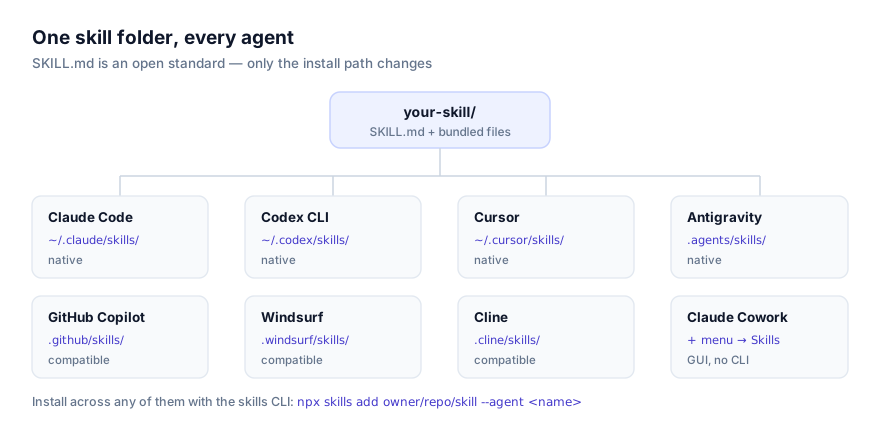
If you're not sure your agent supports skills at all, the platforms directory lists every SKILL.md-compatible agent and whether support is native or CLI-installed.
Combining these skills into a real workflow
None of these are meant to be used in isolation. A realistic data pipeline for a small analytics team might run Spreadsheet Management to clean a raw export, SQL Server Table Reconciliation to confirm the cleaned data matches what's in staging, and then Power BI Semantic Modeling to build the reporting layer on top, three skills, three separate installs, one continuous session. Because skills only load their full instructions when a request actually matches their description, having several installed at once costs very little context; the agent isn't running all of them, just deciding at each step which one applies.
For teams whose data lives somewhere none of the skills above cover directly, Data Context Extractor is worth a second look even though it's not itself an analysis tool. It's the fastest route to a skill that's actually built around your specific warehouse, rather than adapting a general-purpose one and hoping the terminology lines up. Whichever combination you land on, read the source before you run anything against real data: every skill linked here goes to its code on GitHub rather than a re-hosted copy, specifically so that step is easy to take.
Start from the data category page to see the full current listing, or browse all skills if your need doesn't fit neatly into data analysis alone.