

The listing has to fit somewhere
Claude Code doesn't load every installed skill's full body at session start. It loads a listing: each skill's name and description, so Claude knows what's available and can decide which one, if any, matches your request. That listing is progressive disclosure working as intended, cheap discovery now, full instructions only when a skill actually fires.
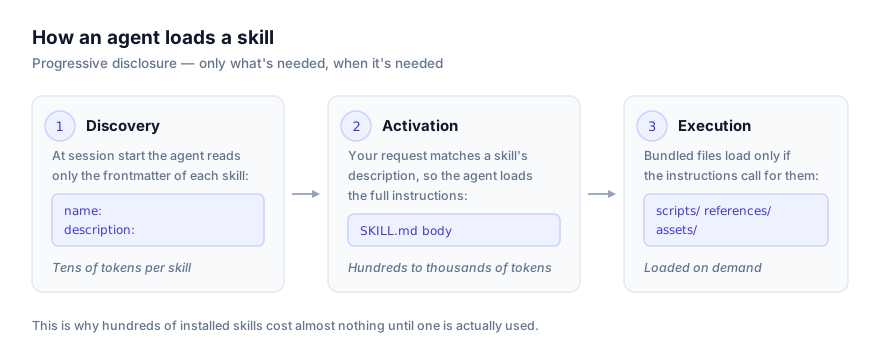
The catch is that the listing itself still costs context, and that cost grows with every skill you install. Claude Code caps it, and what happens once you hit that cap is the single most common reason a skill that worked fine in isolation quietly stops triggering once it's installed alongside a lot of others.
The budget: roughly 1% of the model's context window
Claude Code's own skills reference states the default plainly: the listing's character budget scales at 1% of the model's context window. The listing always contains every installed skill's name, no exceptions, but if the combined names and descriptions of everything installed exceed that budget, Claude Code starts shortening.
What gets dropped isn't chosen at random or alphabetically. When the listing overflows, Claude Code drops full descriptions starting with the skills you invoke least, so the skills you actually use most keep their complete text the longest. A skill you installed once and never touched again is the first to lose its description if the budget runs out; a skill you invoke daily keeps its full text even under pressure.
That ordering matters for diagnosis. A skill that's never fired for you and suddenly has a shortened description isn't broken, it's exactly what the mechanism is designed to do to your least-used skills once you've installed enough of them. A skill you use constantly losing its description is a much stronger signal something else is wrong.
Why this matters more than it sounds like it should
When a skill's description gets dropped to name-only, Claude still knows the skill exists but has nothing to match your request against beyond its bare name. If your skill was meant to trigger on "review this diff for security issues" and its description is the only place that phrase lives, losing the description doesn't just shorten what Claude sees, it removes the entire discovery surface for that skill. The skill still technically works if you invoke it directly with /skill-name, but Claude will stop reaching for it on its own, and nothing about the skill's own file changed to cause that.
This is worth internalising as a genuinely separate failure mode from a badly written description. A vague description fails to trigger because the words don't match what people actually ask. A truncated description fails to trigger because the words were never in context at all, regardless of how well they were written. Debugging the first means rewriting the skill; debugging the second means checking your total skill count and the budget, not touching the skill's wording at all.
The per-skill cap, separate from the overall budget
There's a second limit that applies even when the overall budget has room to spare: each skill's combined description and when_to_use text is capped at 1,536 characters, full stop, regardless of how much budget is left. This cap exists independent of whether your total listing is anywhere near the 1% ceiling.
The practical consequence is a writing discipline, not just a budgeting one: put your skill's most important use case first in the description. Anything past the 1,536-character mark simply never reaches the listing, even on a Claude Code instance with a huge context window and only three skills installed. A description that buries its actual trigger condition in the second paragraph, behind a long preamble, risks losing that trigger condition to the cap before Claude ever reads it, independent of the shared budget entirely.
How to check what's actually happening
Two built-in commands answer this without guesswork:
/doctor gives an estimate of the listing's total context cost and names its biggest contributors, worth running any time you suspect a crowded listing rather than a wording problem. When the listing exceeds its budget, Claude Code also writes a warning to the debug log, visible with the --debug flag, so you can confirm an overflow actually happened rather than assuming it.
/context shows a Skills row reporting the size of the listing after the budget has been applied, so what you see there is what the model actually receives, not the theoretical full-text size. This is worth knowing specifically because it wasn't always accurate: on Claude Code versions before v2.1.196, that row counted the full, untruncated text of every description regardless of what actually made it into context, which could report a number several times larger than the real cost. If you're comparing /context output against older notes or a colleague's screenshot from before that version, expect the numbers to look different for reasons that have nothing to do with your skills changing.
# A quick diagnostic pass when a skill stops triggering unexpectedly
/doctor           # estimate the listing's cost and biggest contributors
/context           # check the Skills row for the post-budget listing size
/skills            # check the skill's own state; see skillOverrides
Three ways to fix a crowded listing
Raise the budget. Set skillListingBudgetFraction higher than the 1% default, for example 0.02 for 2%, or set the SLASH_COMMAND_TOOL_CHAR_BUDGET environment variable to a fixed character count instead of a percentage. This is the right move when you genuinely need many skills fully described and have context budget to spare for it.
Deliberately demote low-priority skills. Rather than letting the automatic least-invoked-first rule decide, set specific skills to "name-only" in skillOverrides, Claude Code's settings-level visibility control. This frees their description budget for other skills without uninstalling anything, and gives you control over exactly which skills lose their description rather than relying on your own invocation history to decide it for you.
Trim the description at the source. Put the key use case first, cut filler, and stay well under the 1,536-character per-skill cap regardless of how much shared budget you have. A tight, front-loaded description is cheaper for every skill on the system, not just yours, and it's the one fix that helps even if your total skill count never grows past a handful.
Settings reference
| Setting | Controls | Default |
|---|---|---|
skillListingBudgetFraction | Overall listing budget, as a fraction of the model's context window | 1% (0.01) |
SLASH_COMMAND_TOOL_CHAR_BUDGET | Overall listing budget, as a fixed character count instead of a fraction | Unset (fraction-based default applies) |
skillListingMaxDescChars | Per-skill cap on combined description + when_to_use text | 1,536 characters |
A related budget: what survives auto-compaction
The listing budget covered above governs what Claude sees about skills it hasn't invoked yet in a session. A separate, related mechanism governs what happens to skills Claude has already invoked once the conversation gets long enough to need auto-compaction. When a conversation is summarised to free context, Claude Code re-attaches the most recent invocation of each previously-used skill after the summary, keeping the first 5,000 tokens of each. Those re-attached skills share a combined budget of 25,000 tokens, filled starting from the most recently invoked skill, so older invocations can be dropped entirely once that shared pool runs out.
The practical read: a skill you invoked once early in a long session, then moved on from, can lose its full re-attached content after compaction the same way an unused skill loses its listing description, through a different mechanism aimed at the same underlying problem, context is finite and Claude Code prioritises what you're actually using recently over what you used once and set aside. If a skill seems to have "forgotten" details it clearly had access to earlier in a long session, checking whether compaction happened in between is worth doing before assuming the skill itself has a gap.
What /doctor's estimate actually tells you
/doctor's output for the skill listing breaks down into two useful pieces: the total estimated context cost of the listing as installed, and which specific skills are contributing the most characters to it. Because the budget scales with the active model's context window rather than being a fixed number, the same installed skill set can report a different available budget on a smaller-context model than on a larger one, worth checking specifically if you switch models mid-project and a skill set that fit comfortably before suddenly doesn't.
The useful habit is running it after any change to your skill set, not just when something breaks. Installing a new skill, even a well-written one, shifts the priority order for every other skill's description, since the drop order is based on relative invocation frequency across the whole set. A skill that was safely above the cutoff yesterday can end up below it today purely because something new was added, with nothing about the skill itself having changed.
Troubleshooting
A skill that fired reliably last month has stopped, and you haven't touched it. Check your total installed skill count first, not the skill's description. If you've added skills since it last worked, the budget may have quietly dropped its description as a lower-priority entry. Run /doctor to confirm.
/context shows a Skills row that seems too large. Confirm you're on Claude Code v2.1.196 or later. Earlier versions counted full untruncated description text in that row rather than the post-budget size, which reads as inflated compared to what the model actually receives.
You raised skillListingBudgetFraction and nothing changed. Individual skills can still be capped at the 1,536-character skillListingMaxDescChars limit independent of the overall budget. Raising the shared budget doesn't help a single skill whose own description is what's hitting the wall; that needs either a shorter description or a higher skillListingMaxDescChars value.
You want one specific skill protected from ever losing its description. There's no per-skill "always keep full text" flag. The practical approach is to invoke it more (since the drop order is least-invoked-first) or to explicitly free space for it by setting other, lower-priority skills to "name-only" in skillOverrides.
Designing a description that survives truncation
Since both limits, the shared listing budget and the 1,536-character per-skill cap, always favour whatever comes first in the description, the single highest-leverage edit you can make to any skill's frontmatter is reordering rather than rewriting. A description that opens with scope and context before getting to the actual trigger condition, "This skill helps with various tasks related to reviewing code changes before they merge, covering style, security and correctness across a range of languages and frameworks, and should be used when..." buries the part Claude actually matches against behind a paragraph of throat-clearing. The same information, trigger condition first, "Reviews a pull request or diff for security issues, style violations and correctness bugs before merge. Use when asked to review, check or audit a code change." survives both truncation mechanisms intact, because the words that matter are the words most likely to still be there if either cap bites.
Where to go next
For the settings-level way to demote or hide a specific skill deliberately, see Claude Code's skillOverrides setting explained. For writing a description that earns its place in a crowded listing in the first place, see how to write your own agent skill. For confirming a skill's discovery is actually working, separate from output quality, see how to test an agent skill before you ship it. Browse the current catalogue at getclaudeskills.com/platforms/claude-code.