

Triggering isn't the same as working
Watching Claude load your skill the first time feels like confirmation. It isn't, not fully. A skill firing tells you Claude found it, matched your prompt against the description, and pulled in the body. It says nothing about whether what Claude then produced is actually what you intended. Those are two separate failure modes, and conflating them is the most common reason a skill that "seemed to work" in a quick demo turns out to be unreliable once other people start using it.
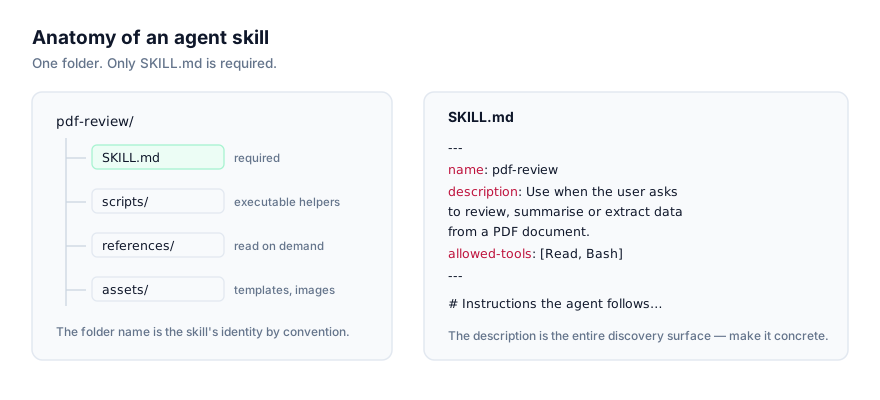
Testing an agent skill properly means checking both, separately: whether Claude invokes it on the prompts it should (and doesn't on prompts it shouldn't), and whether the output matches what you expect on the occasions it does fire. This guide covers the manual version of that check, which works on any agent reading the SKILL.md standard, and Claude Code's automated version, which turns the same idea into a repeatable loop with evidence attached.
Step 1: write realistic test prompts, not idealised ones
Before touching any tooling, collect a handful of prompts a real user would actually type, not the phrasing you'd use knowing exactly what the skill does. If your skill is meant to fire on "review this PR for security issues," test with that phrase and a couple of natural variants someone else might use, "check this diff for anything risky," "does this change introduce a vulnerability." Include at least one deliberate near-miss too, a prompt adjacent to the skill's purpose that shouldn't trigger it, to catch a description that's too broad rather than too narrow.
Step 2: the baseline comparison
This is the core technique behind every method below it, manual or automated: run the same prompt twice, once with the skill available and once with it disabled, in a fresh session both times, and compare the two outputs. The fresh session matters more than it sounds like it should. Leftover context from writing or editing the skill will quietly mask gaps in the instructions themselves, you already know what the skill is supposed to do, so an agent can lean on that shared context rather than on the skill body being clear enough to stand on its own.
To disable a skill for a fair comparison without touching its SKILL.md, Claude Code offers skillOverrides in settings, which controls visibility from outside the skill's own frontmatter. That matters specifically for skills checked into a shared project repo, where editing the file itself to test it would mean committing a temporary change:
{
  "skillOverrides": {
    "your-skill-name": "off"
  }
}
The /skills menu writes this for you too: highlight a skill, press Space to cycle its state, then Enter to save. Four states are available, "on" (fully listed and invocable), "name-only" (listed by name with no description, still invocable), "user-invocable-only" (hidden from Claude, still runnable by you directly), and "off" (hidden entirely, including from the / menu). For a baseline comparison you want "off": it removes the skill from Claude's context the same way an uninstalled skill would be absent, giving you a genuinely clean second run to compare against.
Step 3: check discovery, not just output
Run each test prompt and confirm two things separately, not just one:
- Did the skill actually load? Ask directly, "what skills are available?" or check for the skill's name appearing in context, rather than inferring activation from output quality alone. A capable agent can sometimes produce a plausible-looking answer from general capability without ever loading your skill, and that false positive hides a real discovery problem.
- Did the near-miss prompt correctly not trigger it? This is the check people skip. A description broad enough to catch every phrasing you want will often catch some you didn't intend, and the only way to find that is to deliberately test something adjacent and confirm the skill stays quiet.
If discovery fails in either direction, fix the description field first, not the body. This is the single most common mistake when debugging a skill that "doesn't work": people start rewriting workflow steps when the actual problem never got past the discovery stage. See how to write your own agent skill for what makes a description strong versus vague.
It's also worth checking whether the skill's description is being read at all. Claude Code loads a full listing of every installed skill's name and description into context at session start, but that listing has a character budget scaled to roughly 1% of the model's context window, and when it overflows, Claude Code drops full descriptions starting with the skills you invoke least, keeping only their names. A skill that tested fine in isolation can start missing activations once it's installed alongside dozens of others and its description gets shortened out of the listing. Running /doctor gives an estimate of the listing's context cost and names its biggest contributors, which is worth checking before assuming a regression is about your skill's wording rather than its position in a crowded listing.
Step 4: automate the loop with skill-creator
Doing the above by hand for every prompt, every time you edit a skill, doesn't scale past a handful of skills. Claude Code's skill-creator plugin automates the comparison loop directly inside a session. Install it from the official marketplace:
/plugin install skill-creator@claude-plugins-official
If the install fails, match the message: Marketplace "claude-plugins-official" not found means you need to add the marketplace first with /plugin marketplace add anthropics/claude-plugins-official, then retry. If the plugin itself isn't found, double-check the name. If the install summary reports Run /reload-plugins to activate., run that command so the plugin's skills become available in the current session.
Then ask Claude to run an evaluation, for example:
evaluate my summarize-changes skill with skill-creator
The plugin walks you through writing test cases and then runs the full loop on its own:
skill-directory/
├── SKILL.md
└── evals/
    ├── evals.json      # your test cases: prompts, input files, expected behavior
    ├── grading.json     # pass/fail per assertion, with evidence
    └── benchmark.json   # aggregated pass rate, time and tokens: with-skill vs without
What each stage actually does:
- Test cases: your prompts, any input files, and the expected behaviour get stored in
evals/evals.jsoninside the skill's own directory, so the test suite travels with the skill. - Isolated runs: each test case runs in its own subagent, giving it a genuinely clean context the way a fresh session does manually, and records token count and duration per run.
- Grading: each assertion in your test case gets checked against the actual output, with a pass or fail written to
grading.jsonalongside the evidence for that verdict, not just a bare score. - Benchmark: pass rate, time and token cost are aggregated for with-skill versus without-skill into
benchmark.json, so you can weigh the pass-rate improvement against the token and time overhead the skill actually adds, rather than assuming a skill is worth its cost by default. - Version comparison: run a blind A/B between two versions of the same skill before committing an edit, to confirm a change is actually an improvement rather than just different.
- Description tuning: the plugin generates should-trigger and should-not-trigger prompts on its own, measures the hit rate against them, and proposes description edits when a skill is firing on requests it shouldn't or missing ones it should catch.
- Review viewer: an HTML report opens where you can inspect every individual output and record qualitative feedback the next iteration reads back.
For the exact evals.json file format and the full iteration workflow in detail, Anthropic points to a dedicated page on agentskills.io; that page wasn't reachable to verify directly while researching this guide, so treat the field-by-field format as something to confirm against the plugin's own generated file the first time you run it, rather than something documented here.
What this catches that a quick manual test won't
The manual baseline comparison from Step 2 catches the big, obvious failures: a skill that never fires, or one that fires constantly. The automated loop catches the failures that only show up statistically, a skill that fires correctly nine times out of ten but silently regresses on a specific phrasing, or one whose token overhead is genuinely not worth the pass-rate improvement it buys. That second category matters more the longer a skill has been in production and the more people are relying on it firing consistently, which is exactly when a one-off manual test stops being enough.
Troubleshooting
The skill passes every eval but still doesn't fire for real users. Your test prompts don't match how people actually phrase the request. Go back and collect prompts from real usage, support questions, Slack messages, whatever the actual source of requests is, rather than prompts you wrote yourself while thinking about the skill.
Grading marks a correct-looking output as a fail. Check the assertion itself before assuming the skill is broken; an assertion phrased too strictly (exact string match where a paraphrase would be fine) produces false failures that look like a skill problem but are actually a test-writing problem.
Benchmark shows the skill barely beats the without-skill baseline. That's a legitimate reason not to ship it as-is. If a general-purpose agent produces nearly the same result without your skill loaded, the skill isn't adding enough to justify its token cost, and the fix is usually a sharper, more specific body rather than a longer one.
Version comparison keeps flip-flopping between two edits. This usually means your test set is too small or too narrow to distinguish them reliably. Add more realistic, varied prompts before trusting either version's win.
A skill that worked yesterday stopped triggering today, with no edits to it. Check whether a newly installed skill is competing for the same phrasing, or whether the description listing budget covered in Step 3 has quietly shortened this skill's entry as your total skill count grew. Re-running /doctor after installing anything new is a cheap habit that catches this before it becomes a confusing bug report from someone else.
Before you publish
Once evals pass and the baseline comparison confirms both discovery and output quality hold up, do one more read of the skill with a critical eye, the same posture as reviewing our security checklist on your own work: a clear licence, no unexplained scripts, and an allowed-tools list, if you set one, that actually matches what the skill needs and nothing more. This site links to skills on GitHub rather than re-hosting them precisely so anyone installing yours can read it first; testing it properly before you publish is the other half of that same habit.
Where to go next
For the full walkthrough of writing a skill from scratch, including the description field this guide assumes you already have right, see how to write your own agent skill. For what actually happens under the hood when a request is matched against an installed skill, see how AI agents discover and activate skills. For the full frontmatter reference, see the SKILL.md format explained. Browse published skills at getclaudeskills.com/skills.