

Same standard, one CLI and one IDE
Claude Code and Cursor both read SKILL.md: YAML frontmatter with name and description, optionally allowed-tools and model, followed by a markdown body. Agent Skills is an open standard Anthropic published in late 2025, and both tools implement it directly, alongside Codex CLI, Antigravity and others. What differs is the environment each one drops that folder into. Claude Code is a terminal-based agent with no editor of its own. Cursor is a full IDE built around Anysphere's Agent mode, with your file tree, open buffers, and editing context already loaded before a skill ever enters the picture. That structural difference shapes more of the comparison than the shared file format might suggest.
Claude Code: the reference implementation
Claude Code, from Anthropic, was the reference implementation of the Agent Skills standard. It reads personal-scope skills from ~/.claude/skills/ and project-scope skills from .claude/skills/. Because the standard was built around Claude Code first, the published ecosystem of skills is largest here, and there's no version gate to worry about: any current release of Claude Code reads skills the same way.
Activation is entirely automatic. Claude Code reads every installed skill's name and description at session start and matches your requests against those descriptions as you work. There's no separate mechanism for invoking a skill by name; a well-written description is the whole interface.
Cursor: skills inside the IDE
Cursor, from Anysphere, added Agent Skills support in version 2.4. That version threshold matters more here than it does for Claude Code: on an older release, skills simply don't appear, with no error pointing at the version as the cause, so it's worth checking Cursor > About before spending time debugging a folder that's probably fine. Cursor reads personal-scope skills from ~/.cursor/skills/ and project-scope skills from .cursor/skills/, following the same personal-versus-project split as Claude Code, just under a different directory name.
Discovery uses the same progressive disclosure mechanic: Cursor's Agent reads only name and description at session start, and loads the full body only once a request matches. What's distinctive is that Cursor's Agent already has your open project loaded, so a skill layers a specific, reusable procedure on top of context the IDE already holds, rather than needing to be told what files exist.
Side-by-side
| Claude Code | Cursor | |
|---|---|---|
| Vendor | Anthropic | Anysphere |
| Interface | Terminal CLI | IDE (desktop app) |
| Minimum version for skills | Any | 2.4 or later |
| Personal-scope path | ~/.claude/skills/ | ~/.cursor/skills/ |
| Project-scope path | .claude/skills/ | .cursor/skills/ |
| Activation | Automatic, by description matching | Automatic, by description matching |
| Explicit invocation | None; description is the whole interface | / opens a picker to run a specific skill directly |
| Ecosystem size | Largest, reference implementation | Growing, same underlying standard |
| Repo conventions file | CLAUDE.md | Cursor rules / AGENTS.md-style conventions |
| Install via CLI | npx skills add owner/repo/skill --agent claude-code | npx skills add owner/repo/skill --agent cursor |
Activation: description-only vs description-plus-picker
Both tools activate a skill automatically when a request matches its description. Where they diverge is the fallback. Claude Code has no equivalent to a manual picker: if a description doesn't match what you typed, the skill simply doesn't fire, and the fix is always to rewrite the description. Cursor offers a second path. Typing / in a chat brings up a picker where you can select and run a specific skill directly, independent of whether your phrasing would have matched its description on its own.
That difference is useful for debugging. In Cursor, if / finds and runs a skill correctly but ordinary phrasing never triggers it automatically, you've isolated the problem to the description, not the install, because the picker proves the skill itself works. Claude Code doesn't offer that same isolation step: a skill that never activates there could still be an install problem, since there's no separate invocation path to rule that out independently of the description.
Where skills live, worked
Say you maintain one pr-review skill and want it available globally in Claude Code but scoped to a single project in Cursor:
~/.claude/skills/
└── pr-review/
    └── SKILL.md

my-project/.cursor/skills/
└── pr-review/
    └── SKILL.md
The skills CLI handles the distinction with its --agent flag:
npx skills add owner/repo/pr-review --agent claude-code
cd my-project && npx skills add owner/repo/pr-review --agent cursor
Both commands pull from the same source and land the identical SKILL.md, just in each tool's own directory and scope.
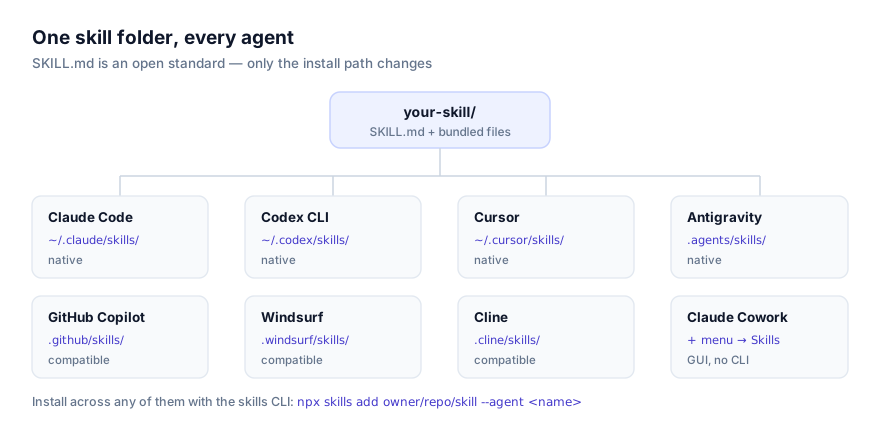
What doesn't change between them
The SKILL.md structure itself, frontmatter plus body, is identical whichever tool reads it. The optional scripts/, references/, and assets/ subfolders behave the same way in both: references/ loads on demand, scripts/ runs only when instructions call for it, assets/ holds templates the instructions point to. None of that is specific to either vendor. It's the shared standard, which is also why the same folder works unmodified in Codex CLI, Claude Cowork, Antigravity, and the rest of the ecosystem covered on the platforms page.
Portability: what to check before moving a skill
Because both read the identical standard, a skill's name, description, and body port over without edits in the overwhelming majority of cases. The one field worth a second look is allowed-tools. If a skill's frontmatter names a tool specific to how you've configured Claude Code (an MCP server, for instance), check that the equivalent tool name or configuration exists in Cursor before assuming it works unmodified there, and vice versa. Skills that avoid naming agent-specific tools port over with zero changes.
Updating, removing, and pinning a skill in each tool
Neither tool runs a central registry, so day-to-day maintenance is filesystem work in both, with the same two install routes determining how you update. If you installed with git clone, updating means cd-ing into the skill's folder inside ~/.claude/skills/, .claude/skills/, ~/.cursor/skills/, or .cursor/skills/ and running git pull. If you installed with the CLI, re-running the same npx skills add ... --agent claude-code or --agent cursor command overwrites the folder with the current version from the source repository. Removing a skill in either tool is a plain rm -rf on its folder, followed by starting a fresh session (Claude Code) or a fresh chat (Cursor) so the tool stops reading it.
Pinning works identically too, since it's really pinning a git dependency rather than anything skill-specific: git checkout <sha> inside the skill's folder locks it to a known-good version in either tool, the same way you'd pin any other vendored dependency. For a project-scoped skill committed to the repository, whether under .claude/skills/ or .cursor/skills/, an update becomes an ordinary diff, reviewable in a pull request in exactly the same way regardless of which of the two tools your team standardises on.
Sharing a skill with your team
Both tools make project-scoped sharing effectively free once someone commits the skill to the repository. A skill checked into .claude/skills/ reaches every teammate who clones the repo and opens it in Claude Code, no separate install step required on their end. Cursor works the same way through .cursor/skills/, with the one caveat that a teammate on a Cursor release older than 2.4 won't see it, silently, which is worth flagging to a team the first time someone rolls out a shared skill this way. Personal-scope sharing doesn't exist in either tool by design: ~/.claude/skills/ and ~/.cursor/skills/ are local to one machine, so a skill you want the whole team to have needs to live in the project-scoped directory, committed like any other file.
The same request, in both tools
Picture a pr-review skill installed in both, with a description reading "Use when reviewing a pull request for correctness, missing tests, exposed secrets, or unsafe migrations." Typing "review this PR for missing tests and exposed secrets" in Claude Code triggers it the same way it would in Cursor's chat: both tools already read the skill's name and description at session or chat start, match the phrasing against that description, and load the full body before responding. Neither requires anything beyond the request itself for a well-written description to catch.
The difference shows up when the phrasing doesn't land cleanly. In Cursor, you can fall back to /pr-review and select the skill from the picker directly, getting the same result without depending on the description matching your exact wording. Claude Code offers no equivalent fallback: if the phrasing doesn't match, the fix is rewriting the description, not finding an alternate way to invoke the skill by name. For a skill you expect to trigger reliably across a range of phrasings, that difference is worth designing the description around more carefully in Claude Code than it strictly needs to be in Cursor, precisely because Cursor gives you a manual escape hatch that Claude Code doesn't.
Read before you install, in either tool
Both tools will run a skill's bundled scripts when its instructions call for it. Neither hosts skills itself, and this site links to a skill's source on GitHub rather than a packaged download specifically so you can read SKILL.md and everything under scripts/ before either tool ever touches it. If you're not confident a skill is trustworthy yet, project scope is the safer default in both: .claude/skills/ or .cursor/skills/ limits the blast radius to one repository and gives a teammate a small, reviewable diff, rather than something invisible sitting in a personal home directory. See the security guide for more on what to check before trusting a skill you didn't write yourself.
Which should you use
This rarely needs to be an either-or decision; plenty of teams run both. A few things do tip it for a specific task:
- Want the largest existing library of published skills and pure CLI workflows, scriptable and scheduleable? Claude Code's reference-implementation status and terminal-first design fit that better.
- Want skills operating directly against an open IDE session, with your file tree and editor context already loaded, and a fallback picker when a description doesn't quite match? Cursor's
/picker and IDE integration are the differentiators. - Already standardised your team on one tool for other reasons? Skills themselves aren't the deciding factor here; the underlying format is shared either way, so a skill written for one ports to the other with minimal friction.
Because the underlying SKILL.md format doesn't change, switching a skill from one tool to the other later is a matter of moving a folder into the right directory, not rewriting it.
Troubleshooting: skills behaving differently between the two
A skill I installed in Cursor doesn't show up at all. Check your Cursor version first. Skills require 2.4 or later, and an older version gives no error, just silence. This is the single most common cause of "the folder is right there and nothing happens" in Cursor specifically.
A skill works in Claude Code but never activates in Cursor, or vice versa. Almost always a description problem, not a platform problem. In Cursor, confirm this by invoking the skill directly with /; if that works, the description needs rewriting, not the install. Claude Code has no equivalent explicit-invocation check, so there, go straight to tightening the description per how agents discover and activate skills.
allowed-tools breaks a skill in one tool but not the other. Check for a tool name specific to one agent's configuration, commonly an MCP server name that exists in one environment and not the other.
A skill added mid-session isn't showing up in either tool. Both read skill metadata at session or chat start. Start a new session or chat after adding or editing a skill; neither tool picks up a change to an already-running session.
The bigger picture
Because Claude Code and Cursor both implement the same open standard, choosing between them for skills specifically is rarely the deciding factor; the CLI-versus-IDE question usually matters more. A skill written without agent-specific assumptions works in both, and in every other agent reading the same format. Review a skill's SKILL.md and any bundled scripts before installing it in either tool, see the security guide, and check the platforms directory for the full list of agents that read SKILL.md.
Verified 23 August 2026 against Cursor's documented version requirement and directory structure and Claude Code's own skills documentation.