

Two different answers to "how does the agent know what I want"
Every AI assistant has to solve the same problem: how does it know your preferences, your team's conventions, or the specific way you want a recurring task done, without you re-explaining it every single time. Two mechanisms answer that question, and they get confused with each other more often than they should, because from the outside both just look like "instructions you gave the agent once."
Custom instructions are a standing, account-level (or per-chat, or per-project) setting: text you write once that gets folded into every conversation automatically. Agent Skills are folders of instructions that load conditionally, only when a specific request matches what they cover. The difference isn't cosmetic. It changes what each mechanism is good for, what it costs, and how much detail you can reasonably put in it.
What custom instructions are
Custom instructions exist across most major AI products in some form. On claude.ai, account-level instructions live under Settings, in a field asking what preferences Claude should consider in responses; Claude Projects, on Pro and Team plans, add a second layer, per-project instructions that apply to every conversation started inside that project, stacked on top of the account-level ones. ChatGPT has an equivalent: a personalization setting with two fields, one for information about you and your role, the other for how you want responses formatted, applied to every new conversation once turned on.
The shape is consistent across products: you write it once, it applies automatically and invisibly to everything that follows, and you don't have to invoke it. That's the entire value proposition, and it's also the entire cost. Because the text is folded into every single request, whether that request needs it or not, it has to stay short. Every product with a custom instructions field enforces some limit for exactly this reason, and even without a hard limit, a bloated custom instructions field taxes every reply with tokens spent restating preferences that only mattered for one kind of task.
What agent skills are
An agent skill is the opposite shape. A skill is a folder containing a SKILL.md file, YAML frontmatter with a name and description, followed by markdown instructions, and Claude reads only the name and description at session start. That's cheap enough that having a hundred installed skills costs barely anything if none of them apply to the current request. Only when a request matches a skill's description does the agent load the full body, a mechanic called progressive disclosure.
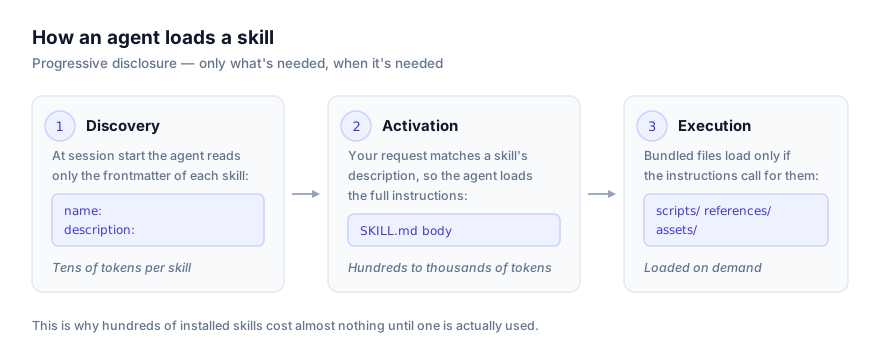
That mechanic is why a skill can be as long and as detailed as the procedure actually needs. A skill covering how your team writes a database migration, how a specific audit is run, or how a particular document gets formatted can run to hundreds of lines, because none of that cost is paid on requests that don't touch migrations, audits, or that document format. Anthropic published Agent Skills as an open standard in late 2025, and by 2026 the format is read by Claude Code, Claude Cowork, Claude Desktop, the Claude API, OpenAI Codex CLI, Cursor, Google Antigravity, GitHub Copilot, and several other agents, precisely because the same folder can be dropped into any of them and behave the same way.
Side by side
| Custom instructions | Agent Skills | |
|---|---|---|
| When it loads | Every message, automatically | Only when a request matches the skill's description |
| Context cost | Paid on every message, relevant or not | Near-zero at idle; full cost only when triggered |
| Practical length | Short, most products cap it in the low thousands of characters | As long as the procedure needs |
| Scope | Your account, or one chat, one project | Any specific, recurring task |
| Portable across agents | No, each product's field is separate and non-transferable | Yes, the same SKILL.md folder works across Claude Code, Codex CLI, Cursor, Antigravity, and others |
| What it holds | Standing preferences: tone, role, formatting, things true of nearly everything you ask | Procedures that matter sometimes: a specific multi-step task done a specific way |
| Set by | You, once, in a settings field | Anyone: written by hand, generated with Record a Skill, or installed from a repository |
A worked example
Say you're a technical writer who wants every reply to use British spelling and a direct, no-fluff tone, and separately you have a recurring task: converting a raw changelog into a formatted release note following your team's exact template.
The tone preference belongs in custom instructions, because it's true of essentially everything you ask, regardless of task:
What preferences should Claude consider in responses?

Use British spelling. Be direct and avoid hedging language.
Skip introductory summaries; start with substance.
The changelog-to-release-note conversion belongs in a skill instead, because it only applies to one specific, recognizable kind of request:
---
name: release-notes
description: Use when converting a raw changelog or list of merged PRs into a formatted release note for publication.
---

# Release Notes

1. Group entries by category: Features, Fixes, Breaking Changes.
2. Drop internal-only changes (marked [internal] in the source).
3. Rewrite each entry as a single sentence, present tense, no jargon.
4. Follow the template in references/template.md exactly, including the footer link.
Every reply you get, on any topic, respects the tone preference, because custom instructions apply unconditionally. But the eight-step release-note procedure, with its own reference template, only ever loads on the requests that are actually about release notes, and costs nothing on the days you're asking about something else entirely.
Why you can't just make custom instructions do both jobs
It's tempting to try cramming the release-note procedure into the same custom instructions field, since it's already there and already applies automatically. Two things go wrong when you do.
First, the character limit. Most custom instructions fields sit in the low thousands of characters; ChatGPT's, for instance, was tripled from 1,500 to 5,000 characters in mid-2026, and even that expanded limit is thin for a genuinely detailed, multi-step procedure with its own reference material.
Second, and more expensive over time, every token you spend on that procedure gets paid again on every unrelated message. A tone preference costs almost nothing to restate on every reply. An eight-step procedure with a linked template does not, and if you have several such procedures, each for a different recurring task, custom instructions become the bloated, catch-all file that the always-loaded vs conditionally-loaded tradeoff warns against, just at the account level instead of the project level.
Why you can't just make skills do both jobs either
The reverse mistake is putting your tone and formatting preferences into a skill instead of custom instructions, reasoning that skills are the more powerful mechanism. This backfires differently: a skill only loads when a request matches its description, so a preference that should apply to literally everything you ask risks silently not applying on requests that don't happen to trigger that skill. "Always use British spelling" needs to be unconditional, and only a mechanism that loads on every message can guarantee that.
Decision criteria
Ask one question: is this true of nearly everything I ask, or only some specific, recognizable kind of task?
- True of nearly everything → custom instructions. Tone, role, formatting defaults, language preferences.
- Only true for a specific, recurring task → a skill. Give it a description that names the concrete situation where it applies.
- A project-specific version of "true of nearly everything" → project instructions in Claude Projects, or CLAUDE.md and AGENTS.md in coding agents, which apply the same always-loaded logic at project rather than account scope.
Troubleshooting
A preference I set in custom instructions isn't showing up. Check that it's actually saved in the right scope. Claude layers account-level instructions, per-chat styles, and per-project instructions, and a project-level setting only applies inside that project, not account-wide.
A skill I wrote for a specific task never triggers. This is almost always the description, not the body. See how agents discover and activate skills for what a triggering description actually looks like; a vague description is the single most common reason a skill silently never fires.
Custom instructions and a skill seem to disagree. Most agents give system or operator-level instructions priority over what a skill's body suggests, but the cleanest fix is to not let them overlap in the first place. Keep standing preferences in custom instructions and task-specific procedure in skills, and check whether the skill is duplicating something already stated at the account level.
My custom instructions field is too full to add anything else. That's the signal to stop treating it as a place for procedures. Anything longer than a preference or a role description is a candidate to become a skill instead, one that loads only when actually needed rather than eating into a shrinking character budget on every message.
Where to go next
For the mechanics of exactly when a skill's description gets matched, see how agents discover and activate skills. For the project-scoped version of this same always-loaded-vs-conditional tradeoff, see Agent Skills vs AGENTS.md. To browse what other people have already written as reusable skills, see getclaudeskills.com/skills, filtered by category if you know what you're after.