

What makes a good security skill
A security skill is asking for more trust than most others on this site, because doing its job well often means reading broadly across a codebase, and sometimes running scripts that touch dependencies, CI configuration, or secrets directly. The good ones earn that trust by being specific about what they check and transparent about how they check it (naming the exact vulnerability classes, the exact file types, the exact standard they're auditing against) rather than making a vague claim to "find security issues."
That specificity also makes a skill's output verifiable. "Scans for SQL injection, XSS, command injection, exposed API keys, hardcoded secrets, insecure dependencies, and access control issues" tells you exactly what a clean report does and doesn't mean. "Improves your security posture" tells you nothing you can check.
A security skill deserves extra scrutiny before you install it, especially if it bundles scripts
This is worth stating plainly rather than in passing: a security skill that ships and runs its own scripts is asking to execute code with your permissions, in service of examining code that may include credentials, infrastructure configuration, and access-control logic. That's a legitimate and common pattern. Several skills below need Node.js or shell access to do real work, like running CodeQL or querying GitHub's secret-scanning API, but it means the bar for reading the script before you trust it should be higher here than for, say, a frontend animation skill, not lower just because the skill's stated purpose is security.
Read our full pre-install checklist before adding any skill from this list to a real project. The short version: open scripts/ if the skill has one, check what it actually does with any data it touches, and don't assume a skill is safe because its description sounds defensive rather than offensive.
How this list is ordered
Broadest, most codebase-agnostic checks first. Security Review, Secret Scanning, CodeQL Code Scanning and GitHub Actions Hardening lead because they apply to essentially any GitHub-hosted project regardless of language or architecture. Threat Model Analyst follows as a broadly applicable but more structural check. From there the list moves into skills scoped to the AI-agent ecosystem specifically (MCP configuration auditing, agent supply-chain integrity, pre-execution action review) which matter increasingly as more of a codebase's automation runs through agents, but which assume that context exists. The list closes with two narrower, specialized tools: a compliance-focused breach-impact estimator, and a generator for one specific threat-modeling file format.
| Skill | Best for | Requires |
|---|---|---|
| Security Review | Scanning a codebase for concrete vulnerabilities | Nothing extra |
| Secret Scanning | Configuring GitHub secret scanning and push protection | Shell |
| CodeQL Code Scanning | Setting up CodeQL via GitHub Actions or CLI | Shell |
| GitHub Actions Hardening | Reviewing CI workflows for injection and token risks | Node.js |
| Threat Model Analyst | Architecture-level STRIDE-A threat modeling | Nothing extra |
| MCP Security Audit | Auditing .mcp.json for secrets and shell injection | Node.js |
| Agent Supply Chain Integrity | Verifying agent plugins haven't been tampered with | Nothing extra |
| Verify Agent Action | Pre-execution review of a consequential agent action | Nothing extra |
| Data Breach Blast Radius Analyzer | Estimating regulatory impact of a potential breach | Nothing extra |
| Microsoft Threat Modeling Tool Generator | Generating .tm7 files for Microsoft's threat modeling tool | Nothing extra |
The ten skills
Security Review
From GitHub's awesome-copilot collection (38,000 stars), this scans a codebase the way a human security researcher would (tracing data flows and understanding component interactions rather than pattern-matching in isolation) to catch SQL injection, XSS, command injection, exposed API keys, hardcoded secrets, insecure dependencies, and access-control issues.
Who it's for: teams that want a codebase-wide security pass beyond what a pattern-matching linter catches. No bundled-script requirement. It reasons over code the agent already has access to. Caveat, direct from the skill: not built for quick scans, or for environments that need automated fixes applied without human oversight. MIT licensed.
Secret Scanning
Also from awesome-copilot, this covers configuring and managing GitHub's secret scanning: push protection, custom patterns, and alert remediation. For pre-commit secret scanning inside AI coding agents via the GitHub MCP Server, it points to the Advanced Security plugin (advanced-security@copilot-plugins) rather than reimplementing that itself.
Who it's for: any team that wants leaked credentials caught before or immediately after a push, configured correctly the first time. Requires shell access to run through GitHub's scanning setup. Caveat: not worth setting up for a project that genuinely handles no sensitive information. MIT licensed.
CodeQL Code Scanning
An awesome-copilot skill covering CodeQL setup end to end, GitHub Actions workflow configuration, the CodeQL CLI, language matrices, default versus advanced setup, and SARIF output interpretation.
Who it's for: teams setting up or troubleshooting CodeQL scanning who want the workflow file and configuration handled correctly rather than copy-pasted from an outdated example. Requires shell access to run CLI commands. Caveat: not built for advanced custom query development or integrations outside what's documented. MIT licensed.
GitHub Actions Hardening
Also from awesome-copilot, this reasons specifically about the Actions threat model that general linters miss: untrusted-input script injection, privileged triggers running fork code, mutable action references, and over-scoped tokens.
Who it's for: any team with GitHub Actions workflows that accept external contributions or run privileged operations, which is most projects with public repos or CI secrets. Requires Node.js for its analysis tooling. Caveat: the skill itself says it may not be necessary for simple workflows with no external input or sensitive operations, where the risk it's built to catch barely exists. MIT licensed.
Threat Model Analyst
An awesome-copilot skill running full STRIDE-A threat model analysis in two modes: a single full analysis producing architecture overviews, data-flow diagrams, prioritized findings and executive assessments, or an incremental update that compares a codebase against a previous baseline report and tracks what's new, resolved, or still open.
Who it's for: teams doing structured architecture-level security review, either as an initial assessment or a periodic re-check as the system evolves. No bundled-script requirement. Caveat: it's built for structured analysis, not real-time threat detection. It won't help with an environment that needs immediate live monitoring. MIT licensed.
MCP Security Audit
Also from awesome-copilot, this audits .mcp.json files specifically: hardcoded secrets or shell-injection patterns in server args, whether MCP servers use pinned versions rather than @latest, unpinned dependencies, and whether registered servers are on an approved list.
Who it's for: any team that's onboarded MCP servers into a project and wants their configuration checked against known risk patterns before trusting them. Requires Node.js to parse and check configurations. Caveat: only relevant if you're actually using MCP. It has nothing to check in a project that isn't. MIT licensed.
Agent Supply Chain Integrity
An awesome-copilot skill addressing a risk that's genuinely underserved: AI agent plugins and tools carry supply-chain risk similar to npm packages or container images, but without the equivalent provenance tooling. This generates SHA-256 integrity manifests for plugin directories, verifies installed plugins match their published manifests, detects tampered or untracked files, audits dependency pinning, and builds provenance chains for plugin promotion across environments.
Who it's for: teams promoting agent plugins through dev, staging and production who want a verifiable integrity check at each stage. No bundled-script requirement beyond hashing files the agent can already read. Caveat: the skill says it may be unnecessary for small projects or environments where supply-chain integrity genuinely isn't a concern. MIT licensed.
Verify Agent Action
Also from awesome-copilot, marked advanced complexity, this reviews a proposed AI-agent action (a consequential tool call, command, deployment, message, purchase, credential operation, or data mutation) before it executes, checking whether an approval actually matches the exact action, and auditing evidence for forged results, parameter swaps, replay, correlated reviewers, missing evidence, expiry, or stale monitoring. It produces an evidence-based review only; it never executes or authorizes anything itself.
Who it's for: teams running agents with real permission to take consequential actions, who want a structured pre-execution gate rather than trusting an agent's own judgment on when something is safe to run. No bundled-script requirement. Caveat: not suitable where immediate execution without a review step is genuinely required. It's built to add friction on purpose. MIT licensed.
Data Breach Blast Radius Analyzer
An awesome-copilot skill for pre-breach impact analysis: it inventories sensitive data (PII, PHI, PCI-DSS, credentials), traces data flows, scores exposure vectors, and produces a regulatory blast-radius report with fine ranges sourced from GDPR Article 83, CCPA §1798.155(a), and HIPAA 45 CFR §160.404, plus cost benchmarks from an annually updated industry breach-cost report. All citations are kept in a references/SOURCES.md file for verification.
Who it's for: teams preparing for a security review or data-processing impact assessment who want a first-pass estimate of regulatory exposure. No bundled-script requirement. Caveat, stated directly by the skill: it is not a substitute for legal counsel or a formal risk assessment. Treat it as a preliminary analysis tool only. MIT licensed.
Microsoft Threat Modeling Tool Generator
The narrowest entry here: generates valid .tm7 files compatible with Microsoft Threat Modeling Tool v7.3 and above, adhering strictly to the WCF DataContractSerializer format the tool expects, so a STRIDE threat model produced elsewhere opens cleanly without manual reformatting.
Who it's for: teams standardized on Microsoft's Threat Modeling Tool specifically who need .tm7 output rather than a general report. No bundled-script requirement. Caveat: no use outside that specific tool and format, and it assumes familiarity with threat modeling concepts generally. MIT licensed.
How to install these skills
The installation mechanics are the same as any other skill, via the skills CLI:
npx skills add github/awesome-copilot/security-review --agent claude-code
npx skills add github/awesome-copilot/secret-scanning --agent claude-code
Swap in the exact install coordinate from each skill's page at getclaudeskills.com/skills. Security skills generally belong at project scope rather than personal, Secret Scanning, GitHub Actions Hardening and MCP Security Audit all encode standards the whole team should apply the same way, so committing the skill folder into the repo is usually the right call, with the folder itself reviewed the same as any other addition to the codebase.
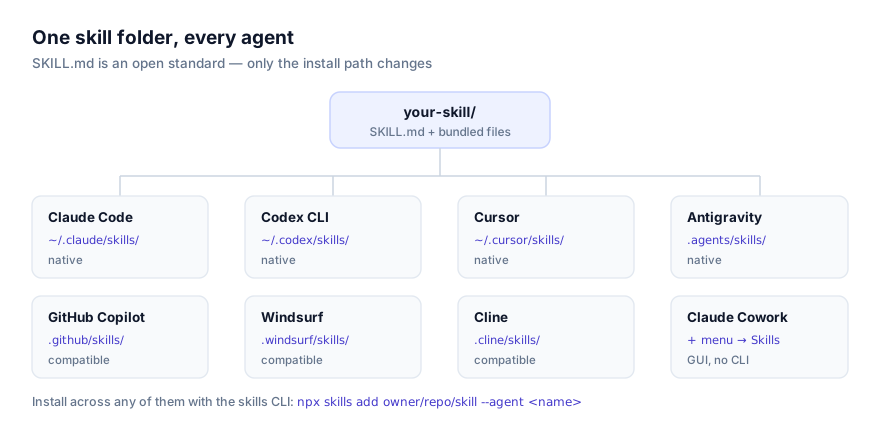
For the mechanics of scope and manual installation without the CLI, see how to install skills in Claude Code and how to install skills in Codex CLI. And before installing any of the four skills here that bundle scripts (GitHub Actions Hardening, MCP Security Audit, CodeQL Code Scanning, and Secret Scanning) read them first. The security guide walks through exactly what to look for.
Combining security skills into one review process
These skills map naturally onto different points in a project's lifecycle rather than competing for the same moment: Threat Model Analyst at the design or architecture-review stage, GitHub Actions Hardening and MCP Security Audit as ongoing configuration checks, Security Review and CodeQL Code Scanning as recurring codebase passes, and Verify Agent Action as a standing gate in front of any agent with consequential permissions. Running several at once rarely causes conflict, since each is scoped to a distinct artifact (workflow files, .mcp.json, source code, a proposed action) rather than overlapping territory.
The one thing to be deliberate about is trust boundaries. Agent Supply Chain Integrity and Verify Agent Action both exist specifically because an agent's own actions and dependencies are now part of the attack surface, not just the code it's reviewing. If you're running agents with meaningful permissions in a production-adjacent environment, treating those two as standing infrastructure rather than occasional checks is the more defensible default.
Why isn't my skill activating?
The most common cause is a missing dependency. GitHub Actions Hardening and MCP Security Audit need Node.js; CodeQL Code Scanning and Secret Scanning need shell access to drive the underlying CLI or API. If a security skill's instructions load but nothing actually runs, confirm your agent session has the runtime it needs before assuming the skill is broken.
A second cause is scope mismatch: MCP Security Audit will not fire usefully in a project with no .mcp.json file, and GitHub Actions Hardening has nothing to check in a repo with no .github/workflows/. These skills are correctly narrow, not broken, when there's nothing matching for them to examine.
A third, worth naming for this category specifically: don't mistake a clean report from any of these skills for a guarantee. Security Review and CodeQL Code Scanning catch known, well-understood issue classes reliably. They are not exhaustive, and a passing result is evidence, not proof, of a secure codebase.
Where to go next
Read the security guide in full before installing any skill from this list on a real project. It covers the pre-install checklist this article only summarizes. The rest of the security category, including the two skills not covered here, is at getclaudeskills.com/categories/security. Adjacent categories worth checking: the best code review skills and the best DevOps skills, since CI hardening and deployment safety overlap heavily with application security. Browse everything at getclaudeskills.com/skills.