

What makes a good DevOps skill
DevOps work is command-heavy and consequence-heavy at the same time. A single az acr invocation or Bicep deployment can touch production infrastructure, so the value of a skill here is less about creativity and more about getting a genuinely correct, complete sequence of steps every time. The strongest skills in this category wrap a specific CLI or platform precisely enough that an agent using them makes the same calls a competent engineer would, in the same order, checking the same things first.
That's also where the risk concentrates. A DevOps skill that runs shell commands with real credentials deserves the same scrutiny you'd give a new CI pipeline step before merging it. Read what it actually does, not just what its description claims. Every skill on this list needs shell access at minimum to be useful; a few also touch Node.js or Python for supporting scripts.
How this list is ordered
Framework-agnostic and widely applicable first, platform-specific second. Turborepo and Vercel CLI lead because monorepo builds and deployment CLIs are close to universal DevOps concerns, not tied to one cloud vendor. Dependabot Configuration, GitHub Codespaces Efficiency and Publish to Pages follow, all three apply to any team on GitHub, regardless of cloud provider. The back half of the list is Azure-specific, reflecting where the current skill registry has the deepest DevOps coverage; if you're not on Azure, the first five entries cover the ground you actually need. Within each tier, stars and repo activity broke ties, but scope match came first.
| Skill | Best for | Requires |
|---|---|---|
| Turborepo | JS/TS monorepo build caching and task pipelines | Shell |
| Vercel CLI | Deploying and managing Vercel projects | Shell |
| Dependabot Configuration | Automated dependency updates on GitHub | Shell |
| GitHub Codespaces Efficiency | Faster, cheaper Codespaces dev environments | Shell |
| Publish to Pages | Deploying presentations/HTML to GitHub Pages | Python, shell |
| Azure Developer CLI | Managing azd projects end to end | Nothing extra |
| Azure Deployment Preflight | Validating Bicep deployments before they run | Shell |
| Azure Container Registry CLI | Managing container images and builds in ACR | Shell |
| Aspire | Orchestrating polyglot distributed apps | Shell |
| Azure Pipelines Validation | Iterating on Azure DevOps pipeline YAML locally | Node.js, shell |
The ten skills
Turborepo
Maintained by Vercel in the vercel/turborepo repository (31,000 stars), this covers the whole surface of turbo.json configuration: task pipelines, dependsOn, caching, remote cache, --filter, --affected, CI optimization, environment variables, and internal package structure. It's written to trigger on the actual signals of monorepo work, an apps/packages directory structure, a request to set up shared code between apps, a cache that needs debugging.
Who it's for: any team running a JS/TS monorepo who wants task pipelines and caching configured correctly the first time. Requires shell access to run turbo commands. Caveat, direct from the skill: skip it for small projects or single-package applications, where a monorepo's overhead isn't worth taking on. MIT licensed.
Vercel CLI
From Vercel's main vercel/vercel repository (16,000 stars), this is a broad wrapper around the vercel/vc command, deployments, project and team management, environment variables, domains and DNS, logs, metrics, Speed Insights, cron jobs, deploy hooks, Blob storage, and more.
Who it's for: teams deploying on Vercel who want an agent that can troubleshoot a failed build or inspect deployment metrics directly from the terminal instead of the dashboard. Requires shell access. Caveat: irrelevant if you're not on Vercel, or if you'd rather manage deployments through the GUI. Apache-2.0 licensed.
Dependabot Configuration
An awesome-copilot skill (38,000 stars) covering the full range of dependabot.yml configuration: update strategies, grouped updates, monorepo patterns, multi-ecosystem groups, security update settings, auto-triage rules, and GitHub Advanced Security's broader supply-chain security surface.
Who it's for: any GitHub-hosted project that wants dependency updates automated correctly rather than hand-rolled. Requires shell access. Caveat: not useful for projects off GitHub, or teams that deliberately prefer manual dependency management. MIT licensed.
GitHub Codespaces Efficiency
Also from awesome-copilot, this audits an existing Codespaces setup and recommends concrete fixes for startup time, cost, devcontainer bloat, machine sizing, idle timeout, and prebuild scoping. It starts from a baseline reference file and works from there rather than guessing.
Who it's for: teams already on GitHub Codespaces who suspect their setup is slower or pricier than it needs to be. Requires shell access. Caveat: only relevant if you're actually using Codespaces. It has nothing to offer teams on a different dev-environment setup. MIT licensed.
Publish to Pages
An awesome-copilot skill that converts PPTX, PDF, HTML, or Google Slides content into a live GitHub Pages URL, handling repo creation, file conversion, Pages enablement, and returning the final link, in one pass.
Who it's for: anyone who needs to get a presentation or static HTML content onto a public URL quickly, without manually wiring up Pages. Requires Python and shell access for file conversion. Caveat: it only supports the file types it's built for, and offers no path to custom repository configuration beyond what it automates. MIT licensed.
Azure Developer CLI
An awesome-copilot reference skill covering azd end to end: azure.yaml, AZD templates, Bicep or Terraform under infra, environments and secrets, hooks, deployment workflows, and azd-managed CI/CD, all against current Microsoft guidance.
Who it's for: teams designing, reviewing, or troubleshooting Azure Developer CLI projects. No bundled-script requirement beyond having azd itself installed and working. Caveat: not useful outside Azure, or for projects that don't use infrastructure-as-code practices. MIT licensed.
Azure Deployment Preflight
Also from awesome-copilot, this runs a validation pass on Bicep deployments before they execute: template syntax checks, a what-if analysis to preview actual changes, and a permission check, so problems surface before a deployment runs rather than mid-way through it.
Who it's for: anyone deploying to Azure via Bicep who wants a pre-flight check as standard practice, not an afterthought. Requires shell access to run the Azure CLI. Caveat: it assumes Bicep and the Azure CLI specifically, and isn't built for teams that need real-time deployment without a validation step first. MIT licensed.
Azure Container Registry CLI
An awesome-copilot skill wrapping the az acr command group: registries, images, cloud builds, ACR Tasks, authentication, tokens, geo-replication, and networking.
Who it's for: teams managing container images in Azure Container Registry who want registry and image operations handled correctly from the terminal. Requires shell access. Caveat: not useful outside Azure, or for anyone who'd rather manage ACR through a graphical interface. MIT licensed.
Aspire
An awesome-copilot skill covering the Aspire CLI, AppHost orchestration, service discovery, integrations, the Aspire MCP server, the VS Code extension, Dev Containers, GitHub Codespaces support, templates, the dashboard, and deployment, for polyglot distributed applications spanning C#, Python, JavaScript/TypeScript, Go, Java, Rust and more from a single AppHost project.
Who it's for: teams building observable, production-ready distributed applications across more than one language who want a single orchestration layer. Requires shell access. Caveat, stated directly: not suited to simple applications that don't need distributed architecture, or teams working in a single language. MIT licensed.
Azure Pipelines Validation
From microsoft/vscode (189,000 stars), this validates Azure DevOps pipeline YAML changes for the VS Code build specifically, queueing builds, checking status, viewing logs, and iterating on pipeline changes without waiting for a full CI run each time.
Who it's for: contributors modifying VS Code's own Azure DevOps pipeline configuration. Requires the Azure CLI plus its DevOps extension, and Node.js and shell access to run. Caveat: scoped tightly to VS Code's pipeline setup, useful as a pattern to adapt, but narrower than the other Azure skills on this list. MIT licensed.
How to install these skills
Every skill here installs as a SKILL.md folder, and the skills CLI is the fastest path:
npx skills add vercel/turborepo/turborepo --agent claude-code
npx skills add github/awesome-copilot/dependabot --agent claude-code
Swap in any skill's exact install coordinate, listed on its individual page at getclaudeskills.com/skills. DevOps skills are usually a project-scope decision rather than a personal one: Turborepo, Dependabot Configuration and the Azure infrastructure skills all encode conventions the whole team needs consistently, so committing the skill folder into the repo alongside turbo.json or azure.yaml is the right default.
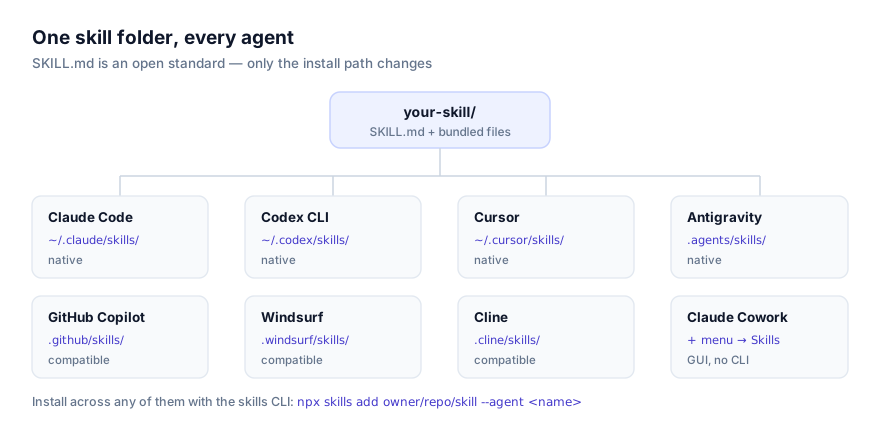
For the mechanics of personal versus project scope and manual installation, see how to install skills in Claude Code and how to install skills in GitHub Copilot, relevant here since several of these skills come from GitHub's own awesome-copilot collection and were originally written with Copilot's agent mode in mind, though the format is portable.
Combining DevOps skills across a pipeline
These skills stack cleanly along a pipeline's natural stages: Turborepo for build and cache configuration, Azure Deployment Preflight right before a deployment runs, Dependabot Configuration for ongoing dependency hygiene. None of them overlap in trigger conditions, since each is scoped to a distinct tool or stage. The one place to be deliberate is credentials. Several of these skills run CLI commands that assume az login, vercel login, or an equivalent has already happened in the environment. An agent following the skill's instructions correctly will still fail at the authentication step if that hasn't been set up, which can look like a broken skill when it's actually a missing prerequisite.
If your team runs a genuinely multi-cloud setup, install only the Azure skills that match services you actually use, five Azure-specific skills sitting in a project that's 90% AWS just adds noise to what an agent has to consider, even though the context cost of an unused skill's description is small.
Why isn't my skill activating?
The most common cause here is a missing or unauthenticated CLI. All ten of these skills wrap an external tool (turbo, vercel, az, azd) and none of them install that tool for you. If a skill's instructions load but every command inside them fails, check whether the underlying CLI is installed and logged in before assuming the skill itself is broken.
A second cause is running in an agent session without shell access. Every skill on this list needs it; none of them are pure-instruction skills the way some frontend or reference skills are. If you're testing one of these in a restricted or read-only agent context, it won't get past its first real step.
A third, specific to Publish to Pages and Azure Pipelines Validation: both need Python or Node.js respectively for supporting scripts, on top of shell access. Confirm both are available in the environment before troubleshooting further.
Where to go next
Browse the rest of the category at getclaudeskills.com/categories/development/devops, or the full catalog at getclaudeskills.com/skills. For adjacent categories, see the best debugging and testing skills and the best security skills. Infrastructure work and security review overlap more than the category boundaries suggest. If your pipeline runs on a tool not covered here, how to write your own agent skill is a reasonable next step; a DevOps skill scoped to one CLI is usually a short, high-leverage SKILL.md to write.