

What makes a good productivity skill
Productivity skills are the ones most likely to touch your actual working week, which makes two things matter more here than almost anywhere else in the ecosystem: does the skill name the specific tool it operates on, and does it ask for your approval before it does anything that affects other people, sending an email, updating a CRM record, posting to social media. A skill that says "manages your tasks" is vague enough to mean almost anything. A skill that says "creates a browser canvas task board with focus mode and gentle, non-shaming overdue handling" tells you exactly what you're getting and exactly how to judge whether it fits how you work.
The second thing worth checking, especially if your team is largely non-technical: whether a skill assumes a terminal or works from a plain chat interface. Most of the skills below need nothing more than an agent that can hold a conversation, no code, no configuration files. A few need shell access because they drive a browser or run a script, but that's a property of the agent's environment, not something you personally have to set up. Our guide to agent skills for non-technical teams covers how to judge any skill without reading its code line by line.
This is a curated selection based on quality, popularity and maintenance activity, not a benchmarked or independently tested ranking. Every fact below (stars, licence, requirements) comes straight from each skill's own listing page.
The best productivity skills for AI agents
Ordered from most broadly useful (things almost anyone benefits from) to more situational tools that assume a specific setup.
Daily Focus Board
A personal, motivating daily task board that renders in a browser canvas and is driven entirely by talking to your AI partner. Tasks move through to-do, in progress and done, with timestamped notes rolling into a "today's momentum" feed, and numeric-goal tasks (pages written, pomodoros done, reps completed) render as progress bars. It's explicitly designed to be executive-function and neurodivergent-friendly: a Focus mode, kind "not today" carryover instead of overdue-shaming, a brain-dump box, and reduced-motion support.
Who it's for: anyone who wants a more dynamic, conversational alternative to a static to-do list, no external tool required. Caveat: its own guidance says it may not suit people who prefer a traditional list, or who need a more complex project management system than a single-user focus board provides. No special requirements listed, so it runs anywhere. From github/awesome-copilot, 38,000 stars, MIT licensed.
Agent-Browser Core
The foundational guide for controlling a browser through the command line via Chrome DevTools Protocol, navigating pages, clicking and filling forms, extracting data, taking screenshots, managing multiple tabs and parallel sessions, without depending on Playwright or Puppeteer.
Who it's for: anyone whose work involves repetitive interaction with websites that don't have a proper API, filling forms, pulling data, checking something on a schedule. Caveat: its own guidance says it's not built for tasks needing extensive custom browser behaviour or integration with non-web applications. Requires shell access. From vercel-labs/agent-browser, 40,000 stars, Apache-2.0 licensed. Read this one before Slack Automation below. It's the shared foundation.
Slack Automation
Interacts with Slack through browser automation: checking unread channels, sending messages, extracting data, searching conversations, anything you'd normally do by clicking around Slack yourself.
Who it's for: anyone drowning in Slack channels who wants a faster way to triage or search than doing it manually. Caveat: its own guidance says it's limited to what's reachable through the browser interface. It's not a fit if you need Slack's API directly or cross-workspace automation. Requires shell access. Same repository, vercel-labs/agent-browser, 40,000 stars, Apache-2.0.
CRM Maintenance
Keeps HubSpot current without you opening it: creates and updates contacts and deals using context pulled from recent email and calendar activity, logs notes and calls, and flags stale records, the "stop doing data entry" skill.
Who it's for: anyone in sales or account management who spends real time on CRM upkeep that could be inferred from context they already have elsewhere. Caveat: its own guidance is explicit that it's not built for deleting records or making changes without your approval. It updates and flags, it doesn't act unilaterally. No special requirements listed. From anthropics/knowledge-work-plugins, 23,000 stars, Apache-2.0.
Invoice Chase
Drafts overdue-invoice reminder emails from QuickBooks and PayPal data, matching tone to each customer's payment history, gentle for reliable customers, firm for repeat late payers. Sends via PayPal only with owner approval; anything outside PayPal queues as a mail draft rather than sending automatically.
Who it's for: small business owners chasing accounts receivable who want the drafting done, not necessarily the sending. Caveat: its own guidance says it's not a fit if you don't use QuickBooks or PayPal, or if you need more complex invoicing features than that integration covers. No special requirements listed. From anthropics/knowledge-work-plugins, 23,000 stars, Apache-2.0.
Roundup Setup
An interactive onboarding flow that learns your communication style, audiences and data sources by asking a few questions and reading examples of updates you've already written, then configures a personalised status-briefing skill calibrated to your workflow.
Who it's for: anyone who regularly writes status updates and is tired of starting from a blank page every time. Caveat: its own guidance says it's not suited to people who don't write status updates regularly, or who prefer a fully manual approach to communication. No special requirements listed. From github/awesome-copilot, 38,000 stars, MIT.
Canva Creator
Takes an approved content brief and executes a campaign end to end: builds the posting calendar, generates Canva designs for social posts (Instagram, Facebook, X, LinkedIn), drafts caption and email copy, and stages social sends in HubSpot. Every step requires your explicit approval before moving to the next.
Who it's for: small marketing teams turning an already-approved brief into finished, scheduled output without doing each step by hand. Caveat: its own guidance says it's not suited to campaigns needing extensive email design work, since Canva is used for social posts only. Email content comes back as plain text for you to send from your own tool. No special requirements listed. From anthropics/knowledge-work-plugins, 23,000 stars, Apache-2.0.
Zoom MCP
Guidance for using Zoom's bundled MCP connectors to search meetings semantically, retrieve meeting-linked assets, and access cloud recordings and transcripts, routing Zoom Docs requests and Whiteboard requests to their own dedicated servers.
Who it's for: anyone who regularly needs to find or pull content out of past Zoom meetings without manually digging through the Zoom app. Caveat: its own guidance says it's not for creating, updating or deleting meetings. That's handled by Zoom's REST API, not this skill. Requires shell access. From anthropics/knowledge-work-plugins, 23,000 stars, Apache-2.0.
Impediment Prioritization
Ranks any list of impediments and countermeasures (audit findings, retrospective action items, risk register entries, architecture review gaps) using a value-stream scoring model (ROI, cost to implement, ease of deployment, risk factor) and a fixed prioritisation formula.
Who it's for: operations and process-improvement teams that need to triage a backlog of issues objectively rather than by whoever complains loudest. Caveat: its own guidance says it's not built for situations needing subjective judgement, or for non-quantifiable impediments without clear countermeasures attached. No special requirements listed. From github/awesome-copilot, 38,000 stars, MIT.
Setup My IQ
Creates and updates a structured personal context portfolio (markdown files describing who you are, how you work, your team, and your tool configuration) through an interview workflow for first-time setup and targeted edits for updates.
Who it's for: anyone setting up a new agent relationship and wanting it to have persistent context about their role and preferences from the start, rather than re-explaining every session. Caveat: its own guidance says it's not for retrieving read-only information from your existing context files, for querying, not setting up, look elsewhere. No special requirements listed. From github/awesome-copilot, 38,000 stars, MIT. Included here as a meta-skill worth running before the others: several of the workflow-heavy skills above work better once an agent already has this kind of context to draw on.
Common failure modes with productivity skills
- A skill that assumes a tool you don't use. CRM Maintenance assumes HubSpot; Invoice Chase assumes QuickBooks and PayPal; Canva Creator assumes Canva and HubSpot. If your stack is different, these particular skills have nothing to connect to. Check the assumed tool before installing.
- Browser-automation skills failing on login or two-factor prompts. Agent-Browser Core and Slack Automation drive a real browser session; anything that needs manual authentication mid-flow (a 2FA code, a CAPTCHA) will interrupt the automation and needs a human to clear it.
- A skill never activates. Usually a description mismatch, try phrasing your request closer to the trigger language on the skill's own listing page rather than a vague version of the task.
- Assuming approval gates exist when they don't. CRM Maintenance and Invoice Chase are both explicit about requiring approval for sensitive actions, but that's a property of those two skills specifically, not a guarantee across every productivity skill. Read the
whenNotToUseguidance on any skill before trusting it with something consequential.
How to install these skills
Every skill above installs the same way. For Daily Focus Board:
npx skills add github/awesome-copilot/daily-focus-board
Add --agent claude-code to target Claude Code specifically, or drop the folder manually into your agent's skills directory. The full walkthroughs for installing skills in Claude Code and installing skills in Codex CLI cover both the CLI method and manual installs, including where personal versus project-scoped locations differ:
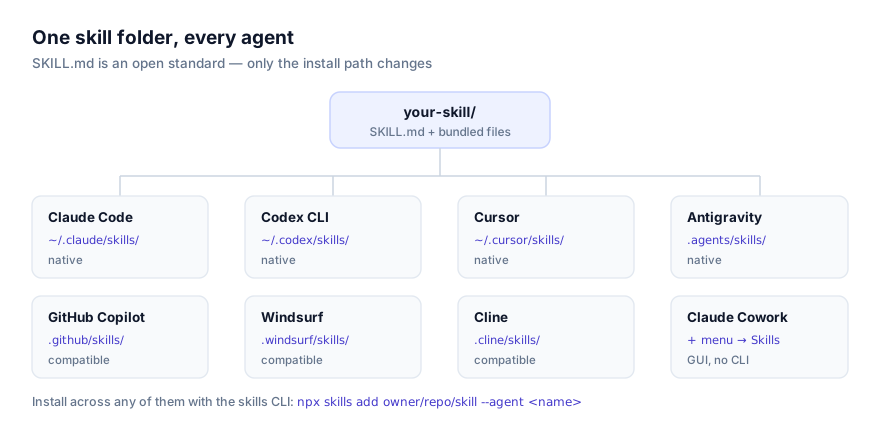
If your team works from Claude Cowork rather than a terminal, the same skills add through the + menu with no command line involved. See our guide for non-technical teams for how to evaluate a skill without reading its code.
Combining these skills into a real workflow
A realistic setup for a small operations team: Setup My IQ once, to give the agent lasting context about your role and tools; Daily Focus Board for personal task management; CRM Maintenance and Invoice Chase running in the background on sales and finance follow-up; and Agent-Browser Core installed as the foundation for Slack Automation or any other browser-driven task that comes up later. None of these need to run simultaneously. Skills only load their full instructions when a request matches, so having several installed costs little.
If your actual daily routine doesn't map onto any of the ten above (a specific report format, a tool nobody's built a skill for yet) that's a normal gap in a fast-growing but still uneven ecosystem. If it's mostly a GUI task you already know how to do, Record a Skill in Claude Cowork is often the faster route than searching further: screen-record yourself doing it once, narrate what you're doing and why, and let Claude convert it.
Start from the productivity category page for the current full listing, or browse all skills for adjacent categories.