

Most of this ecosystem isn't built for engineers
It's easy to assume agent skills are a developer thing, because so much of the public conversation around them is about coding agents. The numbers say otherwise: Anthropic's own data shows more than 90% of Claude Cowork usage is non-software work. Operations, finance, content, the kind of repetitive knowledge work that fills most people's actual jobs. This article is a guide for that majority: not a list of specific named skills, since what's genuinely useful changes fast and the strongest option for your exact task may not exist yet, but a category-by-category map of where to look, what a good skill in each category looks like, and how to evaluate one before you trust it with real work.
For each category below, the link goes to the live category page on this site, where you can browse what's currently listed and filter by what you need.
Business
Category: getclaudeskills.com/categories/business
This is the broadest and often highest-value category for non-technical teams, covering analytics and reporting, marketing, sales and CRM work, finance and accounting, HR, strategy and planning, and legal or compliance tasks. What ties these together is that they're all built around a repeatable process someone in the business already knows cold (closing the books, qualifying a lead, drafting a standard contract clause, compiling a board update) but has never had automated because it didn't look like a "coding" problem.
What to look for: a skill whose description names a specific business process, not a vague capability. "Summarizes documents" is a weak description. "Compiles the weekly sales pipeline report from CRM exports into the standard format finance expects" is a strong one. It tells you exactly when it'll fire and exactly what output to expect:
description: Compiles the weekly sales pipeline report from CRM exports into the standard format finance expects.
Favor skills that reference a template or a house format explicitly (bundled in a references/ folder) over ones that improvise structure each time, since consistency is usually the whole point of automating a business process.
Where this category is thin: highly regulated processes (anything touching legal review, compliance sign-off, or financial reporting that has audit requirements) deserve extra scrutiny. Read the instructions fully before trusting a skill here with anything that has compliance consequences if it goes wrong.
Writing and content
Category: getclaudeskills.com/categories/writing
Covers creative writing, technical writing, copywriting and marketing, editing and proofreading, translation, blogging, and scriptwriting. Content teams are one of the clearest wins in the whole ecosystem, because "write like we always write" is exactly the kind of instruction a skill is built to hold, a house style, a banned-phrases list, a structure a newsletter always follows, a tone that shifts by channel.
What to look for: skills that bundle actual reference material (a style guide, examples of good and bad output, a glossary of terms your brand uses a specific way) rather than ones that just say "writes well" in the description and leave everything to the model's judgment in the moment. A content skill without a bundled style reference is really just a system prompt with extra steps; the ones worth using encode something specific to your voice, not generic good writing advice.
A genuine trade-off to know about: a skill this specific to your brand voice is rarely going to be a great fit off a public registry as-is. Expect to adapt a general-purpose editing or drafting skill with your own style guide rather than finding one pre-built for your exact brand.
Productivity
Category: getclaudeskills.com/categories/productivity
Task management, note-taking, automation, calendar and scheduling, email and communication, project management, and time tracking. This is the category most likely to save time on the boring connective tissue of a working week, triaging an inbox, turning a meeting transcript into action items, keeping a project tracker in sync with what actually happened.
What to look for: skills that clearly state which tool they operate on (a specific calendar, a specific project management platform, a specific inbox) rather than assuming a generic setup. A skill built around "your" tracker only works if you're using the tool it was written for. Check the instructions for tool-specific assumptions before assuming it'll drop into your stack unmodified. Skills that produce a defined output (a filled-in template, a specific status format) are easier to verify at a glance than ones that produce free-form prose you have to read carefully to check for correctness.
Where recording shines: productivity tasks are often exactly the tacit, "I just do it, I don't think about it" kind of work that's easier to demonstrate than describe. If nothing on a category page matches your specific routine, recording it yourself is frequently faster than searching further.
Data and analytics
Category: getclaudeskills.com/categories/data
Data analysis, data visualization, machine learning, data cleaning, reporting, statistics, and database queries. This category skews slightly more technical than the other three, but a large share of the actual demand from non-technical teams is genuinely simple: cleaning up an export, standardizing column formats, turning a spreadsheet into a chart someone can put in a deck, checking a report against last month's numbers.
What to look for: for anything that touches real data, precision matters more here than in most categories, a skill that silently mishandles a data cleaning step is worse than no automation at all, because the error is invisible until someone downstream trusts a bad number. Prefer skills with instructions specific enough to check by hand: "removes rows where the date field is blank" is verifiable; "cleans the data" is not. If a skill bundles a script rather than pure instructions, that's a point in its favor for consistency, but it also means the platform running it needs to support script execution. Check that against the platform you're using before relying on it.
A genuine trade-off to know about: data work is one of the areas where getting it wrong has the most downstream cost, and it's also one of the areas where a skill's output looks confidently correct even when it isn't. Spot-check a data skill's output against a manual pass before trusting it unsupervised, especially the first several times you run it.
How to evaluate any skill before you trust it
Regardless of category, the same checklist applies:
- Read the description first. It's the entire discovery surface (the only thing Claude sees before deciding a skill is relevant) and it's also the fastest way for you to judge whether the author actually understood the task or wrote something generic.
- Open the source before you install or add it. This site links to skills on GitHub rather than re-hosting them specifically so you can read the code before running it. Do that, every time, especially for anything that touches real business data. You don't need to be technical to do this. A skill's
SKILL.mdfile is plain text, readable top to bottom, and looks roughly like this:
---
name: weekly-pipeline-report
description: Compiles the weekly sales pipeline report from CRM exports into the standard format finance expects.
---

1. Read the CRM export attached to the request.
2. Group opportunities by stage and owner.
3. Fill in the team's standard report template.
4. Flag any deal with no activity in the last 14 days.
The section between the dashes at the top is what Claude reads to decide when the skill applies. Everything below it is the actual instructions, written in plain English, if you can follow a numbered list, you can judge whether those instructions look sound before you trust them with anything real. 3. Check whether it bundles scripts. A skill that only has instructions and reference files will work almost anywhere. A skill that bundles and runs scripts needs a platform that supports tool execution. That's worth confirming before you assume it'll work in whatever you're using. 4. Run it once on something low-stakes first. The same way you wouldn't hand a new hire your most sensitive client file on day one, don't hand a new skill your most sensitive task on its first run. 5. Prefer specific over popular. The registry ecosystem has grown enormously through 2026 (tens of thousands of public skills across thousands of repositories) and a large share are thin or duplicated. A skill with a precise description and clear, readable instructions beats one with more stars and a vague one-liner.
If nothing quite fits: write it, or record it
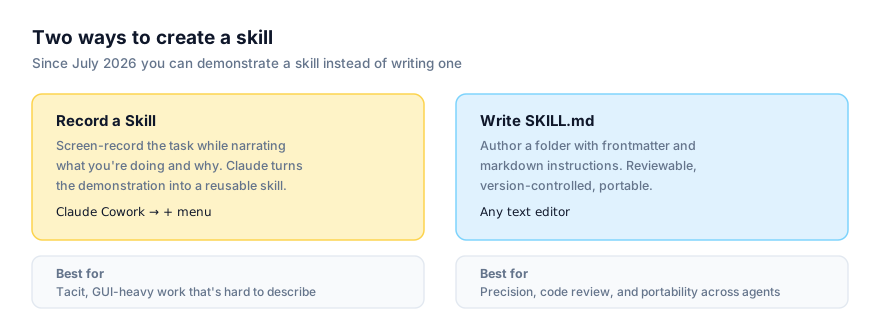
Not every process your team runs will have a matching public skill, and that's fine, the two authoring paths cover different situations well. If the task is precise, code-driven, or needs to work the same way across more than one tool, writing a SKILL.md by hand is worth the extra effort, especially since a hand-written skill is portable beyond the Claude ecosystem. If the task is mostly a GUI workflow that someone on your team already knows how to do but has never written up, Record a Skill in Claude Cowork is very often the faster and more realistic path, screen-record the task once, narrate what's happening and why, and let Claude do the conversion. Our full comparison of recorded skills versus hand-written SKILL.md covers exactly which situations favor which approach.
If someone on your team is comfortable in a terminal, getting a hand-written skill onto a coding agent like Claude Code is a single command, run once:
npx skills add owner/repo/skill-name
Everyone else can keep working from Cowork's point-and-click interface. It's the same underlying skill either way, just two different doors into it.
Rolling skills out across a team, not just for yourself
Finding a good skill for your own workflow is one problem. Getting a team of non-technical people to actually adopt skills consistently is a different one, and it's worth planning for separately.
Start with the process that already has the most friction. The best first skill for a team isn't the most impressive one. It's the one everyone already complains about. A weekly report that takes an hour of manual copy-pasting, an intake process that different people do slightly differently, an inbox triage step that gets skipped when someone's busy. Picking a visibly painful process first builds the case for the second and third skill far better than starting with something nobody was struggling with.
Put a review step in front of anything shared team-wide. On Team and Enterprise plans, a skill can be published to the whole organization's skill directory. Treat that publish step the way you'd treat publishing an internal process document. Someone should read it first, not just the person who wrote or recorded it. This matters more, not less, for non-technical teams, because the people relying on a shared skill are often the least equipped to notice when its instructions are subtly wrong.
Expect uneven adoption at first, and that's normal. Some people will immediately see the value of a skill that saves them a recurring hour of work; others will keep doing the task manually out of habit even after a good skill exists for it. A short, specific description that matches how people naturally ask for the task (rather than technical language about what the skill does internally) closes that gap faster than any amount of documentation, because it means the skill activates when someone describes their task normally, without them needing to know it exists by name first.
Revisit skills when the underlying process changes. A skill built around a specific report format, a specific tool's UI, or a specific approval threshold will drift out of date the same way a written procedure would when the process it describes changes. Treat "does this skill still match how we actually do this" as a periodic check, not a one-time setup task, especially for recorded skills, where a UI change in the target application is a common, specific failure mode.
Opinion: curation matters more than volume right now
Our stance on the broader ecosystem applies directly here: volume is not quality. With tens of thousands of public skills now available, the hard part for a non-technical team isn't finding a skill for a given task (search will surface several) it's telling a genuinely useful one apart from a thin, half-finished, or duplicated one. That's exactly why the category pages on this site exist as a starting point rather than a raw search index: they're a narrower, more deliberate way into a category than a generic search, though the evaluation checklist above still applies to anything you find through them. Treat every skill, however it's surfaced, as something to read before you rely on, not something to trust because it showed up in a list.
Start browsing at all skills, or go straight to the category that matches your team's work: business, writing, productivity, or data.