

What Claude Managed Agents actually is
Anthropic now offers two distinct ways to build on Claude, and the difference is not a matter of degree. The Messages API gives you direct model access: you write the agent loop, you execute tools, you own the runtime. Claude Managed Agents gives you the harness instead. Anthropic's own overview page puts it in one line: a "pre-built, configurable agent harness that runs in managed infrastructure," best for "long-running tasks and asynchronous work."
In practice that means Claude reads files, runs shell commands, browses the web and executes code inside a sandbox Anthropic provisions, with prompt caching and compaction already wired in. You send events and read a stream back. You do not write a while loop that dispatches tool calls.
This matters for anyone shipping skills to production, because Managed Agents is one of the few surfaces where a skill folder runs server-side without you building the container plumbing yourself. It is in beta as of August 2026, and every endpoint needs the managed-agents-2026-04-01 beta header, which the SDKs set for you.
The four concepts you have to hold in your head
Managed Agents is built around four resources, and getting them straight up front saves a lot of confusion later:
| Concept | What it is |
|---|---|
| Agent | The model, system prompt, tools, MCP servers and skills. Created once, referenced by ID. |
| Environment | Where sessions run: an Anthropic cloud sandbox, or a self-hosted one on your own infrastructure. |
| Session | A running agent instance inside an environment, doing a specific task. |
| Events | Messages exchanged with the agent: user turns, tool results, status updates. |
The important structural point is that agents are versioned and sessions are disposable. You define a Coding Assistant agent once, and every session that references it inherits that configuration. Update the agent and the version number increments; sessions can pin to a version, or take the latest. This is the opposite of the Messages API pattern where the system prompt and tool definitions get rebuilt on every request.
Creating an agent
An agent is a small JSON object. The minimum is a name and a model:
curl -fsSL https://api.anthropic.com/v1/agents \
  -H "x-api-key: $ANTHROPIC_API_KEY" \
  -H "anthropic-version: 2023-06-01" \
  -H "anthropic-beta: managed-agents-2026-04-01" \
  -H "content-type: application/json" \
  -d '{
    "name": "Coding Assistant",
    "model": "claude-opus-5",
    "system": "You are a helpful coding agent.",
    "tools": [{"type": "agent_toolset_20260401"}]
  }'
That agent_toolset_20260401 entry is the pre-built toolset: bash, file read and write, glob and grep, web search and web fetch. Anthropic documents the full agent field list as name and model (both required), plus system, tools, mcp_servers, skills, multiagent, description and metadata.
Two details worth knowing before you build anything on this:
- Effort and speed live inside the
modelobject. Passmodelas{"id": "claude-opus-5", "effort": "high"}rather than a bare string.effortacceptslow,medium,high,xhighormax.speedacceptsfaston Claude Opus 5 and Claude Opus 4.8. - Array fields are replaced wholesale on update.
tools,mcp_serversandskillsare not merged. If you update an agent'sskillsarray, you must send every skill you want it to keep, not just the new one. Metadata, by contrast, is merged key by key.
Updating an agent generates a new version when the configuration actually changes. Pass the current version for optimistic concurrency (a mismatch returns 409) or omit it for last-write-wins. Archiving is one-way: existing sessions keep running, new sessions cannot reference the agent.
Environments control the sandbox, and the network
An environment defines where sessions run. Every session gets its own isolated Linux container, even when several sessions share one environment, so sessions never share filesystem state.
The two configuration knobs that actually matter are packages and networking.
curl -fsS https://api.anthropic.com/v1/environments \
  -H "x-api-key: $ANTHROPIC_API_KEY" \
  -H "anthropic-version: 2023-06-01" \
  -H "anthropic-beta: managed-agents-2026-04-01" \
  -H "content-type: application/json" \
  -d '{
    "name": "api-access",
    "config": {
      "type": "cloud",
      "packages": {"pip": ["pandas", "numpy"], "npm": ["express"]},
      "networking": {
        "type": "limited",
        "allowed_hosts": ["api.example.com"],
        "allow_mcp_servers": true,
        "allow_package_managers": true
      }
    }
  }'
packages pre-installs dependencies before the agent starts, and the result is cached across sessions sharing that environment. Six package managers are supported: apt, cargo, gem, go, npm and pip, run in that alphabetical order when you specify several. Versions can be pinned; unpinned entries take the latest.
networking has two modes. unrestricted is the default and gives full outbound access minus a general safety blocklist. limited restricts the sandbox to the hosts in allowed_hosts, with allow_mcp_servers and allow_package_managers as separate opt-ins that both default to false. Anthropic's own guidance for production is unambiguous: use limited with an explicit allowlist.
One subtlety that trips people up: networking governs the sandbox's outbound access, not the web_search and web_fetch tools, which execute on Anthropic's servers. To restrict those you set allowed_domains or blocked_domains on the tool's entry in the agent toolset instead. Locking down the sandbox and assuming web fetch is locked down too would be a mistake.
Environments are not versioned. If you change one often, keep your own record of what changed and when, because nothing in the API will tell you which configuration a past session ran under.
How skills attach to a Managed Agent
This is the part most relevant if you already run Agent Skills elsewhere, and Managed Agents supports two genuinely different routes.
Route one: the skills array
Each entry in an agent's skills array has three fields: type (anthropic or custom), skill_id, and an optional version that defaults to latest.
{
  "name": "Financial Analyst",
  "model": "claude-opus-5",
  "system": "You are a financial analysis agent.",
  "skills": [
    {"type": "anthropic", "skill_id": "xlsx"},
    {"type": "custom", "skill_id": "skill_01AbCdEfGhIjKlMnOpQrStUv", "version": "latest"}
  ]
}
Anthropic's pre-built document skills (pptx, xlsx, docx, pdf) are available in every workspace with no upload step. Custom skills are directories containing a SKILL.md plus supporting files, uploaded to your workspace as a zip or as individual files through the Skills API, which returns the skill_* ID you reference here. Note that skill bundles upload directly to the Skills API, not through the Files API.
The ceiling is 500 skills per session, counted as the deduplicated set across every agent in a multiagent session. Anthropic's own note alongside that number is the more useful constraint: "Mounting more skills increases the time it takes for the session's sandbox to start." Five hundred is a limit, not a target.
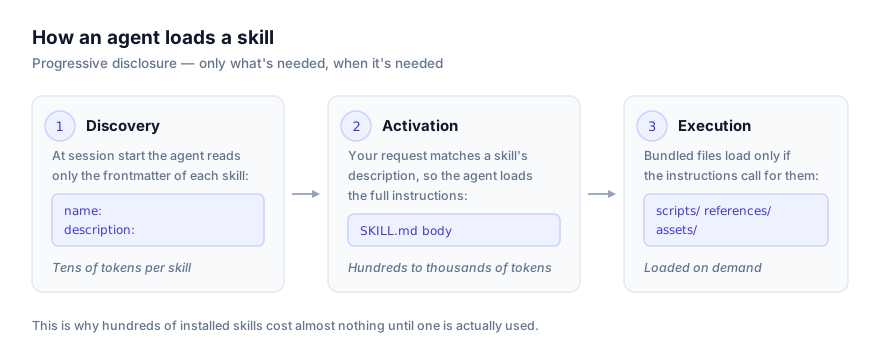
Route two: a GitHub repository mount
The second route needs no upload at all. When a session mounts a repository through the github_repository resource, the repository's root .claude/skills directory is scanned at session start and every skill found there becomes available:
curl -fsS https://api.anthropic.com/v1/sessions \
  -H "x-api-key: $ANTHROPIC_API_KEY" \
  -H "anthropic-version: 2023-06-01" \
  -H "anthropic-beta: managed-agents-2026-04-01" \
  -H "content-type: application/json" \
  -d '{
    "agent": "'"$AGENT_ID"'",
    "environment_id": "'"$ENVIRONMENT_ID"'",
    "resources": [{
      "type": "github_repository",
      "url": "https://github.com/org/repo",
      "mount_path": "/workspace/repo",
      "authorization_token": "ghp_your_github_token"
    }]
  }'
Discovery is strict about layout. It looks for exactly .claude/skills/<skill-name>/SKILL.md, one directory level deep at the repository root:
your-repo/
  .claude/
    skills/
      code-review/
        SKILL.md
      release-process/
        SKILL.md
        scripts/
          run_checks.sh
  src/
Three layouts that will not be discovered, all documented explicitly: a bare .claude/skills/SKILL.md with no skill directory around it, anything nested more than one level deep such as .claude/skills/tools/code-review/SKILL.md, and a skills/ directory sitting outside .claude. A .claude/skills folder inside a package subdirectory is not announced at session start either, though the agent may still surface those skills if it happens to read files under that subtree.
Discovery relies on the agent's read tool, which is enabled by default in the agent toolset. Disable read and repository skills silently stop loading. Discovery also runs only in cloud sandboxes: self-hosted sandboxes do not support GitHub repository resources at all.
The trust boundary this creates
Anthropic attaches an unusually direct warning to repository skills, and it deserves repeating rather than paraphrasing away. Repository skills are agent instructions, so a mounted repository sits inside your agent's trust boundary. Anyone who can commit to that repository, whether through a merged external pull request, a compromised dependency or a contributor account, can add or change a skill. The platform loads it at session start with no review step, and session tools such as bash and web_fetch give those instructions real reach.
This is the same argument this site makes for reading a skill's source before installing it locally, scaled up to a server-side agent with a shell. Mount only repositories you trust, and read .claude/skills before mounting anything that accepts outside contributions. Our Agent Skills security guide covers the wider threat model, and Anthropic's skill and plugin security scanning covers what automated review exists at the Enterprise tier.
Running a session
Sessions have a deliberate two-step lifecycle: create the session, then send a user event to start work. Creating a session does not start anything, though the sandbox begins provisioning immediately so the first tool call is not waiting on it.
session = client.beta.sessions.create(
    agent=agent.id,
    environment_id=environment.id,
    title="Quickstart session",
)

with client.beta.sessions.events.stream(session.id) as stream:
    client.beta.sessions.events.send(
        session.id,
        events=[{
            "type": "user.message",
            "content": [{"type": "text", "text": "List the files in the working directory."}],
        }],
    )
    for event in stream:
        match event.type:
            case "agent.message":
                for block in event.content:
                    print(block.text, end="")
            case "agent.tool_use":
                print(f"\n[Using tool: {event.name}]")
            case "session.status_idle":
                break
You can collapse both steps with initial_events, an array of up to 50 events processed in order at creation, which starts the session directly in running status. It accepts user.message and user.define_outcome only. Validation is all or nothing: if any event fails, no session is created.
Per-session overrides
You do not have to version an agent to try one thing differently. Passing agent as an agent_with_overrides object lets a single session swap model, system, tools, mcp_servers or skills without touching the agent resource:
session = client.beta.sessions.create(
    agent={
        "type": "agent_with_overrides",
        "id": agent.id,
        "model": {"id": "claude-sonnet-5"},
        "system": None,
    },
    environment_id=environment.id,
)
Overrides replace, never merge. A tools override must list every tool the session should have. Three exceptions are documented: model can never be cleared (model: null returns a 400), clearing tools fails when the session's effective skills is non-empty because skills need the read tool, and clearing mcp_servers fails while tools still holds an mcp_toolset referencing one of them.
There is a trap in the model override worth flagging. Because the override replaces the agent's model object in full, an effort level set on the agent is not carried over, and an effort set inside the override is not applied either. A session created with a model override runs at the model's default effort. To pin effort, set it on the agent and do not override model for that session.
Budgets
You can cap a session's spend at creation with a budget object:
{
  "budget": {
    "type": "limit",
    "max_list_cost": {"amount": "2500", "currency": "USD"}
  }
}
amount is a whole number of US cents written as a string, so "2500" means $25.00. Anthropic takes a string specifically so no floating-point rounding is applied. USD is the only currency currently supported. When a session reaches the cap it pauses and goes idle with stop reason budget_reached. Enforcement happens between model requests, so the request that crosses the line finishes first and the final cost can land slightly past the cap. A budget can only be attached at creation; you can change or remove one later, but you cannot add one to a session that started without it.
When Managed Agents is the wrong choice
An honest limitations section matters more here than usual, because the pitch is genuinely appealing and the constraints are real.
Data retention. Managed Agents is stateful by design: sessions resume after pauses and store conversation history, sandbox state and outputs server-side. Because of that, it is not eligible for Zero Data Retention or a HIPAA Business Associate Agreement. You can delete sessions and uploaded files through the API at any time, but if ZDR or a BAA is a hard requirement, this surface does not currently meet it and the Messages API is where you belong.
Platform availability. Managed Agents runs on the Claude API and on Claude Platform on AWS, with some differences in feature availability and session behaviour on the latter. It is not available on Amazon Bedrock, Google Cloud or Microsoft Foundry.
Beta churn. Anthropic states plainly that behaviours may be refined between releases. Pinning agent versions helps with your own configuration drift; it does nothing about platform changes underneath you.
Fine-grained control. If you need to inspect or intervene in every step of the loop, choose which tool result gets fabricated, or run a custom retry and repair strategy around individual tool calls, the harness is working against you. That is exactly the case the Messages API exists for.
Where Managed Agents sits next to the rest of the ecosystem
It is easy to conflate three separate things that all involve the words "Claude", "agent" and "skill":
| Surface | What it is |
|---|---|
| Claude Managed Agents | Anthropic-hosted harness. You create agents and sessions over the API; Anthropic runs the loop and the sandbox. |
The claude-api skill | A skill that teaches Claude to write correct code against Anthropic's API and SDKs. Covered in our explainer. |
| Skills on the Claude API | Shipping a skill folder to your own Messages API agent via container upload. Covered in this guide. |
There is a fourth, useful shortcut if you are already in Claude Code: running /claude-api managed-agents-onboard starts a guided interview that templates an agent config, sets up environments and tools, and emits runnable code in your project's language.
Troubleshooting
A session 400s with agent_model_required. You passed model: null in an agent_with_overrides object. A session always needs a model; model is the one field that cannot be cleared.
Clearing tools returns a 400. The session's effective skills array is non-empty, and skills require the read tool. Clear or override skills in the same request, or leave tools alone.
Repository skills are not loading. Check three things in order: the layout is exactly .claude/skills/<name>/SKILL.md at the repository root and one level deep; the read tool is enabled on the agent; and the environment is type: cloud, since self-hosted sandboxes do not support GitHub repository resources.
A skill you pushed mid-session has not appeared. The repository scan runs once, at session start. Discovered skills follow the checked-out state, meaning the checkout branch or commit if the resource sets one, otherwise the default branch. Commits pushed during a session are never picked up. Start a new session.
An update to an agent returns 409. You supplied a version that no longer matches. Something else changed the agent since you read it. Re-read and retry, or omit version if your caller genuinely owns the resource, such as a CI job syncing checked-in agent definitions.
A session with an inference_geo pin stops accepting turns. The workspace's allowed_inference_geos allowlist narrowed and the pin is no longer permitted. Pins are never exempted, because workspaces depend on them for compliance, so running sessions refuse further turns rather than quietly falling back.
Where to go next
Anthropic's Managed Agents overview, quickstart and skills page are the primary references and are worth reading in full before you commit an architecture to this. For the skill format itself, none of which changes here, see the SKILL.md format explained and how to write your own agent skill. If you are weighing hosted execution against running your own runners, how to self-host Claude Code runners covers the comparable trade-off on the Claude Code side. Browse the catalogue at getclaudeskills.com/skills, or the per-platform install paths at /platforms.
Verified 24 August 2026 directly against Anthropic's Managed Agents overview, quickstart, agent-setup, environments, sessions and skills documentation at platform.claude.com.