

A CLI you already used just got easier to migrate into
OpenAI shipped Codex CLI 0.147.0 on 7 August 2026, and one line in the release notes matters more than it looks: /import can now pull in Cursor-managed skills, not just settings from Claude Code. If you've been running skills in Cursor and are trying Codex CLI, or you maintain the same skill for both tools by hand, this closes a gap that previously meant copying folders yourself.
This is a small feature, and it's worth being precise about what it does and doesn't do rather than treating it as a bigger deal than it is. It doesn't change the Agent Skills format, and it doesn't touch how Codex discovers or activates a skill once it's there. It changes how a skill gets from one tool's directory into another's, which is squarely the portability question this site cares about.
What /import is, and how it got here
/import isn't new. It's a TUI slash command, typed inside a running local Codex CLI session, that OpenAI has been steadily expanding since earlier in 2026 as a migration tool for people moving between coding agents. According to Codex CLI's own release notes, version 0.145.0, released 21 July 2026, significantly expanded the command to "migrate Cursor and Claude Code settings, MCP servers, plugins, sessions, commands, and project-scoped memories." At that point, the command already reached across both tools for general configuration, but skill folders specifically weren't part of the Cursor side of that list.
Version 0.147.0's release notes close that gap in one sentence: Codex now can "import Cursor-managed skills and synchronize changes to imported Claude and Cursor conversations without creating duplicates." Two things are packed into that line. First, skills are now an explicit, named part of what /import moves from Cursor. Second, re-running the command against conversations you've already imported doesn't leave you with duplicates, useful if you import early and then come back to it after a Cursor session has moved on.
A detail worth knowing before you rely on this: /import only runs inside a local, embedded TUI session. OpenAI's own documentation, echoed across independent coverage of the command, is specific that remote Codex Cloud sessions and connections through the app-server daemon don't expose it. If you're driving Codex through a remote or scripted setup, this isn't a path available to you yet, you'd still be copying the skill folder by hand.
What actually gets copied
Based on the pull request that shipped the change, Cursor skill discovery works at two scopes:
- Home-level, where Codex looks in both a
skillsdirectory and a separateskills-cursordirectory under your Cursor configuration, and merges what it finds from each, deduplicating by skill name so a skill present in both doesn't show up twice as a migration candidate. - Repository-level, where the scan is narrower and only looks at a
skillsdirectory inside the project, without the second location the home-level scan checks.
According to that same pull request, migrated skills land in a shared .agents/skills directory rather than Codex's own dedicated skill folder. That's consistent with what other tools in this space are converging on: .agents/skills is increasingly used as a common location several agents can read from, alongside each tool's own dedicated directory (Codex's native location is ~/.codex/skills for personal scope and .codex/skills for project scope, as covered in the Codex CLI install guide). Treat the exact target directory as reported rather than something we independently confirmed end to end. If you rely on it, check /import's output in your own session against what actually landed on disk before assuming a specific path.
What isn't in scope: /import copies files, it doesn't validate them. A skill with a description too vague to ever activate, or one that already had a stale scripts/ dependency in Cursor, comes across exactly as broken as it was before. Importing fixes where the folder is, not what's in it.
Why this is bigger than one CLI flag
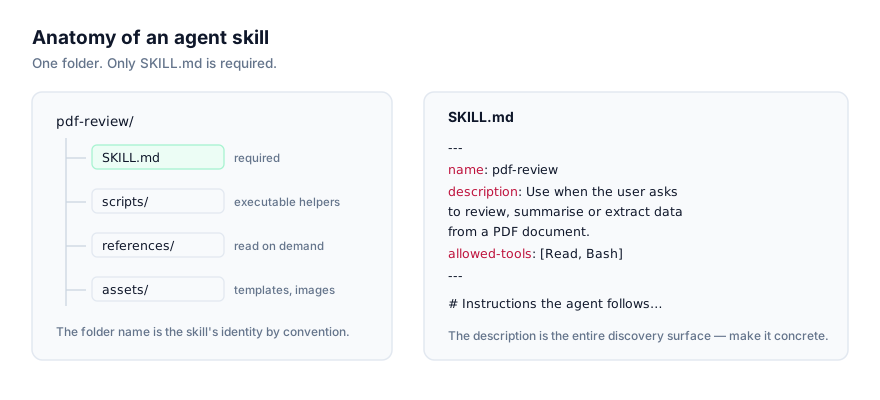
The whole reason Agent Skills works as a format is that Anthropic published it as an open standard in late 2025 rather than keeping it Claude-specific. A folder with a SKILL.md, YAML frontmatter, markdown body, optional scripts/, references/ and assets/ subfolders, doesn't care which agent reads it. Claude Code, Codex CLI, Cursor, Antigravity and others all implement the same underlying format, which is why a skill written for one has always been portable in principle.
In practice, "portable in principle" meant "copy the folder yourself," and that's a real friction point once you maintain the same skill for two or three tools, or you're trying a new one and don't want to start from zero. A dedicated migration path inside the tool itself is a small but genuine improvement on that, the kind of thing that matters more the more agents a team actually runs day to day.
It's also a data point on where the ecosystem is heading. .agents/skills showing up as a shared migration target, alongside the Agent Plugins spec that Amazon, Cursor, Microsoft, OpenAI and Vercel jointly published on 6 August 2026, one day before this Codex release, suggests vendors are actively working on making skills move between tools with less manual copying, not just tolerating the fact that the format happens to be shared. Neither development changes the underlying SKILL.md file itself. Both are about reducing the friction of getting an existing skill to run somewhere new.
What to do before you run it
If you're testing Codex CLI and already have skills set up in Cursor, /import is a reasonable way to get started rather than rebuilding your setup by hand. A few things worth doing around it:
Check your version first. /import's Cursor-skills support requires 0.147.0 or later. Run codex --version (or check however your install method reports it) before assuming the option is there. An older Codex CLI still has /import, but without this specific capability, and the failure mode is the option simply not offering what you expect rather than an obvious error.
Read what lands before your next session uses it. This is the same standing advice for any skill you didn't write yourself, covered in more depth in the Agent Skills security guide: a bundled script does whatever it does regardless of which tool's directory it's sitting in. Migrating a skill doesn't re-review it. If you wouldn't have trusted a given skill's scripts/ folder in Cursor without reading it, importing it into Codex doesn't change that calculus.
Expect a one-time copy, not a sync. Nothing in the release notes describes ongoing synchronisation of skill files themselves, only of already-imported conversations, so a skill you edit in Cursor after running /import won't reflect that edit in Codex until you import again. If you're actively iterating on a skill in one tool while also running it in the other, you're still responsible for keeping the two copies in step, or better, treating one location as the source of truth and copying deliberately.
Confirm where it landed. Given the destination directory is reported rather than something a SKILL.md install guide from OpenAI itself confirms in the same terms, check with /context or a plain directory listing after your first import, rather than assuming it matches Codex's usual .codex/skills layout.
Troubleshooting
The command doesn't do anything, or Cursor skills don't show up as candidates. Check your Codex CLI version first. codex --version (or your install manager's equivalent) needs to report 0.147.0 or later for Cursor skill migration specifically. /import existed before that and will still run, but without this capability it simply won't offer Cursor skills as something to bring in, and there's no error telling you that's why.
A skill you imported doesn't behave the way it did in Cursor. Migration moves the folder, it doesn't translate anything inside it. If a skill's instructions reference a Cursor-specific mechanic, a particular keyboard-triggered mode, an IDE panel, a Cursor rule file it expected to sit alongside it, that reference doesn't become meaningful just because the folder is now somewhere Codex reads. Open the SKILL.md after importing and check whether anything in the body assumes context that only existed in Cursor.
You imported twice and now something looks duplicated, or doesn't. OpenAI's release notes specifically call out deduplication for already-imported conversations, keyed so a second run doesn't create copies. Skill folders migrated through the home-level scan are deduplicated by name across the two source directories the scan checks, so two differently-managed copies of a skill with the same name collapse into one candidate rather than showing up twice.
A bundled script fails immediately after import. This is the same failure mode as any freshly installed skill, unrelated to where it came from. Check what the script expects, Python, Node, a specific binary on PATH, and confirm Codex's environment actually has it. Reading the script before your first run, rather than after the failure, tells you this in advance and is worth doing regardless of which tool a skill was copied from.
Where this leaves Cursor and Claude Code users
If you already maintain a skill for Cursor and want to add Codex CLI to the mix, this is now the more direct path rather than a manual copy. If you're coming from Claude Code instead, /import's Claude-Code side has been in place since the July expansion and covers more than just skills, MCP servers, commands and project memories move too. Neither replaces actually reading what you're bringing across. For a fuller side-by-side of how Codex and Claude Code differ once a skill is installed, activation timing, direct invocation with $skill-name, and where each tool looks by default, see Claude Code vs Codex CLI for Agent Skills.
Browse the current, verified list of skills confirmed to work with Codex CLI at getclaudeskills.com/platforms/codex-cli, or everything cataloged at getclaudeskills.com/skills.