

OpenAI's model line into 2026
Skills are a format story, but they're also a model story, what an agent can reliably do with a skill's instructions depends on the model reading them. OpenAI's 2026 has moved fast enough that it's worth laying the timeline out plainly before getting to what any of it means for skills specifically.
GPT-5.3-Codex, 5 February 2026
GPT-5.3-Codex was OpenAI's most capable agentic coding model at release, and the first to combine the Codex and GPT-5 training stacks into one model rather than treating coding as a separate fine-tune. For anyone running Codex CLI, this was the point where "the coding model" and "the general model" stopped being two different things you'd choose between.
GPT-5.5, 23 April 2026
GPT-5.5 became the default frontier model in both ChatGPT and Codex, and it was the first OpenAI model with a 1M-token API context window. It's strong across agentic coding, computer use and knowledge work generally, and the context window figure is the one worth sitting with, because it's the part of this timeline with the most direct bearing on how you should think about writing skills for OpenAI's agents. More on that below.
GPT-5.6, limited release from around 26 June 2026
GPT-5.6 began a limited release around 26 June 2026, split into three named variants:
| Variant | Positioning |
|---|---|
| Sol | Flagship |
| Terra | Balanced, everyday use |
| Luna | Fast and affordable |
This is recent and still settling. Treat the exact rollout into Codex CLI as something to verify directly rather than assumed, since a limited release by definition hasn't reached everyone yet, and which variant ends up as Codex CLI's working default isn't something we're prepared to state as fixed while it's still in flux. If your skills rely on a particular latency or cost profile (a skill that fires on every commit versus one reserved for occasional, deliberate use) the eventual spread across Sol, Terra and Luna is worth watching, since which variant handles a given Codex CLI session could plausibly affect how much headroom you have for a skill's bundled reference material. Nothing in the current brief confirms how that shakes out, so treat it as an open question rather than a settled one.
What a 1M-token context window changes for skills, and what it doesn't
A million-token context window is large enough to change the calculus around a concern that's shaped a lot of skill-writing advice: keeping a skill lean because context is scarce. It's worth being precise about what actually changes here, because "bigger context window" gets overinterpreted in both directions.
Progressive disclosure matters less for context pressure
Progressive disclosure exists because loading every installed skill's full body at session start would burn through a limited context window before a single message got typed. That specific pressure eases substantially with a million tokens available. The raw arithmetic of "how many skill bodies can fit" stops being a binding constraint the way it was against a much smaller window. If your worry about a verbose SKILL.md was purely "will this even fit," a 1M-token window makes that worry mostly moot.
...but still matters for precision and cost
That's not the same as saying skill size stops mattering. Two things don't move just because the window got bigger.
Precision. A model doesn't reason better by having more tokens to sift through. A skill padded with irrelevant detail still makes it harder for the agent to identify the specific instruction that applies to the task in front of it, window size notwithstanding. A tightly scoped description and a body that says exactly what it needs to and no more is still what makes an agent apply a skill correctly, not just successfully load it.
Cost. Every token an agent actually loads into a request is billed, regardless of how much headroom the context window has left. A 1M-token ceiling doesn't mean loading more is free. It means loading more won't get truncated. Those are different properties. Progressive disclosure was never purely a "will it fit" mechanism; it's also the reason an agent with a hundred installed skills doesn't pay for ninety-nine irrelevant ones on every single request. That economic argument holds regardless of window size.
The honest summary: a bigger window removes one reason to keep skills lean and leaves the other two intact. Write skills tight because it makes them work correctly and cheaply, not because you're worried they won't fit.
Codex CLI's native skill support
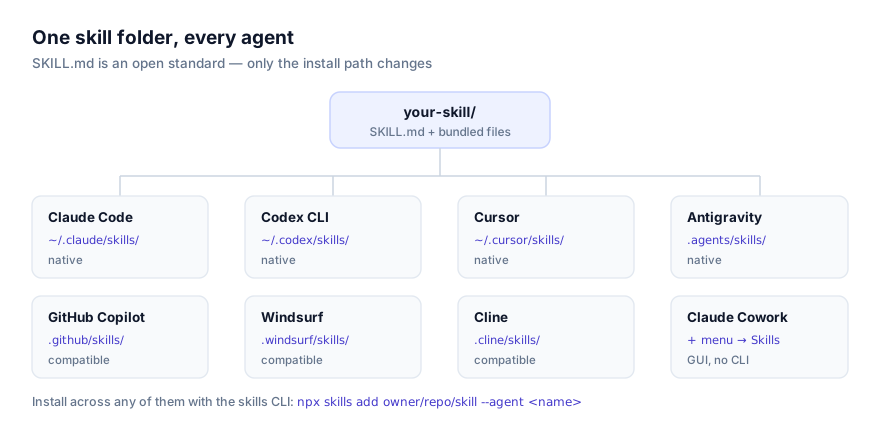
Codex CLI reads the same SKILL.md standard Claude Code originated, with no adapter or conversion step. The specifics:
Install paths
| Scope | Path |
|---|---|
| Personal, every project | ~/.codex/skills/ |
| Project-only | .codex/skills/ |
Invocation: automatic match or direct call
Like other agents implementing the standard, Codex CLI matches a request against each installed skill's description at session start and loads the full body on a match. It additionally supports direct invocation, reference a skill by name with a $ prefix, for example $changelog-writer, to load it regardless of how closely your phrasing matches its description. That's useful when several installed skills cover overlapping ground and you want to be unambiguous, or when you're testing a newly written skill and want to confirm its instructions work before worrying about whether the description would trigger it naturally.
Pairing with AGENTS.md
Codex CLI also reads AGENTS.md, loaded on every session regardless of relevance. The right home for facts that are true of nearly everything you do in a given repo: build commands, conventions, architecture notes. A skill is the right home for a specific, occasional procedure. The two are meant to work together, not compete: AGENTS.md can note that a skill exists and roughly when it applies, without embedding the skill's actual steps. The full breakdown is in Agent Skills vs AGENTS.md.
Worked example: a skill sized for a 1M-token context, still written tight
project/
└── .codex/skills/
    └── api-error-audit/
        └── SKILL.md
---
name: api-error-audit
description: Use when reviewing an API route for missing error handling, unhandled promise rejections, or responses that leak internal error details to the client.
---

# API Error Audit

1. Check every route handler has a try/catch or equivalent around calls that can fail.
2. Confirm error responses never include a stack trace or raw exception message.
3. Confirm every non-2xx response includes a machine-readable error code, not just a message.
4. Flag any handler that swallows an error without logging it.
Nothing about this skill changed because Codex CLI's context window grew. The description is still the entire discovery surface, and the body still says exactly what it needs to and nothing more. What a large context window buys is headroom. A team could reasonably bundle a longer references/checklist.md alongside this without worrying it will crowd out something else the agent needs mid-session. It doesn't buy a reason to make the SKILL.md body itself sprawling; a vague or padded description would still fail to trigger correctly, window size aside.
Our take: portability is the point
Our take: OpenAI adopting the same
SKILL.mdformat Anthropic published is the strongest signal yet that this standard has actually won.
It would have been easy for OpenAI to ship a competing, Codex-specific instruction format, a company with its own frontier models and its own CLI has no structural reason to defer to a format another lab defined. That it didn't is the interesting fact here, more interesting than any individual model release in the timeline above. Codex CLI reading ~/.codex/skills with the identical frontmatter schema and the identical $skill-name invocation pattern working alongside standard description-matching means a skill written once, reviewed once, and version-controlled once now runs unmodified on the flagship coding tools of both labs.
That's the entire argument for why portability matters, made concrete rather than asserted: the value of a skill was never really about which specific agent runs it. It was always about writing a procedure down exactly once and having it travel. A world where Anthropic's and OpenAI's coding agents both read the same folder is a much stronger version of that promise than a world where only Anthropic's products did. Be skeptical of any tool, on either side, that tries to add a proprietary extension that breaks that portability. The entire reason this format is worth investing in is that it doesn't lock you to one vendor's roadmap.
Using the same skill across Claude Code and Codex CLI
In practice, a skill written for one generally works in the other without changes, provided it doesn't depend on a tool call unique to one agent, a bundled script that shells out to something only one CLI exposes, for instance. The install step differs only in path: ~/.claude/skills/ versus ~/.codex/skills/ for personal scope, .claude/skills/ versus .codex/skills/ for project scope. If you're actively choosing between the two tools rather than just running both, Claude Code vs Codex CLI for Agent Skills covers the comparison in full; if you're setting Codex CLI up for the first time, How to Install Skills in OpenAI Codex CLI walks through both the CLI installer and doing it by hand.
The cross-agent skills CLI makes the two-install step mechanical rather than manual:
npx skills add owner/repo/skill --agent claude-code
npx skills add owner/repo/skill --agent codex
Run both, and the same repository lands in both agents' directories, ready to be reviewed once and used from either CLI. That's the practical shape of "write once, run on both labs' tools", not a promise, a command you can actually run.
Troubleshooting: skills that behave differently in Codex CLI
A skill that worked in Claude Code does nothing in Codex CLI. Check first whether it's actually installed in the right directory for Codex CLI specifically, ~/.codex/skills/ or .codex/skills/, not the Claude equivalent. If it's installed correctly and still silent, try direct invocation with $skill-name; if that works but natural phrasing doesn't trigger it, the description needs tightening, not the install.
A skill's script errors out in Codex CLI but not elsewhere. Confirm the runtime the script expects (Python, Node, a specific CLI binary) is actually installed and on PATH in this environment. This is unrelated to which GPT model is active; it's an environment problem, not a model or format one.
You're not sure which GPT-5.6 variant is actually running. Given the limited-release status as of this writing, don't assume. Check current Codex CLI documentation or the model indicator directly rather than relying on anything written here as of a specific date. This is the one part of OpenAI's current lineup that's genuinely still moving.
A large references/ folder feels like it should now always load. It shouldn't. Progressive disclosure still governs when bundled reference files load. A bigger context window means they'd fit if loaded, not that the instructions should stop being selective about when to load them.
Where to go next
For the mechanics of how a request gets matched to a skill's description in the first place, see How AI Agents Discover and Activate Skills. For the file format itself, field by field, The SKILL.md Format Explained covers it in full. The exact same document applies whether you're installing into Claude Code or Codex CLI. And before installing anything Codex CLI would execute on your behalf, our security guide covers what to check regardless of which agent or which model is running it. Browse skills confirmed compatible with Codex CLI at getclaudeskills.com/platforms/codex-cli.