

What makes a good frontend skill
A frontend codebase accumulates conventions faster than almost any other kind: a specific form library used a specific way, a component-testing setup nobody wants to re-explain, animation patterns that took a week to get right the first time. A good frontend skill captures one of those conventions precisely enough that an agent following it produces code indistinguishable from what your team already writes, not generic best practice, but your practice.
The signal to look for is specificity. "Helps with React" is not a useful skill description. "Correct React Hook Form usage (data flow, subscriptions, reset, dirty state, controlled-input rules) loaded before writing or modifying any form code" is: it names exact trigger conditions and exact scope. The stronger skills below all read that way. The weaker ones lean on a framework name and hope the model fills in good judgment on its own.
Two other things worth checking before you install anything from this list: whether the skill bundles executable scripts (several here need Node.js, and one needs shell access), and whether its whenNotToUse guidance actually applies to your project. Skipping that second check is the most common way a skill ends up firing on the wrong kind of task.
How this list is ordered
Broadest first, narrowest last. React Hook Form and Playwright Component Testing lead because forms and component tests are close to universal frontend concerns, most React or Vue codebases have both. From there the list moves through skills that apply to a wide slice of projects (visual QA, scroll animation, general CSS conventions) toward skills scoped to a specific library, SDK or internal tool (Blazor, Zoom's Video SDK, a Markdown renderer). Stars and maintenance activity broke ties within a tier, but a smaller, sharply-scoped skill still outranks a bigger, vaguer one. Popularity is a secondary signal here, not the primary one.
| Skill | Best for | Requires |
|---|---|---|
| React Hook Form | Any React codebase using RHF | Nothing extra |
| Playwright Component Testing | Isolated React/Vue component tests | Node.js |
| Web Design Reviewer | Visual QA across any web stack | Nothing extra |
| GSAP & Framer Scroll Animation | Scroll-triggered motion in JS/React/Next.js | Node.js, shell |
| CSS Layout Guidance | General CSS conventions and layout patterns | Nothing extra |
| Component Fixtures | Isolated UI components for screenshot testing | Nothing extra |
| Fluent UI Blazor | Blazor apps using Microsoft's Fluent UI | Nothing extra |
| Build MCP App | Interactive UI widgets inside an MCP server | Node.js, shell |
| Zoom Video SDK UI Toolkit | Prebuilt video-conferencing UI | Node.js, shell |
| Markstream Install | Streaming Markdown rendering setup | Node.js, shell |
The ten skills
React Hook Form
Supabase maintains this one inside their main supabase/supabase repository (108,000 stars), and it exists because React Hook Form is deceptively easy to misuse. Subscriptions, watch/useWatch, dirty state and controlled inputs all have non-obvious correct patterns, and a codebase without guardrails tends to accumulate the wrong ones. The skill is written to load before any form code gets touched, not after something breaks, which is the right moment for this kind of guidance.
Who it's for: any team building React forms with RHF, especially one where the codebase already has inconsistent patterns to fix. No special runtime requirements. It's pure instruction, no scripts. The caveat, straight from the skill's own guidance: it's not necessary for simple forms or in a codebase that already follows RHF best practices consistently. Apache-2.0 licensed.
Playwright Component Testing
Microsoft's Playwright team (94,000 stars on the core repo) built this to cover a specific gap: testing React or Vue components in isolation without standing up @playwright/experimental-ct-react or -ct-vue. It uses a story-gallery approach instead, scaffolding stories and a gallery dev page driven by Playwright's built-in mount fixture.
Who it's for: teams that want component-level tests but don't want a dedicated component-testing runtime as a separate dependency. Requires Node.js, since it drives an actual Playwright run. The skill's own caveat: skip it if you need a fully dedicated component-testing framework, or if your project isn't React or Vue. Apache-2.0 licensed.
Web Design Reviewer
From GitHub's awesome-copilot collection (38,000 stars), this skill inspects a running site (local or remote) and fixes what it finds directly in source: responsive breakage, accessibility gaps, visual inconsistency, layout that's come apart. It's built to work across static sites, SPAs (React, Vue, Angular), full frameworks like Next.js, and CMS platforms like WordPress and Drupal, which makes it one of the more broadly portable entries here.
Who it's for: anyone doing visual QA without a dedicated design-review process already in place. No extra runtime requirements. Caveat: it needs the source code accessible to make fixes, so it's the wrong fit for non-web applications or sites where you only have a rendered page and no repo. MIT licensed.
GSAP & Framer Scroll Animation
Also from awesome-copilot, this covers two ecosystems at once: GSAP's ScrollTrigger (pinning, scrubbing, snapping, timelines, ScrollSmoother) and Framer Motion / Motion v12 (useScroll, useTransform, useSpring, whileInView, variants). It applies across vanilla JS, React and Next.js, so it's not locked to one animation library the way a lot of motion tooling is.
Who it's for: frontend developers building parallax, pinned sections, or scroll-triggered reveals who don't want to relearn ScrollTrigger's API from scratch each time. Requires Node.js and shell access to run build tooling. Caveat: not useful outside JavaScript-driven frameworks, and overkill for a site with no scroll interaction at all. MIT licensed.
CSS Layout Guidance
Part of the microsoft/vscode repository (189,000 stars), this documents CSS file organization, class naming, standard sizing, SplitView/Grid layout patterns, scrollable content handling, and text-overflow/ellipsis conventions. It's written for VS Code's own codebase conventions specifically (co-locating CSS with TypeScript components, a particular naming scheme) rather than as a generic CSS guide.
Who it's for: teams that want a worked example of disciplined CSS conventions to adapt, or contributors working directly in VS Code's source. No runtime requirements. The skill says plainly that it's not a general CSS guide and won't suit projects that don't follow VS Code's specific conventions. Treat it as a strong reference to borrow patterns from, not a drop-in for an unrelated codebase. MIT licensed.
Component Fixtures
Another microsoft/vscode skill, this one covers building isolated component fixtures for screenshot testing, fixture file structure, theming, service setup, CSS scoping, async rendering, and the pitfalls that come with all of it. It's a workflow skill: it walks through creating or updating fixtures rather than just documenting the format.
Who it's for: teams doing visual regression testing on UI components who want components that are fixture-friendly by design, not retrofitted. No runtime requirements. Caveat: it's not useful outside UI component development, and assumes a screenshot-testing setup exists or is being built. MIT licensed.
Fluent UI Blazor
A reference skill from awesome-copilot covering the Microsoft.FluentUI.AspNetCore.Components NuGet package, every Fluent-prefixed component (FluentButton, FluentDataGrid, FluentDialog, FluentToast, FluentNavMenu and more), setup, and troubleshooting for missing providers.
Who it's for: Blazor developers building on Fluent UI specifically. This is the first genuinely narrow entry on the list, and deliberately so. It's not useful for any project outside Blazor, and the skill says as much directly. No runtime requirements beyond the .NET project itself. MIT licensed.
Build MCP App
From Anthropic's official plugins repository (33,000 stars), this covers building interactive UI (forms, pickers, dashboards, confirmation dialogs) that render inline inside an MCP server's chat interface, using the Apps SDK. It's meant to run after a server's deployment model is settled, not as a first step.
Who it's for: developers extending an MCP server with inline UI rather than plain text responses. Requires Node.js and shell access. Caveat, from the skill itself: skip it if your application doesn't need interactive components, or if simple text responses are enough. Apache-2.0 licensed.
Zoom Video SDK UI Toolkit
From Anthropic's knowledge-work plugins repo (23,000 stars), this is a reference skill for the framework-agnostic Zoom Video SDK UI Toolkit, a prebuilt React UI layer for chat, screen sharing and participant management, used after a workflow has already routed toward web video and away from building a fully custom interface.
Who it's for: teams that want a working Zoom-style video UI fast, without hand-building controls. Requires Node.js and shell access. Caveat: skip it if you need full control over the UI or a video experience that departs meaningfully from Zoom's standard layout. Apache-2.0 licensed.
Markstream Install
The narrowest entry on this list: an awesome-copilot skill for installing and configuring Markstream, a streaming Markdown renderer, across Vue, React, Svelte, Angular, Nuxt and Vue 2. It handles package selection, minimal peer dependencies, CSS ordering, SSR boundaries and streaming-mode setup, the kind of configuration detail that's easy to get subtly wrong by hand.
Who it's for: any team adding Markstream to a frontend project, across a genuinely wide range of frameworks. Requires Node.js and shell access to run the install. Caveat: irrelevant if you don't need streaming Markdown rendering, or you're already on a different renderer that works fine. MIT licensed.
How to install these skills
Every skill on this list installs the same way: as a folder containing a SKILL.md file, dropped into an agent's skills directory. The fastest route is the cross-agent skills CLI, maintained by Vercel Labs:
npx skills add supabase/supabase/react-hook-form --agent claude-code
npx skills add microsoft/playwright/playwright-component-testing --agent claude-code
Swap the install coordinate for any skill on this page, each one's page on getclaudeskills.com/skills lists its exact owner/repo/skill-path. Drop the --agent flag to let the CLI infer your agent, or set it explicitly if you run more than one on the same machine.
Where a skill lands depends on scope. Personal skills, installed without a project context, go to a global directory and load in every session on that machine. Project skills go into a directory inside the repo itself, usually checked into version control so a whole team gets the same skill automatically, the right default for something like React Hook Form or CSS Layout Guidance, where the point is a shared house convention.
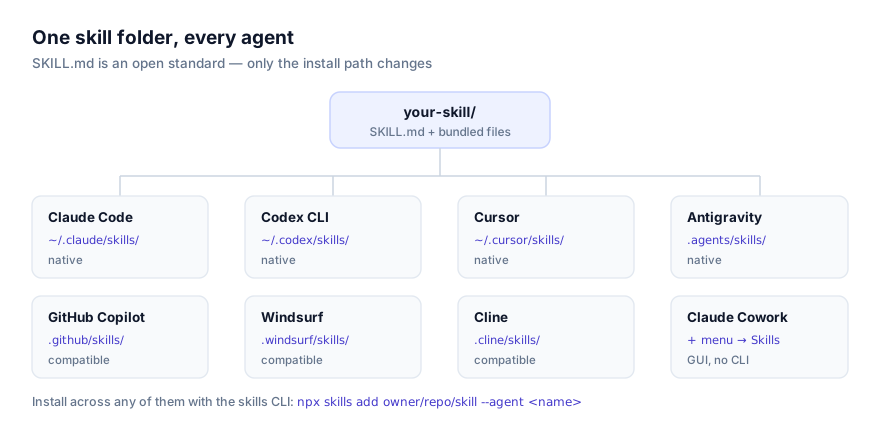
Exact paths differ by agent. Full walkthroughs, including manual installation without the CLI, are in how to install skills in Claude Code and how to install skills in Cursor. If your team is split across agents, Claude Code vs Codex CLI for skills covers where behavior actually diverges.
Combining frontend skills in one project
These skills are built to coexist. A typical React project might run React Hook Form for forms, Playwright Component Testing for isolated component tests, and Web Design Reviewer for a final visual pass, three skills, three different trigger conditions, no overlap. Progressive disclosure means installing all three costs almost nothing until a request actually matches one: at session start an agent reads only each skill's name and description, not its full body, so a dozen frontend skills sitting in a project's .claude/skills/ directory add negligible overhead. How agents discover and activate skills covers the mechanism in more depth.
The one place combinations go wrong is overlapping descriptions. If two installed skills both claim to handle "form code" or "component testing," an agent has to guess which one applies, and that guess is not guaranteed to be the one you wanted. Before adding a new frontend skill to a project that already has several, skim the other SKILL.md descriptions for overlap. It takes a minute and avoids a genuinely confusing failure mode later.
Why isn't my skill activating?
The most common cause, by a wide margin, is a description that doesn't match how you're actually phrasing the request. If "fix the form validation" doesn't trigger React Hook Form, check the skill's literal description for the terms it's listening for (watch, useWatch, formState, getValues, setValue, reset) and use one of those, or file the gap as feedback to the skill's maintainer.
A second cause is scope mismatch: a skill installed at personal scope on your machine won't be visible to a teammate unless it's also installed at project scope and committed to the repo. Check which directory the skill actually landed in.
A third, specific to this list: four of these ten skills require Node.js or shell access to run bundled scripts (Playwright Component Testing, GSAP & Framer Scroll Animation, Build MCP App, Zoom Video SDK UI Toolkit, and Markstream Install). If you're running an agent or sandbox without tool execution enabled, those skills will load their instructions but fail at the step that needs to actually run something. Confirm your agent has shell or code-execution access before assuming the skill itself is broken.
Where to go next
Browse the full list this article draws from at getclaudeskills.com/categories/development/frontend, or the entire catalog at getclaudeskills.com/skills. If you're pairing frontend work with testing or CI, the best debugging and testing skills and the best DevOps skills cover the adjacent ground. And if nothing here matches a convention specific to your own codebase, how to write your own agent skill walks through building one from scratch, usually a smaller task than it sounds, for a skill scoped to one team's actual practice.