

What makes a good skill-authoring skill
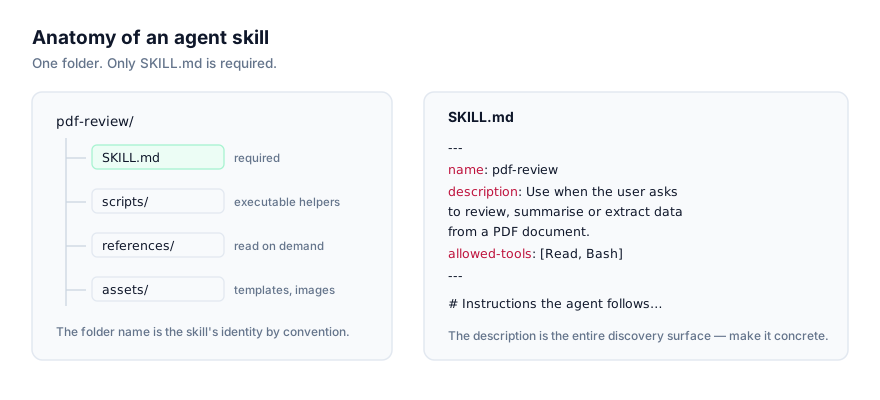
Writing a SKILL.md file isn't hard. It's YAML frontmatter and a markdown body, and our SKILL.md format guide covers the whole spec in a few minutes of reading. What actually separates a mediocre skill from a good one is process: does the description name concrete triggering situations rather than a vague capability, does the body stay focused enough that it doesn't need splitting, and (critically) does anyone actually test whether the thing activates before it ships. The skills below earn their place because they encode that process, not because they save you from learning the format itself.
The other thing worth knowing before you pick a tool here: since Record a Skill launched on 21 July 2026, hand-writing SKILL.md is no longer the only path to a working skill. Screen-recording yourself doing a task while narrating what you're doing and why (found in the + menu of the Claude desktop app) lets Claude convert that demonstration directly into a reusable skill, no markdown involved. It's aimed squarely at the roughly 90% of Cowork usage that Anthropic's own data shows is non-software work. Our full guide to recording a skill in Claude Cowork covers the mechanics; the skills below are for the other path, writing one directly, with more precision and control than a recording gives you.
This is a curated selection based on quality, popularity and maintenance activity across each skill's source repository, not a benchmarked or independently tested ranking. Every fact below comes from each skill's own listing page.
The best skills for building your own agent skills
Ordered from the flagship, general-purpose authoring-and-testing tool down to the narrowest, most situational ones.
Skill Creator
Anthropic's own tool for creating new skills, modifying existing ones, and measuring skill performance. It walks through defining a skill's purpose and drafting an initial version, then generating test prompts and running evaluations against Claude to gather qualitative and quantitative feedback, iterating with bundled scripts like generate_report.py for performance analysis.
Who it's for: the default starting point for most people writing a skill from scratch, especially if you want to evaluate it properly rather than just eyeballing whether it seems to work. Caveat: its own guidance says it's not the best fit for a quick, one-off skill you don't intend to iterate on. The value here is in the testing loop, and that loop has overhead. Requires Python and shell access. From anthropics/skills, 167,000 stars, unspecified licence (check the repository directly before any commercial redistribution).
Skill Development for Claude Code
The conceptual companion to Skill Creator above: guidance on skill structure, progressive disclosure, and best practices specifically for skills that ship as part of a Claude Code plugin, what the required SKILL.md file needs, and how optional bundled content should be organised.
Who it's for: anyone building a skill intended to ship inside a Claude Code plugin, where structure and organisation matter beyond a single skill file. Caveat: its own guidance says it's not suited to general programming help or unrelated AI tasks outside this specific plugin-development context. Requires shell access. From anthropics/claude-plugins-official, 33,000 stars, Apache-2.0 licensed.
Doublecheck
A three-layer verification pipeline for AI-generated output: extracts verifiable claims, finds supporting or contradicting sources via web search, runs adversarial review for hallucination patterns, and produces a structured report with source links for human review. It runs in active mode (continuously monitoring responses) or one-shot mode.
Who it's for: authors who want a structured way to test whether a newly written skill's output actually holds up, rather than just re-reading it themselves. Caveat: its own guidance says it's not suited to creative writing or brainstorming tasks where factual accuracy matters less, its whole design is built around verifiable claims. No special requirements listed. From github/awesome-copilot, 38,000 stars, MIT licensed.
Behavioral Evaluations
A framework for creating, running, fixing and promoting behavioural evaluations, tests that check how an agent chooses tools and makes decisions given a prompt, rather than whether a function returns the right value. Built to catch cases where a prompt or tool change quietly degrades decision-making.
Who it's for: anyone building a skill (or tool integration) where the risk isn't a broken function, it's an agent making the wrong call given ambiguous input. Caveat: its own guidance says it's not built for general functionality testing outside decision-making contexts. No special requirements listed. From google-gemini/gemini-cli, 106,000 stars, Apache-2.0.
Microsoft Skill Creator
Builds skills that teach agents about specific Microsoft technologies, Azure, .NET, M365, VS Code, Bicep and others, using Learn MCP tools to investigate a topic deeply, then generating a hybrid skill that stores essential knowledge locally while enabling dynamic deeper lookups on demand.
Who it's for: teams building internal skills around Microsoft-stack knowledge specifically. Caveat: its own guidance says it's not a fit for non-Microsoft technologies, or for anyone wanting a quick, generic skill without deep customisation. Requires Node.js and shell access. From github/awesome-copilot, 38,000 stars, MIT.
Skill Creator
Google's own guide for creating and updating skills that extend Gemini CLI specifically, with a strong emphasis on conciseness, pushing authors to critically evaluate what actually needs to be in the skill body rather than including everything that might be relevant.
Who it's for: anyone authoring skills specifically for Gemini CLI, where this skill's platform-specific conventions apply directly. Caveat: its own guidance says it's not suited to general-purpose programming tasks, or situations that genuinely need extensive documentation and auxiliary files, its whole philosophy leans toward brevity. Requires shell access. From google-gemini/gemini-cli, 106,000 stars, Apache-2.0.
Agent Development
Guidance for creating autonomous subagents for Claude Code plugins. Agent frontmatter, triggering conditions ("when to use" descriptions), tool permissions, and system prompt design. Worth flagging clearly: this covers subagents, a related but distinct concept from Agent Skills. See our agent skills vs subagents comparison for the difference.
Who it's for: teams building a full Claude Code plugin that bundles both subagents and skills together, and need guidance on the subagent half specifically. Caveat: its own guidance says it's not for general-purpose programming tasks or work outside the Claude Code plugin context, and again, it's not the tool for writing a SKILL.md file itself. Requires shell access. From anthropics/claude-plugins-official, 33,000 stars, Apache-2.0.
Chat Customizations Editor
A split-view management UI, inside VS Code, for every kind of AI customisation item at once (agents, skills, instructions, hooks, prompts, MCP servers and plugins) across workspace, user, extension and plugin storage, with harness-based filtering between them.
Who it's for: VS Code users managing a growing library of skills and other customisations who want one interface rather than juggling separate config files. Caveat: its own guidance says it's not for people who don't need extensive AI customisation, or anyone working outside VS Code. It's a management surface, not an authoring methodology, so pair it with one of the skill-creator skills above for the actual writing. Requires Node.js and shell access. From microsoft/vscode, 189,000 stars, MIT.
Skill Creator
Functionally near-identical to Anthropic's Skill Creator above (same create, edit, evaluate and benchmark workflow, described almost word for word) but shipped inside ByteDance's broader deer-flow project rather than Anthropic's own skills repository.
Who it's for: teams already using deer-flow for other workflows who'd rather not add a second repository dependency just for skill authoring. Caveat: the near-duplication with Anthropic's own Skill Creator is worth naming directly. This is a useful, concrete example of why star count and source repository matter when two listings do almost exactly the same thing. Requires Python and shell access. From bytedance/deer-flow, 80,000 stars, MIT.
Hand-written versus recorded: a quick decision guide
Since both authoring paths now exist side by side, it's worth a direct answer to "which one, for this task":
| Situation | Better fit |
|---|---|
| The task is precise, code-driven, or has strict rules to follow | Hand-written SKILL.md, likely with Skill Creator's evaluation loop |
| The task needs to run identically across Claude Code, Codex, Cursor and other agents | Hand-written SKILL.md — recorded skills are a Claude Cowork feature |
| Someone already does the task well but has never written it down, and it's mostly clicking through a GUI | Record a Skill |
| The skill needs code review, version control, or a diff-able change history | Hand-written SKILL.md |
| The author is non-technical and the task is genuinely hard to put into words | Record a Skill |
| The skill will be shared publicly on GitHub for others to install | Hand-written SKILL.md — recorded skills live inside Cowork's sharing model, not a public repository |
Neither path is objectively better. They solve different authoring problems, and most teams doing this seriously will end up using both, choosing per skill rather than picking one approach company-wide.
Common failure modes when authoring skills
- A skill that never activates. This is by far the most common failure, and it's almost always the
descriptionfield. Vague ("helps with data") instead of concrete ("use when the user asks to reconcile two SQL Server tables"). Both Skill Creator entries and Behavioral Evaluations build structured testing specifically around catching this before you ship. - Confusing subagents with skills. Agent Development builds subagents, not SKILL.md skills, a genuinely easy mix-up given how similar the words sound. If you're not sure which you need, agent skills vs subagents walks through the distinction.
- A body that's too long to load efficiently. If a skill's
SKILL.mdsprawls, push detail into areferences/folder that loads on demand instead. That's the mechanic progressive disclosure depends on, and it's why hundreds of installed skills cost little context even though each one, fully loaded, might be long. - Publishing without a licence. Several skills in this list flag an unspecified licence as something to check directly on GitHub. If you're publishing your own skill for others to use, add a
LICENSEfile. It's the single easiest thing to get right and the easiest thing to forget.
How to install these skills
All nine skills above install through the same command. For Anthropic's Skill Creator, that's:
npx skills add anthropics/skills/skill-creator
Add --agent claude-code to target Claude Code specifically, or copy the folder manually into your agent's skills directory, the installing skills in Claude Code and installing skills in Codex CLI guides cover both paths in detail. Once you're ready to write your own from scratch rather than adapting one of these, how to write your own agent skill walks through the process end to end, and the SKILL.md format explained is the reference to keep open while you do it.
Combining these skills into a real workflow
A realistic authoring workflow: draft a skill's purpose and first version with Skill Creator, run its evaluation loop to check the description actually triggers on realistic phrasing, then run Doublecheck or Behavioral Evaluations against the output for anything where correctness matters more than style. If the skill is destined for a Claude Code plugin alongside a subagent, Skill Development for Claude Code and Agent Development cover the two halves of that bundle separately. They're not interchangeable, so use both rather than expecting one to cover the other.
For teams with people who'll never touch a terminal, remember the two authoring paths aren't competitors. They're complements. Recording wins for tacit, GUI-heavy work that's hard to put into words; hand-writing wins where you need precision, version control, and portability across agents beyond Cowork. Our full comparison, recorded skills versus written SKILL.md, covers exactly which situations favour which approach, and most serious teams will end up using both.
Start from the skill authoring category page for the current full listing, or browse all skills for adjacent categories.