

What makes a good content writing skill
The best content writing skills in this ecosystem aren't the ones that claim to "write well", every model can already produce competent prose. What separates a useful skill from a restated system prompt is a specific, checkable convention: a platform's formatting quirks, a punctuation rule, a documentation folder's existing standards, a statistical reporting checklist a journal actually enforces. That's the pattern to look for before installing anything in this category.
A few things worth checking:
- Does it target a specific format or platform, or just "writing" in general? LinkedIn Post Formatter works because LinkedIn's lack of rich text is a concrete, checkable constraint. A skill that just says "writes engaging content" gives the model nothing more specific than it already has.
- Does it enforce existing conventions, or invent new ones? Docs Writer and Supabase Docs Authoring both work by reading and applying a project's established documentation standards rather than deciding style from scratch. That's a meaningfully different, more reliable approach than a skill that improvises "good writing" each time.
- Does it require script execution? A handful of these skills need Node.js or shell access to run validation scripts; most are pure-instruction and will run anywhere.
- Is the audience genuinely broad, or is it scoped to a niche use case? Several strong entries here are built for academic or scientific writing specifically, excellent if that's your domain, irrelevant otherwise.
The order below runs broadest first (general-purpose formatting and editing skills useful to almost any content writer) narrowing toward specialized documentation and academic writing skills that are excellent within their domain but won't generalize outside it.
The 10 best content writing skills for AI agents right now
LinkedIn Post Formatter
Formats and drafts LinkedIn posts using Unicode Mathematical Alphanumeric Symbols to simulate bold, italic and bold-italic text (a real workaround for the fact that LinkedIn's editor has no native rich-text formatting) plus visual separators, structured sections and engagement-optimized patterns.
Who it's for: anyone drafting thought-leadership or company posts for LinkedIn who wants visual structure without hand-typing Unicode characters. Caveat: the author notes it's not a full content-creation tool and has no graphic design capability. It formats and structures text you or the agent have already drafted, it doesn't originate the underlying ideas. No script execution required. From github/awesome-copilot (38,000 stars, MIT).
Markdown and Mermaid Writing
A comprehensive style guide for combining markdown with embedded Mermaid diagrams as the default documentation standard, with full style guides for both formats, 24 diagram type references, and nine document templates, treating diagrams as first-class, version-controllable content rather than external image assets.
Who it's for: any content or technical writer producing reports, analyses or documentation that benefits from text-based diagrams rendering natively on GitHub, GitLab or Notion. Caveat: the author flags it as a weaker fit for highly detailed visualizations that need graphical features beyond what Mermaid supports, for that, a dedicated diagram generator is a better tool. Requires shell access. From k-dense-ai/scientific-agent-skills (33,000 stars, MIT).
String Reviewer
Audits user-facing strings in a codebase (inline text, error messages, other UI copy) against rules for clarity, usefulness, brevity and style, acting as a senior UX writer that suggests changes rather than making them automatically, which preserves the original author's intent while surfacing specific fixes.
Who it's for: teams that want a structured pass over interface copy without an agent silently rewriting text wholesale. Caveat: the author is explicit that it's not for generating new content or making unreviewed changes, every suggestion needs a human decision, which is a deliberate constraint rather than a limitation to work around. No script execution required. From google-gemini/gemini-cli (106,000 stars, Apache-2.0).
Docs Writer
Enforces strict standards for clarity, consistency and professionalism whenever writing, reviewing or editing files in a /docs directory or any markdown file in the Gemini CLI repository, guiding the agent through a consistent process rather than letting documentation style drift file to file.
Who it's for: teams that want the pattern this skill demonstrates (strict, repository-specific documentation standards enforced automatically) even if you're not working in the Gemini CLI codebase itself. Caveat: the instructions are scoped to that specific project's conventions, so treat it as a strong template to adapt rather than something to install unmodified elsewhere. Requires Node.js. From google-gemini/gemini-cli (106,000 stars, Apache-2.0).
Em Dash Expert
A narrow but genuinely useful punctuation-enforcement skill: it carries deep knowledge of the em dash's history and correct usage, then applies a specific house rule, never use an em or en dash in code, comments or data files, replacing any found with a plain hyphen.
Who it's for: teams that have a specific punctuation convention (this one, or any other) and want it enforced consistently across code comments and generated text, rather than left to whatever the model defaults to. Caveat: the author is clear this isn't for creative writing contexts where em dashes are stylistically appropriate. It's built for code and technical writing specifically, not prose in general. Requires shell access. From github/awesome-copilot (38,000 stars, MIT).
Supabase Docs Authoring
Writes, edits, organizes and reviews content across Supabase's documentation site (guides, explainers, tutorials, troubleshooting entries, reference docs and partials) covering MDX and TOML authoring, frontmatter, navigation, terminology, links, code samples and content listings, all validated against the repository's established guidelines.
Who it's for: contributors to the Supabase docs specifically, and as a reference pattern for any team maintaining a large MDX-based documentation site. Caveat: the author notes it's scoped to the Supabase ecosystem and isn't a fit for general-purpose documentation needs or non-technical writing tasks outside that context. Requires shell access. From supabase/supabase (108,000 stars, Apache-2.0).
Scientific Writing
Drafts, revises and audits scientific manuscripts or reports with explicit evidence provenance, reporting-guideline coverage, authorship accountability, confidentiality controls, and local consistency checks, separating drafting, evidence verification and submission approval into distinct stages to preserve traceability.
Who it's for: researchers and academic authors who need manuscript sections, references, declarations, tables or figures produced with rigor and traceable sourcing. Caveat: the author flags it as unsuitable for creative writing or non-scientific documentation where evidence provenance isn't a primary concern. This is a precision tool for a specific, high-stakes writing context. Requires Python and shell access. From k-dense-ai/scientific-agent-skills (33,000 stars, MIT).
Venue Templates
Prepares journal manuscripts, conference papers, research posters and grant documents using venue-specific formatting guidance and bundled LaTeX scaffolds, checking current page limits and anonymity rules and inspecting submission PDFs against the target venue's requirements.
Who it's for: academics preparing submissions to a specific journal, conference or funding body who need to hit that venue's exact formatting requirements. Caveat: the author notes it's a weaker fit for informal writing or any submission that doesn't require strict adherence to academic formatting standards. The whole value proposition is precision to a specific venue's rules. Requires Python and shell access. From k-dense-ai/scientific-agent-skills (33,000 stars, MIT).
Nature Statistics Reporting
Audits, revises or drafts the statistical reporting sections of manuscripts headed to Nature or other high-impact journals, p-values, confidence intervals, sample size, biological versus technical replicates, randomization, blinding, multiple-comparison correction, model assumptions, and figure-legend wording, built around the transparency and reproducibility standards those journals actually enforce.
Who it's for: researchers preparing or revising the statistics sections of a high-impact journal submission, or responding to reviewer comments about statistical methodology. Caveat: the author is explicit that it doesn't perform raw data analysis or detailed statistical computation itself. It audits and drafts reporting language around statistics you've already computed, it doesn't compute them for you. No script execution required. From yuan1z0825/nature-skills (34,000 stars, Apache-2.0).
Clinical Case Report
Generates structured medical case presentations for clinical rounds, conferences and documentation, producing SOAP-format or narrative case reports with physiologically accurate vitals, labs and evidence-based plans through a defined, step-by-step workflow.
Who it's for: healthcare professionals writing up patient cases for ward rounds, conferences, or teaching documentation. Caveat: the author notes it's not suited to informal case discussions or situations that don't call for a detailed clinical narrative. It's built for the formal, structured version of this document, not a quick verbal summary. No script execution required. From nexu-io/open-design (85,000 stars, Apache-2.0).
How to install any of these skills
Every skill above is a plain folder containing a SKILL.md file, no license to buy, nothing to register anywhere. The fastest install path is the cross-agent skills CLI, run once from your project root:
npx skills add github/awesome-copilot/linkedin-post-formatter --agent claude-code
Swap the path for any installCoordinate listed above, and swap --agent claude-code for the agent you're targeting. Codex CLI, Cursor, Antigravity and others follow the same pattern, only the destination folder changes.
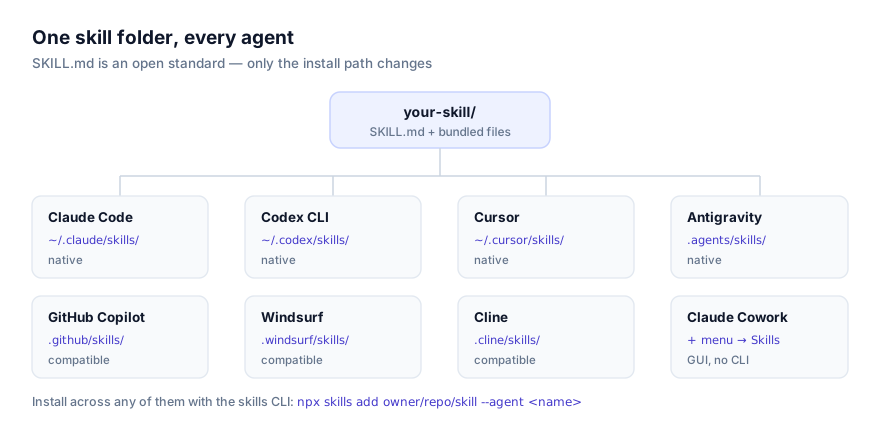
To install by hand, clone or copy the folder into your agent's skills directory (~/.claude/skills/ for personal-scope Claude Code, .claude/skills/ for project scope) then start a new session so it's picked up. Full walkthroughs are in our guides on installing skills in Claude Code and installing skills in Codex CLI. Non-technical writers on a team can skip the terminal entirely via installing skills in Claude Cowork, where skills install through a menu rather than a command.
Combining several of these into one workflow
Content writing skills tend to stack cleanly because they usually operate at different stages of the same piece:
- Draft with a format-specific skill, then review with String Reviewer. Write the LinkedIn post or documentation page with the skill built for that format, then run String Reviewer's clarity-and-brevity pass over the result before it ships.
- Em Dash Expert as a final pass on anything code-adjacent. It's narrow enough to layer on top of almost any other writing skill without conflict. Run it last, after content and structure are settled, as a house-style cleanup step.
- Scientific Writing → Nature Statistics Reporting → Venue Templates for a full manuscript pipeline. Draft the manuscript with evidence provenance intact, audit the statistics section specifically, then format the whole thing to a target venue's exact requirements. All three apply to the same document at different stages.
Skills that enforce competing structural conventions on the same document (two documentation-standards skills, for instance) will produce conflicting instructions rather than a better result. Pick the one whose conventions actually match the project you're writing for.
Where these skills fit in the broader ecosystem
This is a curated selection based on how specific and checkable each skill's underlying convention is, how actively its source repository is maintained, and how clearly its description names what it does, not a benchmark or test result. Browse the current, full list at the writing category page, or check all skills for something more specific to your exact format.
If you're new to the format itself, what agent skills are and the SKILL.md format explained are good starting points. And if your team has a house style nobody has written down yet, writing your own skill is usually less work than it sounds, most of the entries above started as exactly that: someone's existing style guide, restructured as instructions.