

What makes a good documentation skill
Documentation skills succeed or fail on one question: does the output actually reflect the current state of the thing it's documenting, or does it read like plausible-sounding filler? The strongest skills in this category are explicit about being local-first (reading files on disk rather than working from a stale mental model) and about producing a specific, checkable artifact rather than vague prose. The weak version of this category is a skill that says "writes documentation" and leaves structure, scope and accuracy checks entirely up to the moment.
A few things worth checking before you install one:
- Is it local-first? A documentation skill that reads your actual repository rather than working from assumptions is dramatically more trustworthy. Documentation & Modernization and Acquire Codebase Knowledge both make this an explicit design principle.
- Does it produce a defined artifact, or open-ended prose? ADR Skill produces a structured record with an acceptance workflow. Code Tour produces
.tourfiles that link to real file and line numbers. Both are easier to verify than a skill that just generates a paragraph of description. - Does it require script execution? Several strong entries here need Python, Node.js or shell access to scan a repository or generate output files, worth checking against the platform you're running before you assume it'll work.
- Does it separate audiences? A changelog for users and an ADR for future engineers are different documents for different readers, even when they describe the same change. Skills that keep those separate produce more useful output than ones that try to serve every audience with one document.
The order below runs from the broadest, most generally useful documentation skills (repository-wide architecture and onboarding docs) down to skills scoped to a specific artifact type or platform.
The 10 best documentation skills for AI agents right now
Documentation & Modernization
Two related workflows for a locally-cloned codebase in one skill. Documentation mode produces a single, comprehensive, verifiable architecture document primarily by reading files on disk. A local-first approach that keeps the output tied to what's actually in the repository rather than assumptions. Modernization mode generates a plan for bringing a legacy system forward, building on that same architecture understanding.
Who it's for: teams that want one authoritative architecture document rather than several smaller files, and anyone assessing a legacy system for a modernization effort. Caveat: the author notes it's a weaker fit for projects without a local codebase checked out, or teams wanting real-time collaborative documentation tooling. This generates a static document, not a living wiki. No script execution required. From github/awesome-copilot (38,000 stars, MIT).
Acquire Codebase Knowledge
Maps, documents and onboards an agent (or a new team member) into an existing codebase, generating seven detailed documents: STACK.md, STRUCTURE.md, ARCHITECTURE.md, CONVENTIONS.md, INTEGRATIONS.md, TESTING.md and CONCERNS.md, each populated directly from the project's source files and configuration.
Who it's for: teams onboarding new engineers or agents into an unfamiliar repository who want the documentation broken into distinct, scannable files rather than one long document. Caveat: the author is explicit it shouldn't trigger for routine feature implementation, bug fixes, or narrow code edits. This is a repository-level discovery tool, not something to run on every task. Requires Python and shell access. From github/awesome-copilot (38,000 stars, MIT).
CLAUDE.md Improver
Audits and improves CLAUDE.md files across a repository: scans for every instance, evaluates quality against established templates, outputs a quality report, then makes targeted updates rather than a wholesale rewrite.
Who it's for: teams using Claude Code who want their project-memory files to stay genuinely useful rather than accumulating stale or vague instructions over time. Caveat: the author notes it's not applicable to projects without CLAUDE.md files, or teams that don't use them for documentation, the pattern generalizes to other agents' equivalent files, but the skill itself is scoped to this one. Requires Node.js and shell access. From anthropics/claude-plugins-official (33,000 stars, Apache-2.0).
ADR Skill
Creates and maintains Architecture Decision Records optimized for agentic coding workflows, using Socratic questioning to capture intent before drafting and validating output against an agent-readiness checklist. A four-phase workflow scans the codebase for context and existing decisions before proposing, writing, accepting, rejecting, deprecating or superseding a record.
Who it's for: teams that want a documented, checkable trail of why significant technical decisions were made, especially where coding agents will need that reasoning later. Caveat: the author flags it as unsuitable for routine implementation choices or minor bug fixes that don't affect overall architecture. Reserve it for decisions that would genuinely confuse a future engineer without the record. Requires Node.js and shell access. From vercel/ai (26,000 stars, Apache-2.0).
Code Tour
Creates CodeTour .tour files (persona-targeted, step-by-step walkthroughs that link directly to real files and line numbers) supporting 20 developer personas including new joiners, bug fixers, architects and PR reviewers, so the same codebase can have several different guided paths through it depending on who's reading.
Who it's for: teams onboarding new hires, reviewing a complex pull request, or explaining an architecture decision through a structured, navigable walkthrough rather than a wall of prose. Caveat: the author notes it's not suited to quick, informal code discussions. It's built for structured, detailed walkthroughs, which means more setup time than a casual explanation would take. Requires Python and shell access. From github/awesome-copilot (38,000 stars, MIT).
Update Skills & Instructions
Creates or updates repository skills and instructions whenever a significant learning surfaces during a session, triggered by the user saying "learn!" or by identifying a notable pattern or pitfall, capturing reusable domain knowledge so it persists across sessions instead of being rediscovered every time.
Who it's for: teams that want tribal knowledge captured the moment it's discovered rather than relying on someone remembering to write it down later. Caveat: the author notes it's not suited to trivial insights or one-off solutions unlikely to be reused. Treat it as a filter for genuinely reusable learnings, not a log of everything that happened in a session. No script execution required. From microsoft/vscode (189,000 stars, MIT).
Write Coding Standards From File
Writes a coding standards document for a project by analyzing the actual syntax and style present in specified files or folders (indentation, naming conventions, commenting style and more) so the resulting standards reflect real practice in the codebase rather than an idealized style guide nobody follows.
Who it's for: teams that want a coding standards document derived from their actual code rather than written from scratch, or new projects establishing conventions based on an existing reference implementation. Caveat: the author notes it's a weaker fit for projects without existing code, or teams that prefer to define standards from first principles rather than reference material. It needs something to analyze. No script execution required. From github/awesome-copilot (38,000 stars, MIT).
Update Specification
Updates an existing specification file to reflect new requirements or code changes, optimized specifically for generative AI consumption, machine-readable structure alongside clear, human-readable documentation, following established standards for requirements, constraints and component interfaces.
Who it's for: teams maintaining a living specification that both engineers and coding agents reference, where keeping the spec in sync with the actual implementation matters. Caveat: the author flags it as a weaker fit for projects that don't need AI-optimized documentation, or teams preferring less formal specification practices. The machine-readability focus is a real design choice, not a neutral default. No script execution required. From github/awesome-copilot (38,000 stars, MIT).
Changelog Generator
Generates and formats changelog files for a new release from a version string, a release timestamp and raw markdown release notes, automating the creation of latest.md, preview.md and index.md files with consistent formatting.
Who it's for: teams shipping regular releases who want changelog formatting handled consistently rather than hand-edited each time. Caveat: the author notes it's a weaker fit for projects that don't follow semantic versioning or need highly customized changelog formats beyond what the templates support. Requires Node.js. From google-gemini/gemini-cli (106,000 stars, Apache-2.0).
Azure Resource Visualizer
Analyzes Azure resource groups and generates detailed Mermaid architecture diagrams showing the relationships between individual resources, automating discovery and analysis so the resulting diagram reflects what's actually deployed rather than what was originally planned.
Who it's for: developers and system architects who need a current visual map of how Azure resources relate to each other, especially in environments that have grown organically over time. Caveat: the author notes it's a weaker fit for environments with minimal Azure resources or users who don't need detailed architectural insight, the value scales with how complex the deployment actually is. No script execution required. From github/awesome-copilot (38,000 stars, MIT).
How to install any of these skills
Every skill above is a plain folder containing a SKILL.md file, no license to buy, nothing to register. The fastest install path is the cross-agent skills CLI, run once from your project root:
npx skills add github/awesome-copilot/doc-and-modernize --agent claude-code
Swap the path for any installCoordinate listed above, and swap --agent claude-code for whichever agent you're targeting. Codex CLI, Cursor, Antigravity and others follow the same pattern, with only the destination folder changing.
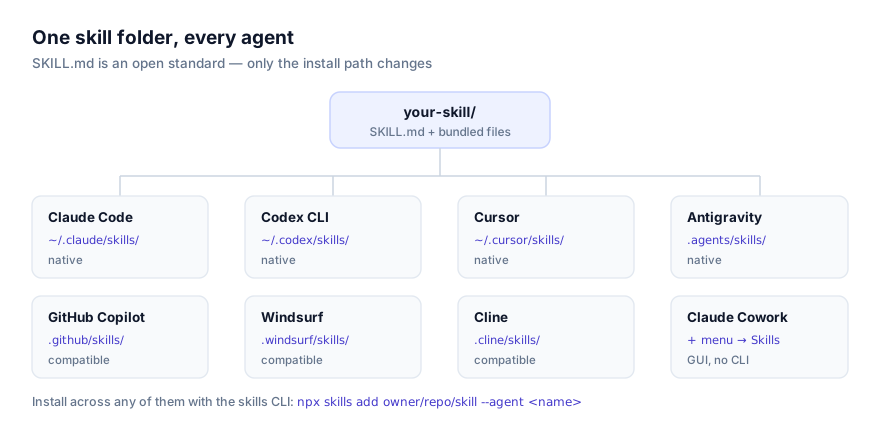
To install by hand, clone or copy the folder into your agent's skills directory (~/.claude/skills/ for personal-scope Claude Code, .claude/skills/ for project scope) then start a new session so it's picked up. Full walkthroughs, including troubleshooting for a skill that doesn't seem to activate, are in our guides on installing skills in Claude Code and installing skills in Codex CLI. If your team documents work primarily from Anthropic's agentic workspace, see installing skills in Claude Cowork instead.
Combining several of these into one workflow
Documentation skills chain naturally because a codebase usually needs more than one kind of document, produced at different moments:
- Acquire Codebase Knowledge or Documentation & Modernization → ADR Skill → Code Tour. Establish the baseline architecture understanding first, capture significant decisions as they're made going forward, then build persona-specific walkthroughs on top of that same understanding for onboarding or PR review.
- Write Coding Standards From File early, CLAUDE.md Improver on a recurring basis. Generate the standards document once a codebase has enough established convention to analyze, then periodically re-run CLAUDE.md Improver as the project evolves so the agent's project memory doesn't drift out of sync with reality.
- ADR Skill alongside Changelog Generator, not instead of it. They serve different audiences from the same underlying change. Run both when a decision is significant enough to need both an internal record and a public-facing note.
Running two repository-mapping skills back to back on the same codebase (Documentation & Modernization and Acquire Codebase Knowledge, for instance) produces redundant output rather than better coverage. Pick one as your primary architecture-documentation tool and use the other only if you specifically need its different output shape.
Where these skills fit in the broader ecosystem
This is a curated selection based on how local-first each skill is, how clearly it defines its output artifact, and how actively its source repository is maintained, not a benchmark or test result. Browse the current, full list at the documentation category page, the broader development category, or check all skills for something more specific to your stack.
If you're new to the format, what agent skills are and the SKILL.md format explained cover the basics, including how a skill's bundled scripts/ and references/ folders only load when the instructions actually call for them. And if your team's documentation conventions are genuinely specific to your stack, writing your own skill is usually a shorter path than adapting one of these, most of the entries above are exactly that: someone's internal documentation process, turned into a reusable skill.